Interview question: Why does SELECT HOST_NAME() sometimes return an empty string for a .NET connection?
Answer: SQL Server receives the workstation label from the client application. Investigate what that provider sent for Workstation ID or WSID; SQL Server does not independently discover and verify the client’s computer name for this function.

I will be honest: when I first heard this question, I did not know the answer. I knew SQL Server better than the .NET connection-string details. The surprise was that the value could be supplied or changed by the application. Two applications can even send the same workstation label.
Run this from the connection you are investigating:
SELECT HOST_NAME() AS ClientWorkstationLabel,
       APP_NAME() AS ClientApplicationLabel,
       SERVERPROPERTY('MachineName') AS ServerMachineName;
HOST_NAME() and APP_NAME() describe client-supplied labels. SERVERPROPERTY('MachineName') identifies the SQL Server machine, so it answers a different question. In a .NET application, inspect the actual provider and the connection string’s Workstation ID or WSID setting. Provider defaults vary; leaving that setting out does not guarantee an empty result.
In my original SSMS example, HOST_NAME() returned my client computer name. This historical screenshot shows a nonempty result; it illustrates what a client sent, not the empty-string case:
SELECT HOST_NAME() AS HostName;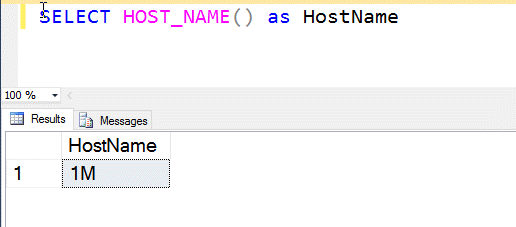
The function returns nvarchar(128), but the label is not trusted identity. Do not authorize access or make security decisions from it. If you need to know who connected, use authenticated login and session information instead.
Published by Pinal Dave on SQLAuthority. More of my work at pinaldave.com.
Discover more from SQL Authority with Pinal Dave
Subscribe to get the latest posts sent to your email.