
Data Ingestion is the work of moving data from the systems that create it into the platform that analyzes it. There are three common ways to do it: batch loads, change data capture and event streams. Each one trades freshness against cost and effort.

Where the Pipe Runs
Ingestion is the pipe between your systems and your reports. The first mistake in many designs is choosing the pipe before asking how fresh the data needs to be.
Most platforms land the data first in a raw layer called bronze. It’s a copy of the source, kept as it arrived, stored as Parquet files or Delta Lake tables. Because the raw copy stays untouched, you can rebuild everything after it when a rule changes.
The Three Paths at a Glance
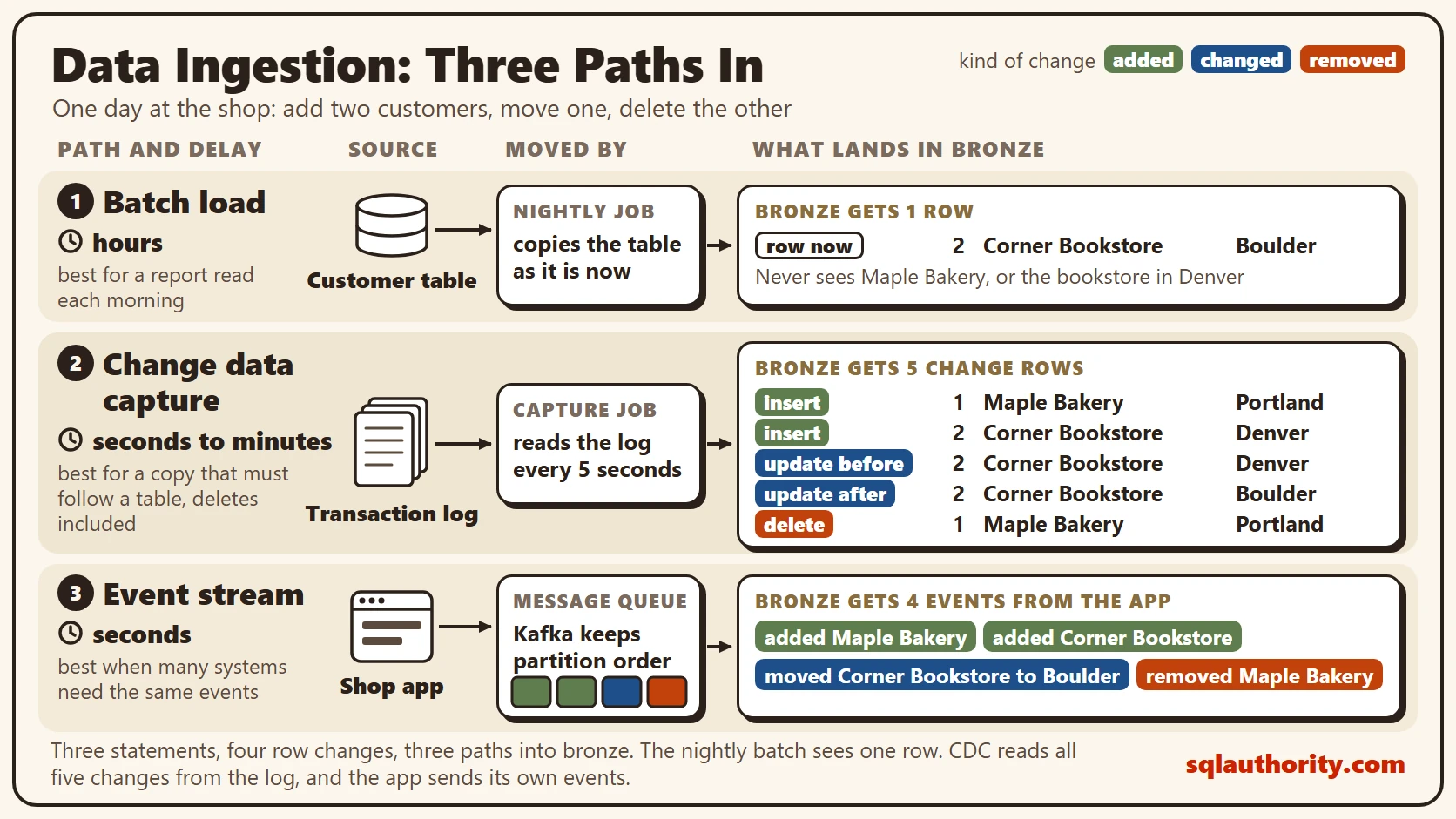
Read the diagram from the top. Batch loads are first. The source feeds a scheduled job, and the landing layer receives data hours after it changed.
Change data capture is second. The transaction log feeds the capture job, which fills the landing layer within seconds to minutes. Event streams are third. The app writes events to a queue, and the landing layer receives them within seconds.
Path 1: Batch Loads
A batch load runs on a schedule. Every night, or every hour, a job reads data from the source and writes it to the landing layer. It’s the oldest path, and the easiest to understand, test and restart.
There are two kinds. A full load copies the whole table each time. An incremental load copies only the rows that changed since the last run, by reading a column such as ModifiedDate. The delay equals the schedule.
Batch has a blind spot. A query sees the table as it is now. A row inserted and deleted between two runs never shows up. A row changed three times shows only its last state. An incremental load that reads ModifiedDate also misses deleted rows, because they leave nothing behind to copy. A full snapshot can remove them, but it loses the history of changes.
Path 2: Change Data Capture
Change data capture, or CDC, reads the transaction log instead of the tables. The log already records every insert, update and delete, because SQL Server needs it for recovery. CDC turns those records into rows you can query.
In SQL Server, you turn CDC on for the database and then for each table. A capture job reads the log and fills a change table. Each change arrives with its operation type. An update arrives as two rows, the old values and the new ones. The job polls every 5 seconds by default, so the delay is short. The readers never query the source table, which keeps the load on it low.
SQL Server 2025 also adds change event streaming, in preview. It pushes each change from the log to an event hub.
The cost is setup and care. CDC needs elevated permissions, storage for the change tables, and a cleanup job. By default, the cleanup job keeps changes for 3 days. A consumer that stays offline longer loses changes.
Path 3: Event Streams
An event stream starts in the application. When a customer places an order, the app writes an event to a message queue such as Apache Kafka. An event is a small message saying what happened. A stream processor or a loader reads the events and writes them to the landing layer, typically within seconds.
Kafka splits a stream into partitions and keeps each one in order for a set time. Many readers can read the same stream at their own pace. A new reader can replay from the earliest retained event, subject to the retention settings.
Streams ask more of you. Events can arrive twice or out of order. Producers and consumers need an agreed format, and someone has to run the cluster. I compare the timing styles in Batch vs Stream Processing: When Data Cannot Wait.
Capturing Changes in T-SQL
You don’t need a cluster to see CDC work. The script creates a database called SqlBigDataIngest, used only for this example, so run it on a test server. CDC needs SQL Server 2025 Developer, Standard or Enterprise edition, not Express, and a sysadmin login to turn it on.
IF DB_ID(N'SqlBigDataIngest') IS NULL CREATE DATABASE SqlBigDataIngest;
GO
USE SqlBigDataIngest;
GO
IF NOT EXISTS (SELECT 1 FROM sys.databases WHERE name = N'SqlBigDataIngest' AND is_cdc_enabled = 1) EXEC sys.sp_cdc_enable_db;
GO
IF EXISTS (SELECT 1 FROM cdc.change_tables WHERE capture_instance = N'dbo_Customer')
    EXEC sys.sp_cdc_disable_table @source_schema = N'dbo', @source_name = N'Customer', @capture_instance = N'dbo_Customer';
DROP TABLE IF EXISTS dbo.Customer;
CREATE TABLE dbo.Customer
(
    CustomerID int NOT NULL PRIMARY KEY,
    CustomerName nvarchar(60) NOT NULL,
    City nvarchar(40) NOT NULL
);
GO
EXEC sys.sp_cdc_enable_table @source_schema = N'dbo', @source_name = N'Customer', @role_name = NULL;
The Messages tab shows a note about CLR, and a note that Agent can’t be notified when it’s stopped. Both are harmless here. Now the shop’s app does its daily work. It adds two customers, moves one to another city and deletes the other.
INSERT INTO dbo.Customer (CustomerID, CustomerName, City)
VALUES (1, N'Maple Bakery', N'Portland'), (2, N'Corner Bookstore', N'Denver');
UPDATE dbo.Customer SET City = N'Boulder' WHERE CustomerID = 2;
DELETE FROM dbo.Customer WHERE CustomerID = 1;
The capture job normally reads the log for you. If SQL Server Agent isn’t running on your test server, the job can’t run. This call reads the log once by hand. Skip it when Agent is running, because the job does the same work. Then wait five seconds before the next query.
EXEC sys.sp_cdc_scan;
The change function returns every change between two log positions. The first query below asks for all of them, with the old values on updates. The second query shows what a nightly batch would see.
DECLARE @from binary(10) = sys.fn_cdc_get_min_lsn(N'dbo_Customer');
DECLARE @to binary(10) = sys.fn_cdc_get_max_lsn();
SELECT CASE __$operation WHEN 2 THEN N'insert' WHEN 3 THEN N'update before' WHEN 4 THEN N'update after' WHEN 1 THEN N'delete' END AS Change,
       CustomerID, CustomerName, City
FROM cdc.fn_cdc_get_all_changes_dbo_Customer(@from, @to, N'all update old')
ORDER BY __$start_lsn, __$seqval, __$operation;

SELECT CustomerID, CustomerName, City FROM dbo.Customer;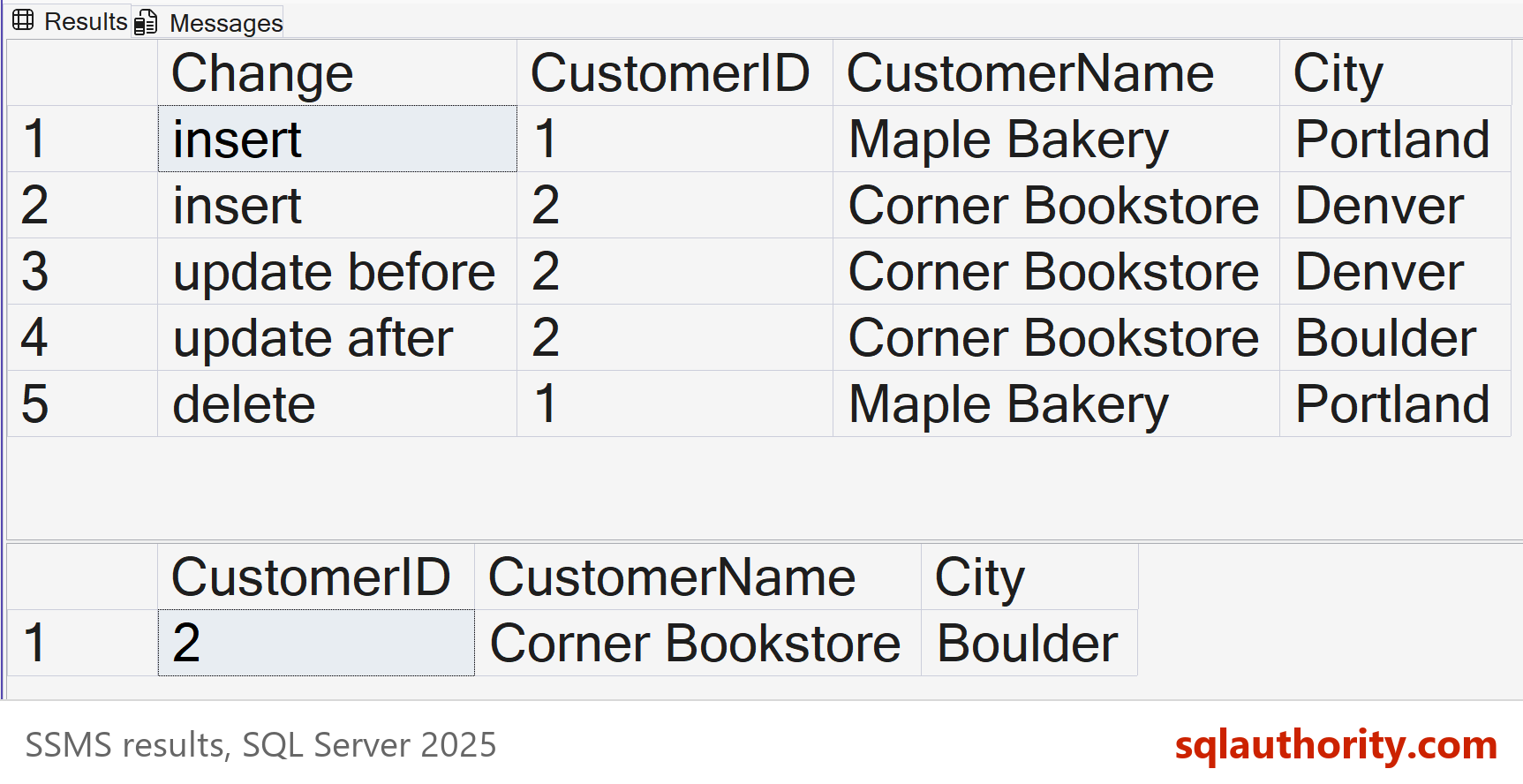
Three statements changed four rows. The first query returned five rows, because the update gives two: the old values and the new ones. Every step of the shop’s day is there, in order. The second query returned one row.
| CustomerID | CustomerName | City |
|---|---|---|
| 2 | Corner Bookstore | Boulder |
A nightly batch would see only that row. It would never learn that Maple Bakery existed, or that the bookstore once sat in Denver. CDC keeps the whole story.
How to Choose
Start from the readers. How fresh must the data be? How fast does it change? Who else needs it? A report read each morning wants a batch. A copy that must follow a source table, deletes included, wants CDC. Several systems that need the same events as they happen want a stream.
Cost grows as the delay shrinks. Every step toward real time adds logs, queues and monitoring. Pay for freshness only where a decision depends on it.
A fair objection: streams make the other two paths obsolete. If everything can arrive in seconds, why schedule anything? Most reports don’t change a decision when they’re a few seconds old. A nightly batch is also easy to rerun when something breaks. Most platforms end up using all three paths.
What to Remember
Batch keeps the latest state of each row, and it can miss changes in between. CDC keeps every change from the log, deletes included. A stream keeps each event the app chooses to send, and it needs the most care. Data ingestion starts with deciding which of these the copy must keep.
Before building a pipeline, ask whether the copy needs the history of changes or only the current state. A nightly snapshot can drop deleted rows, but it can’t show what happened in between. When you finish testing, remove the example database.
USE SqlBigDataIngest;
GO
EXEC sys.sp_cdc_disable_db;
GO
USE master;
GO
ALTER DATABASE SqlBigDataIngest SET SINGLE_USER WITH ROLLBACK IMMEDIATE;
DROP DATABASE SqlBigDataIngest;
Data ingestion is not copying tables, it is deciding which changes the copy must keep.
Published by Pinal Dave on SQLAuthority. More of my work at pinaldave.com.
Discover more from SQL Authority with Pinal Dave
Subscribe to get the latest posts sent to your email.



2 Comments. Leave new
Can you share the sources from where to start learning for Hadoop administration.