Designing Your First Table is easier when you decide what it must hold before you write any SQL. A good table comes down to a few clear choices. Pick the columns, their data types, a key and a handful of rules.

Designing Your First Table Starts With the Facts
Say a bookshop wants to keep track of its customers. Write down what you need to know about one customer. I would list a name, an email address, a city, a join date and loyalty points. Each fact becomes a column. Keep to facts that describe one customer and nothing else.
Then ask what questions will come later. If someone will email customers, the email must be stored. This shop also wants no two customers to share one. If someone will sort by join date, store it as a real date. The questions you’ll ask shape the columns you create.
Keep one fact in each column. Take a single Contact column that holds a name and a city together. You can’t sort it by city without string tricks. Two columns solve that on day one.
Name Things Plainly
Pick a naming pattern and keep it. I name tables in the plural (Customers) and columns in the singular (FullName). I avoid spaces, odd abbreviations and prefixes such as tbl. SQL Server allows spaces in names inside square brackets. Every later query then needs the brackets too.
Names cost nothing to choose and a lot to change. A script, a report or an application can refer to them. When you’re designing your first table, a plain name saves you from a rename on some busy afternoon next year.
Choose Data Types That Fit
A data type tells SQL Server what a column can hold and how much room to reserve. Use int for whole-number IDs and counters. Use nvarchar for names, because a name can contain letters from any language. Use date for a join date, since it stores only the day and needs 3 bytes.
Pick the smallest type that will always fit. A name column of nvarchar(100) says something about the data, while nvarchar(max) says nothing. For money, use decimal and avoid float, because float is approximate and decimal is exact.
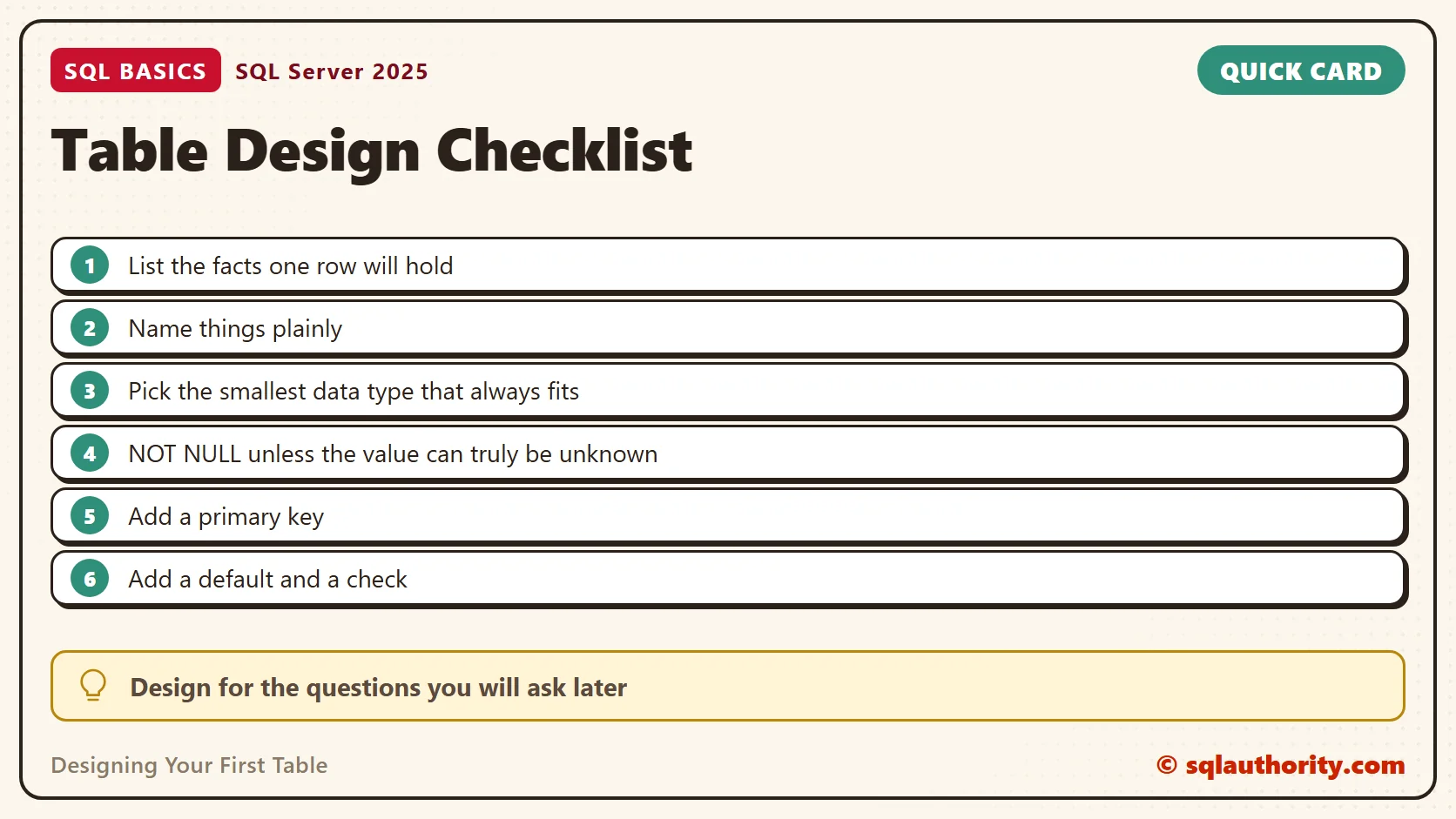
Decide NULL or NOT NULL
NULL means a value is missing or unknown. Make a column NOT NULL when every row must have a value. NOT NULL refuses a missing value, but it accepts an empty string. In my Customers table the name and email are required. The city is optional, because a customer can choose not to share it.
I start with NOT NULL and relax it only for a real reason. Every nullable column adds a case that each later query has to handle. A table that refuses empty values is easier to trust.
Add a Key, a Default and a Check
A primary key gives every row its own address. A UNIQUE constraint stops two rows from sharing an email. That’s this shop’s policy, a rule it chose, not a rule every business needs. A DEFAULT fills in a value when an insert leaves a column out. A CHECK refuses a value that breaks a rule, such as negative loyalty points. I name each constraint, so an error message tells you which rule was broken.
The script creates a database named SqlBasicsDesign if it’s missing, used only for this example. It then drops and rebuilds the demo Customers table inside it. Run it on a test instance, and running it twice is safe.
IF DB_ID(N'SqlBasicsDesign') IS NULL CREATE DATABASE SqlBasicsDesign;
GO
USE SqlBasicsDesign;
GO
DROP TABLE IF EXISTS dbo.Customers;
CREATE TABLE dbo.Customers (
    CustomerID    int           IDENTITY(1,1) NOT NULL
                  CONSTRAINT PK_Customers PRIMARY KEY,
    FullName      nvarchar(100) NOT NULL,
    Email         nvarchar(254) NOT NULL
                  CONSTRAINT UQ_Customers_Email UNIQUE,
    City          nvarchar(60)  NULL,
    JoinedOn      date          NOT NULL
                  CONSTRAINT DF_Customers_JoinedOn DEFAULT (CAST(SYSDATETIME() AS date)),
    LoyaltyPoints int           NOT NULL
                  CONSTRAINT DF_Customers_LoyaltyPoints DEFAULT (0)
                  CONSTRAINT CK_Customers_LoyaltyPoints CHECK (LoyaltyPoints >= 0)
);
IDENTITY(1,1) numbers the rows for you, starting at 1. The key and the email rule each create an index behind the scenes. The engine can use those indexes for lookups. The script runs the same way every time, because the database belongs to this example.
The table below sums up the design. Each row is one column of Customers, with my choice and the reason for it.
| Column | Choice | Reason |
|---|---|---|
| CustomerID | int, identity, primary key | Every row needs its own address |
| FullName | nvarchar(100), NOT NULL | Every customer needs a name (NOT NULL stops a missing one, not an empty one) |
| nvarchar(254), NOT NULL, UNIQUE | This shop’s policy: no two customers share an address | |
| City | nvarchar(60), NULL | Optional, so a customer can skip it |
| JoinedOn | date, default today | Nobody has to type it |
| LoyaltyPoints | int, default 0, CHECK 0 or more | Points can’t go negative |
Try the Table, Then Try to Break It
Run the setup script first. Then add three valid customers. The inserts leave out the join date, and two leave out the points. The defaults do that work.
INSERT INTO dbo.Customers (FullName, Email, City)
VALUES (N'Ananya Rao', N'ananya@example.com', N'Austin'),
       (N'Marcus Lee', N'marcus@example.com', NULL);

INSERT INTO dbo.Customers (FullName, Email, City, LoyaltyPoints)
VALUES (N'Priya Shah', N'priya@example.com', N'Boston', 50);

SELECT * FROM dbo.Customers;
The grid shows three rows numbered 1 to 3. JoinedOn holds today’s date, and the points are 0, 0 and 50. Marcus has no city, and the grid shows NULL there. Now break each rule on purpose. Run the next block only after the valid inserts above. Each failing statement ends only itself, so you’ll see all three errors.
INSERT INTO dbo.Customers (FullName, Email)
VALUES (N'Second Ananya', N'ananya@example.com');

INSERT INTO dbo.Customers (FullName, Email, LoyaltyPoints)
VALUES (N'Test Customer', N'test@example.com', -5);

INSERT INTO dbo.Customers (FullName)
VALUES (N'No Email Given');
This is the text SSMS shows in the Messages tab for the three inserts. It is output, not code to run.
Msg 2627, Level 14
Violation of UNIQUE KEY constraint 'UQ_Customers_Email'. Cannot insert duplicate key in object 'dbo.Customers'. The duplicate key value is (ananya@example.com).
The statement has been terminated.
Msg 547, Level 16
The INSERT statement conflicted with the CHECK constraint "CK_Customers_LoyaltyPoints". The conflict occurred in database "SqlBasicsDesign", table "dbo.Customers", column 'LoyaltyPoints'.
The statement has been terminated.
Msg 515, Level 16
Cannot insert the value NULL into column 'Email', table 'SqlBasicsDesign.dbo.Customers'; column does not allow nulls. INSERT fails.
The statement has been terminated.
The first fails with error 2627, a duplicate email. The second fails with error 547, because the CHECK refuses negative points. The third fails with error 515, since Email can’t be NULL. The table still holds three rows. A failed insert can use up an identity number, so a gap in CustomerID is normal and harmless.
Read each message closely, because it names the constraint that refused the row, such as UQ_Customers_Email. That is the payoff for naming them yourself. An unnamed constraint gets a generated name with a string of digits. That name is hard to find in a script and differs from one database to the next.
NOT NULL has a gap, though. An empty string isn’t NULL, so it passes. The next block adds a customer with an empty name and email, shows the rows, then rolls the insert back. The table keeps its three rows.
BEGIN TRANSACTION;
INSERT INTO dbo.Customers (FullName, Email)
VALUES (N'', N'');
SELECT CustomerID, FullName, Email FROM dbo.Customers;
ROLLBACK TRANSACTION;
The grid shows four rows, and the new one has blank text in both columns. SQL Server accepted it, because blank is a value. If your shop wants to refuse it, add a CHECK that tests the length of the text. The rollback burns an identity number, so expect a gap.
Check the Design Against Your Questions
Go back to the questions you started with. To email customers, you need Email, and it’s stored and unique. To sort by join date, you have JoinedOn as a true date. To see who is close to a reward, you have LoyaltyPoints as a number you can compare. A column that answers no question is a candidate for deletion before you ever create it.
This check takes two minutes, and it’s cheaper than any later rework. If a question has no column behind it, add the column now. If a column has no question behind it, ask why you want it.
What to Leave for Later
Leave out anything you can’t justify today. A foreign key waits until the second table exists, because it needs both tables. Extra indexes wait until real queries show a need, since the key and the email rule already give you two. Computed columns and partitioning can wait as well.
Adding a column later is easy. Fixing a wrong data type can be harder, and the cost can grow with the number of rows. That’s the best argument for choosing types with care now, while the table holds ten rows instead of ten million.
Related Reading
- What Is a Primary Key, and What Happens Without One?
- What Is a Data Type, and Why the Wrong One Costs You
- What Is NULL in SQL Server? The Value That Isn’t a Value
- Rows, Columns and Tables: How a Database Holds Information
A table is not a form to fill in, it is a set of rules your data must obey.
Published by Pinal Dave on SQLAuthority. More of my work at pinaldave.com.
Discover more from SQL Authority with Pinal Dave
Subscribe to get the latest posts sent to your email.