Script Table As is the right-click shortcut that turns an existing table into T-SQL. You pick CREATE, SELECT, INSERT, UPDATE or DELETE, and SSMS writes a statement that fits that table’s columns. It’s the fastest way I know to get a correct column list without typing it.

Where Script Table As Lives
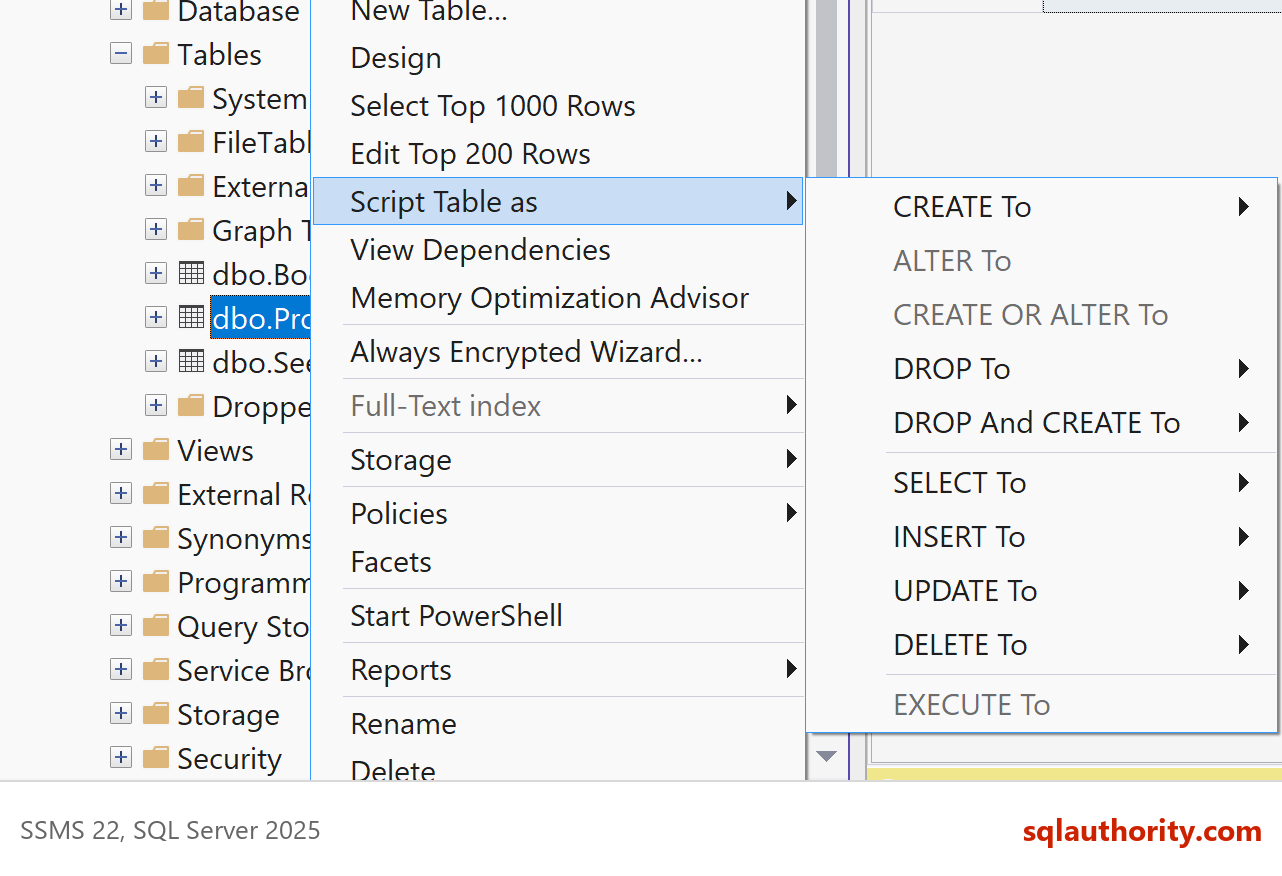
Open Object Explorer, expand a database, and expand Tables. Right-click a table, then point at Script Table as. A submenu lists CREATE To, DROP To, DROP And CREATE To, SELECT To, INSERT To, UPDATE To and DELETE To. ALTER To, CREATE OR ALTER To and EXECUTE To also appear, greyed out for a table.
Each entry has the same four destinations: New Query Editor Window, File, Clipboard and Agent Job. I use the query window to read and edit. I use Clipboard to paste the script into a message. I use File when it belongs in a folder of saved scripts.
The Agent Job destination is the odd one out. It opens the New Job dialog with the script already placed in a job step. That suits a statement you want to run on a schedule, such as clearing a staging table every night. Read the step before you save the job, because a scheduled script repeats any mistake it contains.
To follow along, build a small demo table first. The script creates SqlBasicsScriptAs, a database used only for this example, when it’s missing. It then drops and rebuilds dbo.Product inside that database, so run it on a test instance. You can run it twice in a row.
USE master;
GO
IF DB_ID(N'SqlBasicsScriptAs') IS NULL
    CREATE DATABASE SqlBasicsScriptAs;
GO
USE SqlBasicsScriptAs;
GO
DROP TABLE IF EXISTS dbo.Product;
CREATE TABLE dbo.Product (
    ProductId int NOT NULL,
    ProductName nvarchar(60) NOT NULL,
    Price decimal(8, 2) NOT NULL CONSTRAINT DF_Product_Price DEFAULT (0),
    CONSTRAINT PK_Product PRIMARY KEY (ProductId)
);
INSERT INTO dbo.Product (ProductId, ProductName, Price)
VALUES (1, N'Masala tea', 4.50), (2, N'Notebook', 3.25), (3, N'Mango jam', 5.00);
What CREATE To Writes
Choose CREATE To on dbo.Product and you get the table’s definition. It lists each column with its data type and NULL setting, the default constraint and the primary key. It does not copy the three rows. Script Table As describes the shape of a table, never its contents.
What else lands in the script depends on your scripting options. You find them under Tools, Options, SQL Server Object Explorer, Scripting. Indexes, triggers, permissions and an existence check are all switches there. Open that page once and decide which ones you want on every time.
Generated CREATE scripts are wordy. They carry a SET line or two, brackets around every name and a storage clause at the end. I trim them for blog posts and for code reviews. This is the same table, trimmed by hand and renamed so it can sit beside the original.
USE SqlBasicsScriptAs;
GO
DROP TABLE IF EXISTS dbo.Product_Copy;
CREATE TABLE dbo.Product_Copy (
    ProductId int NOT NULL,
    ProductName nvarchar(60) NOT NULL,
    Price decimal(8, 2) NOT NULL CONSTRAINT DF_Product_Copy_Price DEFAULT (0),
    CONSTRAINT PK_Product_Copy PRIMARY KEY (ProductId)
);
Names matter in these scripts. SSMS wraps every name in square brackets, even plain ones. The brackets are harmless. They keep a script working for a table called Order Items, with a space in its name. In my own code I skip them for plain names. In generated code I leave them alone, because removing them by hand adds risk and saves nothing.
SELECT, INSERT, UPDATE and DELETE
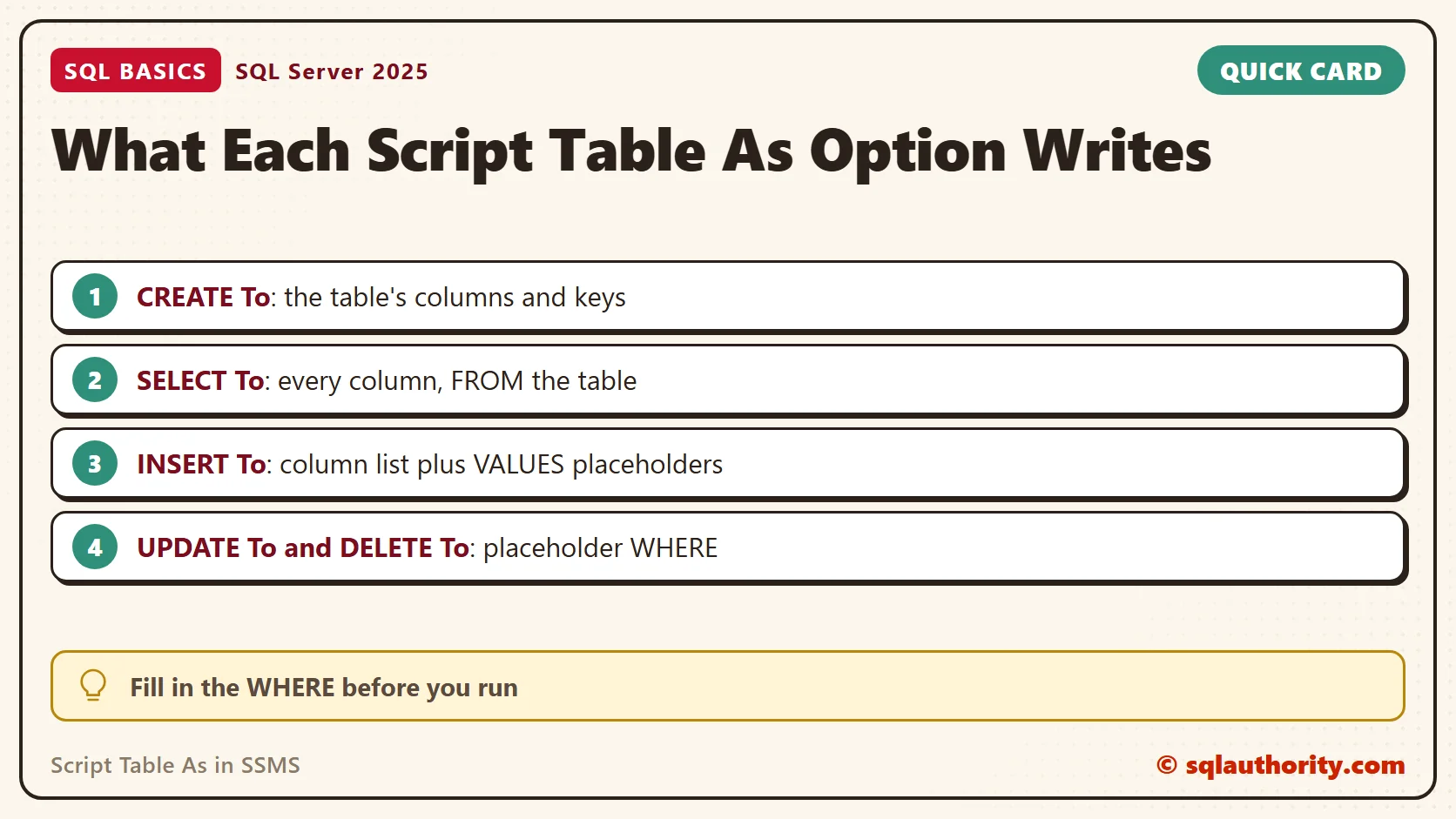
SELECT To is the plainest. It lists every column in table order and adds a FROM clause. Unlike Select Top 1000 Rows, it doesn’t limit the row count. On a big table, add a WHERE or a TOP before you run it.
Here is the SELECT I’d keep from SELECT To, after I cut the columns down and add an ORDER BY. A sorted result is easier to check against what you expect to see.
SELECT ProductName, Price
FROM dbo.Product
WHERE Price > 3.00
ORDER BY ProductName;
INSERT To writes the column list and a VALUES list full of placeholders. UPDATE To sets every column to a placeholder. DELETE To has no columns at all. Both UPDATE and DELETE end in a WHERE clause that holds a placeholder too. The shapes look like this. They are templates, not runnable code, until every placeholder is filled in.
INSERT INTO [dbo].[Product]
           ([ProductId]
           ,[ProductName]
           ,[Price])
     VALUES
           (<ProductId, int,>
           ,<ProductName, nvarchar(60),>
           ,<Price, decimal(8,2),>)
GO
UPDATE [dbo].[Product]
   SET [ProductId] = <ProductId, int,>
      ,[ProductName] = <ProductName, nvarchar(60),>
      ,[Price] = <Price, decimal(8,2),>
 WHERE <Search Conditions,,>
GO
Those angle-bracket pieces are template parameters. Press Ctrl+Shift+M and SSMS opens a dialog where you type a value for each one. Or type over them by hand. Either way, the script isn’t valid until every placeholder is gone, so running it unchanged fails with a syntax error. I treat that as a safety catch.
Here are the filled-in versions. Run the setup script again first, so the table holds three rows. The first block inserts two rows and changes one price.
INSERT INTO dbo.Product (ProductId, ProductName, Price)
VALUES (4, N'Spinach', 1.80), (5, N'Pencil set', 2.40);
UPDATE dbo.Product
SET Price = 4.75
WHERE ProductId = 1;
The second block deletes inside a transaction that ends in a ROLLBACK. I see the row count first and then decide.
BEGIN TRANSACTION;
DELETE FROM dbo.Product
WHERE ProductId = 3;
SELECT @@ROWCOUNT AS rows_deleted;
ROLLBACK TRANSACTION;
If the count says one row, I change ROLLBACK to COMMIT and run only this DELETE block again. I don’t rerun the INSERT and UPDATE block, because its inserts would fail on the duplicate keys. If the count says anything else, I’m glad I looked. A DELETE with no WHERE clause removes every row, and the generated script puts the WHERE there on purpose.
What Script Table As Leaves Out
A scripted table is an empty twin. The rows aren’t included. Views, procedures and foreign keys in other tables that point at this one aren’t included either. When a script refers to another table by a foreign key, create that table first or the script fails.
DROP And CREATE To needs extra care. The DROP removes the table and every row in it. It fails while a foreign key from another table points at it. I never run it against a table that holds data I can’t rebuild. Take a backup first, or use the clipboard option and read the script before it goes anywhere.
Two Habits That Save Time
The first habit is borrowing the column list. Script SELECT To into a new window, then cut it down to the columns you need. You never mistype a column name, and you never forget one.
The second habit is comparing. Script the same table from a test server and from a development server. Then compare the two pieces of text in any diff tool. A missing default or a different data type shows up at once. It’s a quick way to see where two copies of a database have drifted apart.
Related Reading
SQL Code Generators: Let SSMS Write the Script for You
What Is a Primary Key, and What Happens Without One?
SSMS Code Snippets: Writing Your Own Templates
Script Table As is not a copy of your table, it is a description of its shape.
Published by Pinal Dave on SQLAuthority. More of my work at pinaldave.com.
Discover more from SQL Authority with Pinal Dave
Subscribe to get the latest posts sent to your email.