
Iterative deployments should be safe to run twice. DROP IF EXISTS shrugs when the object is already gone. CREATE OR ALTER changes a procedure in place. Together they let you rerun a script without breaking what already works.

Why the second run matters
Every deployment script works on a clean database. That proves very little. The real test is the second run, on a server that already has your objects. Does it fail with “already exists”? Does it quietly remove something people depend on?
Imagine a release that goes out at 6 PM. Nothing fails. At 9 AM the app users start getting permission errors. The script dropped a procedure and created it again, and the grant went away with the old one. I will show you exactly that.
DROP IF EXISTS tolerates absence
DROP IF EXISTS does nothing, without an error, when the object is not there. So you can run it twice. The example below drops an index, then drops the table twice. Note that DROP INDEX needs the table name too.
DROP TABLE IF EXISTS #DeploymentSyntax;
CREATE TABLE #DeploymentSyntax (Id int PRIMARY KEY, Name varchar(50));
CREATE INDEX IX_DeploymentSyntax ON #DeploymentSyntax (Name);

DROP INDEX IF EXISTS IX_DeploymentSyntax ON #DeploymentSyntax;
DROP TABLE IF EXISTS #DeploymentSyntax;
DROP TABLE IF EXISTS #DeploymentSyntax;

SELECT OBJECT_ID(N'tempdb..#DeploymentSyntax') AS RemainingTable;
The second table drop ran against a table that was already gone, and nothing complained. RemainingTable is NULL, the first grid in the screenshot below. One warning: IF EXISTS only means “do not fail if missing”. It also means “delete it happily if it holds your data”. Use it for objects you can rebuild.
CREATE OR ALTER keeps the permissions
For procedures, views, functions and triggers, CREATE OR ALTER creates the object or replaces its definition. It does not remove the object first. Let me make a procedure, create a user without a login, and grant EXECUTE.
CREATE OR ALTER PROCEDURE dbo.IterativeDemo
AS SELECT 1 AS DeploymentValue;
GO
DROP USER IF EXISTS IterativeReader;
CREATE USER IterativeReader WITHOUT LOGIN;
GRANT EXECUTE ON dbo.IterativeDemo TO IterativeReader;

EXECUTE AS USER = N'IterativeReader';
EXEC dbo.IterativeDemo;
REVERT;
The user runs the procedure and gets DeploymentValue 1. Now change the procedure and run the same check again.
CREATE OR ALTER PROCEDURE dbo.IterativeDemo
AS SELECT 2 AS DeploymentValue;
GO
EXECUTE AS USER = N'IterativeReader';
EXEC dbo.IterativeDemo;
REVERT;

SELECT permission_name, state_desc
FROM sys.database_permissions
WHERE major_id = OBJECT_ID(N'dbo.IterativeDemo')
  AND grantee_principal_id = USER_ID(N'IterativeReader');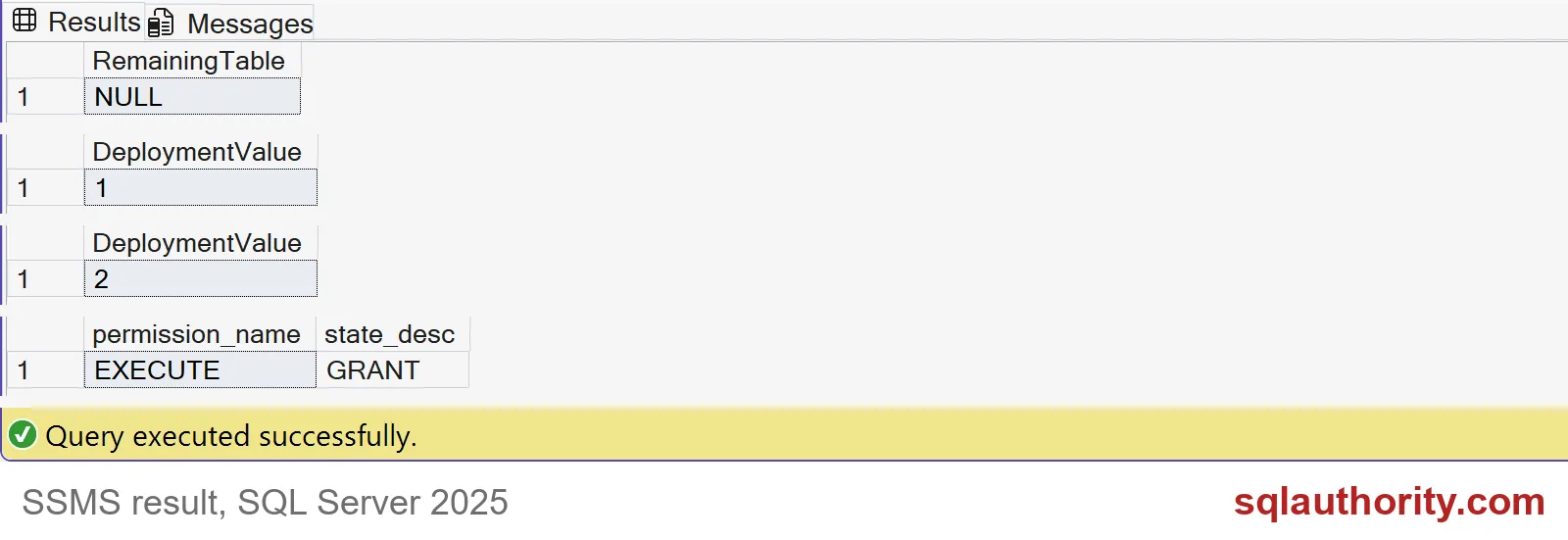
The same user now gets DeploymentValue 2, and the permission query shows EXECUTE with state GRANT. New code, same grant. The script was safe to run again.
The drop and create trap
Now the 9 AM story. The “old way” drops the procedure and creates it again. Watch what happens to the grant.
DROP PROCEDURE IF EXISTS dbo.IterativeDemo;
GO
CREATE PROCEDURE dbo.IterativeDemo
AS SELECT 3 AS DeploymentValue;
GO
SELECT COUNT(*) AS GrantsLeft
FROM sys.database_permissions
WHERE major_id = OBJECT_ID(N'dbo.IterativeDemo')
  AND grantee_principal_id = USER_ID(N'IterativeReader');

EXECUTE AS USER = N'IterativeReader';
BEGIN TRY
    EXEC dbo.IterativeDemo;
END TRY
BEGIN CATCH
    SELECT ERROR_NUMBER() AS ErrorNumber, ERROR_MESSAGE() AS ErrorMessage;
END CATCH;
REVERT;
GrantsLeft is 0. The user now gets an error: the EXECUTE permission was denied. That is error 229, and it is exactly what the app users saw. The drop deleted the permission along with the procedure. You would have to grant it again in the script.

Check definitions, not just names
One more trap. An existence check only asks whether a name exists. It says nothing about whether the thing is right. Here a column called Note already exists, but it is too short.
DROP TABLE IF EXISTS #Orders;
CREATE TABLE #Orders (OrderId int, Note varchar(10));

IF COL_LENGTH(N'tempdb..#Orders', N'Note') IS NULL
    ALTER TABLE #Orders ADD Note varchar(200);

SELECT name, max_length
FROM tempdb.sys.columns
WHERE object_id = OBJECT_ID(N'tempdb..#Orders') AND name = N'Note';
The check found Note and skipped the change. The column is still 10 characters long, not 200. Tables have no CREATE OR ALTER, so for tables compare the definition, then ALTER. Test your migration from the old schema and from a fresh one.
Last, clean up the demo objects.
DROP PROCEDURE IF EXISTS dbo.IterativeDemo;
DROP USER IF EXISTS IterativeReader;
DROP TABLE IF EXISTS #Orders;
Run your deployment script twice before you trust it.
A repeatable deployment is not a repeated drop, it is a controlled change.
Published by Pinal Dave on SQLAuthority. More of my work at pinaldave.com.
Discover more from SQL Authority with Pinal Dave
Subscribe to get the latest posts sent to your email.


