
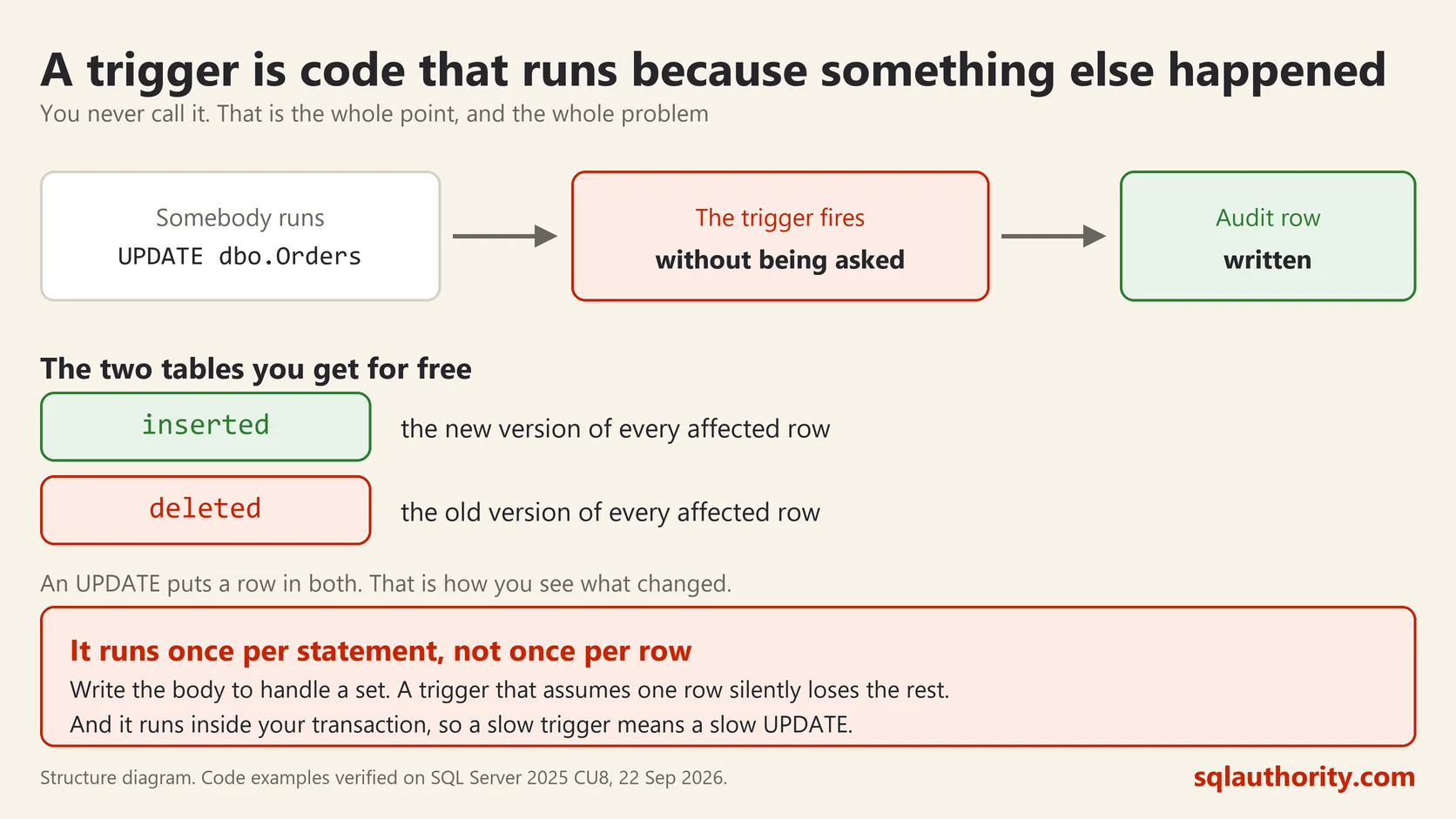
A trigger in SQL Server is code that runs by itself when data changes. Nobody calls it. Somebody runs an UPDATE and the trigger fires, inside the same transaction, whether they knew it existed or not. That last part is both the point and the danger.
A Working One
Here is an audit trigger on a table of orders, written and run on SQL Server 2025. It records every change to the amount column.
CREATE TABLE dbo.OrderAudit (
    id int, changed_at datetime2(0), old_amount money, new_amount money
);

CREATE TRIGGER dbo.trgOrderAmount ON dbo.Orders AFTER UPDATE
AS
SET NOCOUNT ON;
IF UPDATE(amount)
    INSERT dbo.OrderAudit (id, changed_at, old_amount, new_amount)
    SELECT i.id, SYSDATETIME(), d.amount, i.amount
    FROM inserted AS i
    JOIN deleted AS d ON d.id = i.id
    WHERE i.amount <> d.amount;
UPDATE dbo.Orders SET amount = amount + 1 WHERE id <= 5;
SELECT TOP (3) * FROM dbo.OrderAudit ORDER BY id;id changed_at old_amount new_amount
1 2026-09-22 14:55:17 3341.0000 3342.0000
2 2026-09-22 14:55:17 3004.0000 3005.0000
3 2026-09-22 14:55:17 2310.0000 2311.0000Nobody called the trigger. The UPDATE ran and the audit rows appeared.
inserted and deleted
Every trigger gets two special tables and you cannot create them yourself.
inserted holds the rows as they are now. deleted holds them as they were. An INSERT fills only inserted. A DELETE fills only deleted. An UPDATE fills both, which is why the example joins them to compare the old value with the new one.
The Mistake Almost Everyone Makes First
A trigger fires once per statement, not once per row.
My UPDATE touched five rows and the trigger ran once, with five rows sitting in inserted. Write the trigger as though it will only ever see one row and you get this:
-- broken: assumes one row
DECLARE @id int = (SELECT id FROM inserted);
That works perfectly while somebody updates one row at a time. The day a batch job updates five thousand, the subquery returns more than one value and the whole statement fails. Or worse, a variant of it silently records only one row and the audit trail quietly goes wrong.
Always write set based code inside a trigger. Treat inserted and deleted as tables, because they are.
The Kinds
An AFTER trigger runs once the change has happened but before the transaction commits. This is what you want for auditing.
An INSTEAD OF trigger replaces the change. Your code runs and the original statement does not. The main use is making a complicated view updatable.
There are also DDL triggers, which fire when somebody changes the structure rather than the data. Useful for recording who dropped the table at four in the afternoon.
Why Triggers Get a Bad Name
They are invisible. Somebody runs an UPDATE, it takes nine seconds, and the query looks simple. The nine seconds are in a trigger nobody mentioned. You will not find it by reading the statement.
They run inside your transaction. Slow trigger means slow UPDATE and locks held longer. An error in the trigger rolls back the original statement too.
They can chain. A trigger writes to another table, whose trigger writes to a third. That is legal, hard to follow, and can go round in a circle.
This is the first thing I check when a simple statement is mysteriously slow:
SELECT t.name AS trigger_name,
       OBJECT_NAME(t.parent_id) AS on_table,
       t.is_disabled
FROM sys.triggers AS t
WHERE t.parent_class = 1
ORDER BY on_table, t.name;
When to Use One
Use a trigger when the rule must hold no matter who changes the data, including somebody typing into a query window at midnight. Auditing is the clearest case, and enforcing a rule too complex for a constraint is the other.
Do not use one for work that belongs in the application, and do not use one to fire off something slow. If a trigger sends an email, every update waits for the mail server.
And whatever you do, write it down somewhere the next person will look. The problem with triggers is almost never the trigger. It is that nobody knew it was there.
A trigger is not extra code, it is a rule that runs whether anybody remembers it or not.
This post was rewritten from scratch in September 2026. The original, published on 2013-06-17, was a short announcement about something that no longer exists. The address is the same, the subject is now a basic idea worth keeping.
Published by Pinal Dave on SQLAuthority. More of my work at pinaldave.com.



4 Comments. Leave new
I’m really enjoying this NuoDB series of yours Dave. It’s a great database. Keep up the good work.
fun to work with nuoDB, migration would be so easy was un imaginable !!!
Would love to hear about how compatible with MS SQL the NuoDB product is… what migration pains did you have in migrating to this DB… also, does it handle Stored Procs? We use a lot of them…
Its really helpful for me to understand where we i lost in my previous interview. Thanks.
If anyone wants to Learn oracle in Chennai go to the Besant Technologies which is No.1 Training Institute in Chennai