T-SQL mistakes, in the two-panel format the children’s magazines used. Careless writes it one way. Careful writes it the other. Every pair was run on the same 1,200,000 rows on SQL Server 2025 and measured. One pair returned a wrong answer. One I stopped after fourteen minutes of CPU.

Reads are logical reads for the whole statement, including anything a function did on the side. Times are CPU milliseconds. Both came from the request counters, not from STATISTICS IO, which can’t see inside a scalar function.
1. A function on the column
Careless
WHERE YEAR(OrderDate) = 2026
  AND MONTH(OrderDate) = 6
2,424 reads, 172 ms
Careful
WHERE OrderDate >= '2026-06-01'
  AND OrderDate <  '2026-07-01'
65 reads, 4 ms
Same answer, 30,858 rows. Careless wrapped the column in a function. The index on OrderDate couldn’t be seeked and was read end to end. Careful gave the index a range it could use.
37 times the reads and 43 times the time, for a query that looks more readable the wrong way.
2. A scalar function per row
Careless
SELECT dbo.RegionOf(CustomerID), COUNT_BIG(*)
FROM dbo.Orders
WHERE OrderDate >= '2025-01-01'
  AND OrderDate <  '2026-01-01'
GROUP BY dbo.RegionOf(CustomerID)
753,689 reads, 5,449 ms
Careful
SELECT c.Region, COUNT_BIG(*)
FROM dbo.Orders o
JOIN dbo.Customers c
  ON c.CustomerID = o.CustomerID
WHERE ...same range...
GROUP BY c.Region
2,931 reads, 279 ms
Same five regions, same counts. The function looked up one customer per order, 375,428 times. The join looked up the customers table once.
The function had inlining switched off. That’s how many real ones end up once they contain something the inliner won’t accept. 257 times the reads.
3. DISTINCT to hide a join
Careless
SELECT DISTINCT c.CustomerID, c.CustomerName
FROM dbo.Customers c
JOIN dbo.Orders o ON o.CustomerID = c.CustomerID
WHERE o.Status = 'C'
20,174 reads, 237 ms
Careful
SELECT c.CustomerID, c.CustomerName
FROM dbo.Customers c
WHERE EXISTS (SELECT 1 FROM dbo.Orders o
  WHERE o.CustomerID = c.CustomerID
    AND o.Status = 'C')
20,174 reads, 478 ms
Careful lost this one on time, and I’m leaving it in.
The reads are identical because the optimiser saw through both. On this data, with 90 percent of orders matching, the DISTINCT plan was faster.
Both answers are right, and they stay right. An earlier draft of this said the DISTINCT version would break when the join fanned out differently. That was wrong. The select list here is the customer key and the customer name, so extra matching orders change nothing.
The reason to still write EXISTS is that it says what you mean. DISTINCT earns its bad name in two places. One is a select list that reaches into the fanned-out table. The other is the SUM somebody adds later. Then the duplicates you quietly removed were carrying information.

4. Building a string in a loop
Careless
WHILE @i <= 200000
BEGIN
  SELECT @id = OrderID FROM dbo.Scratch
   WHERE OrderID = @i;
  SET @s += CAST(@id AS NVARCHAR(12)) + N',';
  SET @i += 1;
END
did not finish: killed after 831 s of CPU and 584,857,439 reads
Careful
SELECT @s = STRING_AGG(
  CAST(OrderID AS NVARCHAR(MAX)), N',')
  WITHIN GROUP (ORDER BY OrderID) + N','
FROM dbo.Scratch
1,250,099 reads, 1,737 ms
At 20,000 rows the loop finishes in 760 ms and looks fine. At 200,000 I stopped it after 831 seconds of CPU, and it hadn’t finished. Every += copies the whole string so far, so the cost grows with the square of the row count.
STRING_AGG did 200,000 rows in 1.7 seconds. With the trailing comma the measured version appends, it returned 1,288,895 characters.
Note the ordering clause. The loop appends in ascending order because it counts upwards. STRING_AGG promises no order at all without WITHIN GROUP. Both forms returned the identical string on this data, and the ordered one cost nothing, 1,250,099 reads against 1,250,101. Matching output on one plan is not a guarantee, so write the clause.
5. NOT IN against a column that allows NULL
Careless
SELECT COUNT(*) FROM dbo.Customers
WHERE CustomerID NOT IN
  (SELECT CustomerID FROM dbo.Blocked)
60,101 reads, 60 ms, answer: 0
Careful
SELECT COUNT(*) FROM dbo.Customers c
WHERE NOT EXISTS (SELECT 1 FROM dbo.Blocked b
  WHERE b.CustomerID = c.CustomerID)
101 reads, 4 ms, answer: 19,998
This is the pair that matters. The blocked list has three rows: two customers and one NULL.
Careless got zero customers back. Not an error, not a warning. Zero, because NOT IN with a NULL in the list can never be true for any row. Careful got 19,998, which is the right answer.
The 600-fold read difference is the smaller problem here.
6. Updating one row at a time
Careless
DECLARE cur CURSOR FOR
  SELECT OrderID, Amount FROM dbo.Scratch;
... FETCH ...
UPDATE dbo.Scratch SET Tax = @amt * 0.18
 WHERE OrderID = @id;
... loop 200,000 times ...
1,601,540 reads, 9,326 ms CPU, 28.2 s elapsed
Careful
UPDATE dbo.Scratch
   SET Tax = Amount * 0.18;
201,560 reads, 321 ms
Same result, the same total tax of 10,334,571.50. One statement against 200,000 statements. Eight times the reads and 88 times the wall clock.
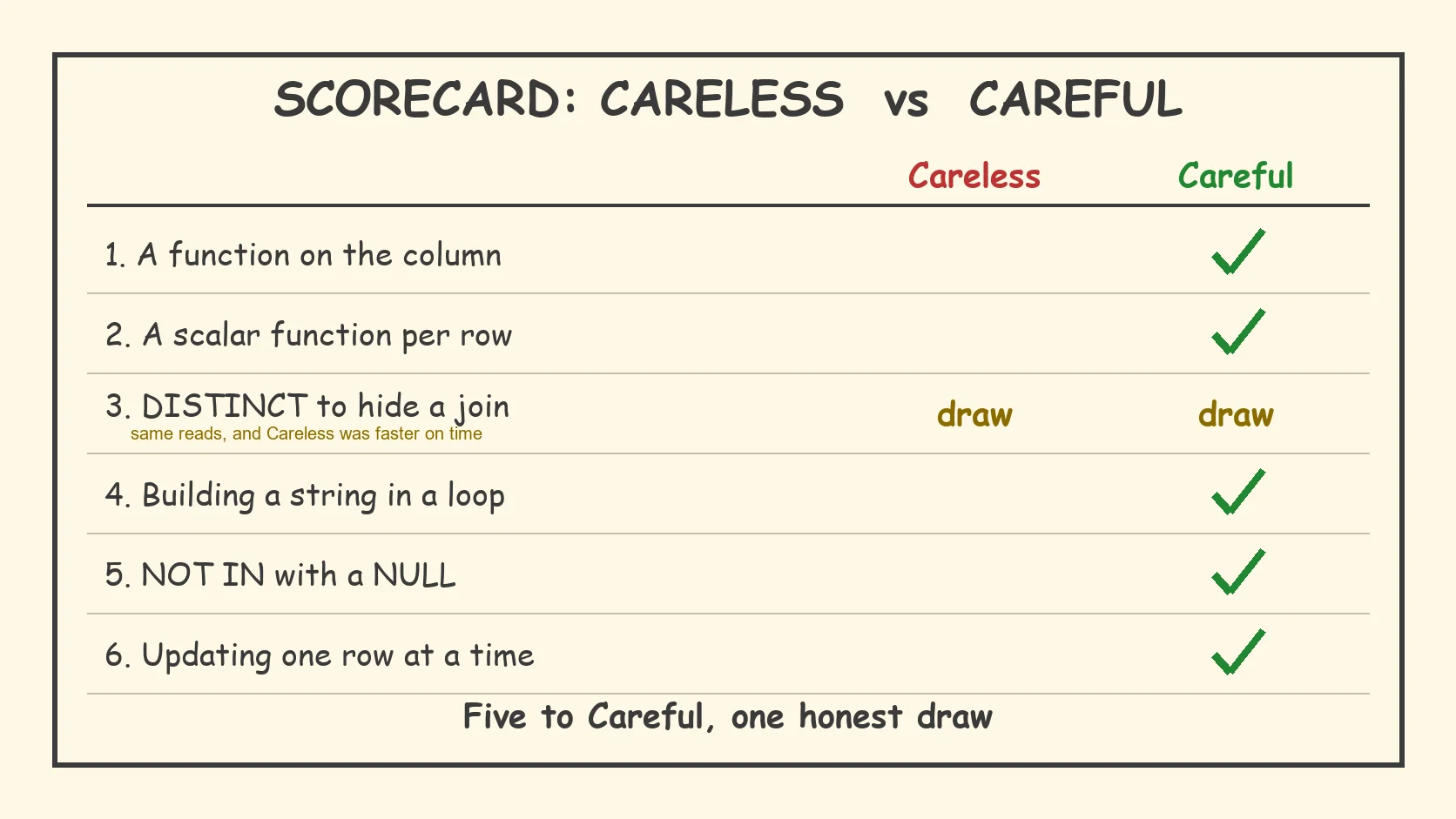
The score on all six T-SQL mistakes
Five to Careful, one draw, and the draw went to Careless on speed. I’d rather show you that than pretend every rule wins every time.
The two to remember are 4 and 5. I had to stop one, and the other finishes with the wrong answer and no complaint.
If you’d like the same six run against your own code, it takes an afternoon.
Careful is not slower, it is the one that still works at 200,000 rows.
Published by Pinal Dave on SQLAuthority. More of my work at pinaldave.com.
Discover more from SQL Authority with Pinal Dave
Subscribe to get the latest posts sent to your email.