Single-query tuning versus workload tuning decides whether one fast victory becomes a durable performance improvement.
Single-query tuning versus workload tuning looks like a choice between speed and patience. Consider an illustrative Tuesday. A twelve-second report drops below one second after a new covering index. By afternoon, order processing slows because every relevant insert must maintain that index.
One query won the race by placing a tollbooth in everybody else’s lane. The index was not wrong, and it solved the measured problem. The mistake was choosing the wrong boundary for success.
One Query Can Deserve Immediate Attention
Focused tuning is appropriate when one statement creates a clear and urgent business problem. A checkout timeout deserves attention before a monthly administrative report. A runaway query consuming most server CPU can also justify direct action. The scope is narrow because the evidence is narrow.
Start with the statement’s actual execution plan, representative parameters, and runtime measurements. Record duration, CPU, logical reads, writes, row counts, and important waits. Then identify the operator responsible for the greatest avoidable work, which connects the change to a demonstrated bottleneck.
A focused test also shortens feedback. You can change one thing, repeat comparable executions, and check whether the expected plan appears. During an incident, that evidence can support a safe, reversible change while customers remain affected.
The Database Does Not Serve One Statement
Indexes are shared database objects, not private assets of the queries requesting them. Every relevant insert, update, and delete may pay maintenance costs afterward. Other queries may use the index, ignore it, or receive different plans because it exists. Storage, memory, statistics, backups, and maintenance can also change.
This shared effect makes workload tuning a physical design problem. Chasing the fastest possible execution for every statement creates overlapping indexes and endless compromises. Aim instead for acceptable response time at the lowest sustainable cost.
Sound index design requires this balance. More indexes can help reads, but they add storage and modification overhead. The hard part is deciding which trade produces the greatest business value.
Frequency Changes the Ranking
The slowest query is not always the largest workload consumer. A ten-second statement running twice may use less CPU than a forty-millisecond lookup running one million times. Frequency turns small per-call costs into large workload costs.
Rank candidates with both per-execution cost and cumulative impact. Include execution count, total CPU, total reads, total writes, and total duration. Add business importance because numbers cannot distinguish checkout from an internal dashboard. A workload needs technical weight and operational context.
| Signal | Single-query view | Workload view |
|---|---|---|
| Duration | Representative executions | Distribution across all executions |
| Reads | Logical reads per execution | Total logical reads across the period |
| Index value | Benefit to one plan | Net benefit across reads and writes |
| Success | Target improves within guardrails | Aggregate improves without unacceptable regressions |
Representative Workloads Require Discipline
A workload is not every query ever captured, but a useful sample of normal and important activity. Include peak periods, parameter patterns, critical transactions, background jobs, and write-heavy operations. Remove health checks and monitoring noise when they distort the picture.
Choose samples from periods the change must serve. A peak sales hour may not resemble overnight processing. Month-end processing may deserve its own sample.
When enabled, Query Store provides persisted plan and aggregated runtime history. That history can provide a workload sample for broader physical design analysis.
Bad samples produce confident mistakes. A read-only test cannot reveal index maintenance costs from production writes. A quiet-hour capture cannot represent memory grants during peak concurrency. Capture the period that will eventually judge your change.
AI Still Needs the Correct Scope
AI can generate candidates quickly, but it cannot repair an incomplete scope. Submit one statement, and the recommendation serves that boundary. Submit related statements, and the workflow can seek a balanced index design.
The desktop AI workflow in SQL DM from IDERA can recommend changes for one high-impact query. It also accepts a group of related queries, currently up to five selected statements. That second path seeks lower cumulative execution time across the submitted group. IDERA AI features stay disabled until an administrator enables them.
The DBA therefore remains responsible for selection and validation. Review the submitted query text, table definitions, and existing indexes, and check whether literals expose sensitive data. Recommendations arrive in a dialog for deliberate copying, so nothing bypasses normal testing and approval.
A Fair Case for Staying Narrow
Workload analysis can become an excuse for doing nothing. Teams sometimes demand perfect evidence while a known query harms customers. Nobody thanks the DBA whose complete workload study arrives after the outage.
That caution sounds responsible, but delay carries a cost. An urgent, reversible fix with strong evidence may be the right decision.
The answer is not to ignore workload effects. Set a time boundary around the focused fix. Measure the target, watch essential neighbors, document rollback, and review broader impact after stability returns. Emergency tuning and responsible tuning can be the same work.
Choose the Smallest Honest Boundary
Use single-query tuning when one statement dominates impact and the proposed change stays contained. Expand to workload tuning when queries share tables, indexes overlap, or writes carry meaningful cost. Expand again when capacity, maintenance, or business cycles change the decision.
The AI workflow in SQL DM from IDERA makes this choice explicit. You select one problematic query or a related group in Query Monitor. A DBA can then compare duration, CPU, reads, writes, and waits in Query History. Those measurements test whether the chosen boundary matched production behavior.
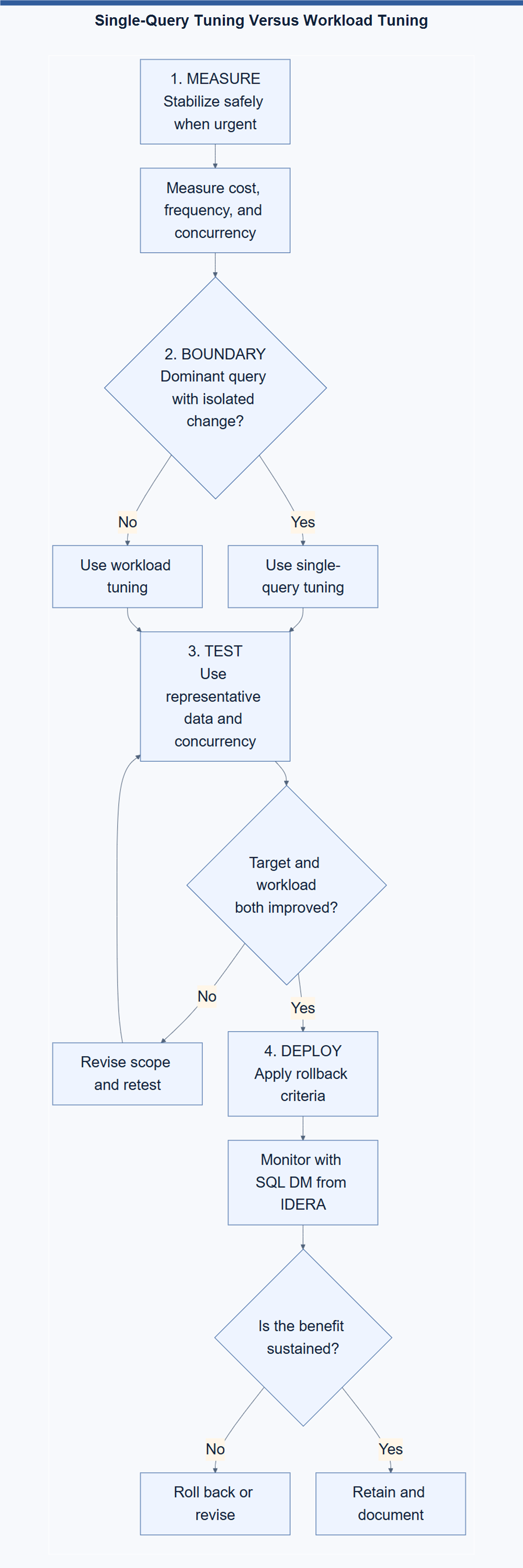
Write the boundary beside the change ticket before testing begins. That small sentence stops a local metric from becoming the system’s entire definition of success.
Your next tuning decision does not need the largest scope. It needs the smallest scope that includes everyone paying for the change. Measure that group, protect it, and then enjoy the faster query.
A query fix becomes performance tuning only when its wider workload cost remains acceptable.
Published by Pinal Dave on SQLAuthority. More of my work at pinaldave.com.
Discover more from SQL Authority with Pinal Dave
Subscribe to get the latest posts sent to your email.