To find damaged pages, read msdb.dbo.suspect_pages, the table where SQL Server records each page it could not read cleanly. On a healthy server that table is empty. One row in it is a reason to stop and look.

What the Table Holds
SQL Server writes this table itself, when a read fails or a repair finishes. You do not insert rows. Each row names one page by database, file and page number. It also holds an event type, a count of errors on that page, and the time of the last event.
The error count grows each time the same page fails again. A count of 1 is a single failed read. A count of 20 means the page keeps failing, and every query that touches it fails too. The count shows how many times the page failed. The last update date shows how fresh the trouble is.
The table keeps at most 1,000 rows. Rows do not disappear on their own, even after the page is fixed. They stay until a person deletes them. A full table of 1,000 rows records no new bad pages. Clear the rows of type 4, 5 and 7 now and then. Read the dates before you panic, because an old row can be a page that was fixed long ago.
Read the Suspected Pages
The query below helps you find damaged pages. It joins the table to sys.master_files to show the file path. It turns the event type into words. It uses a LEFT JOIN, so a row for a dropped database still appears, with an empty name. The query only reads, and you can run it on any server.
SELECT DB_NAME(sp.database_id) AS DatabaseName, sp.file_id AS FileID, sp.page_id AS PageID,
       CASE sp.event_type WHEN 1 THEN N'823 or 824 error' WHEN 2 THEN N'Bad checksum' WHEN 3 THEN N'Torn page'
            WHEN 4 THEN N'Restored' WHEN 5 THEN N'Repaired' WHEN 7 THEN N'Deallocated' ELSE N'Other' END AS EventMeaning,
       sp.error_count AS ErrorCount, sp.last_update_date AS LastUpdated, mf.physical_name AS FilePath
FROM msdb.dbo.suspect_pages AS sp
LEFT JOIN sys.master_files AS mf ON mf.database_id = sp.database_id AND mf.file_id = sp.file_id
ORDER BY sp.last_update_date DESC;
On a healthy server it returns no rows. That is the result you want. The table below comes from a different case. It is a throwaway database on a test server, and its page 424 was damaged on purpose. Never damage a database file on a server you care about.
| DatabaseName | FileID | PageID | EventMeaning | ErrorCount | LastUpdated | FilePath |
|---|---|---|---|---|---|---|
| SuspectPageDemo | 1 | 424 | Bad checksum | 1 | 2026-10-07 11:47:35.780 | D:\data\SuspectPageDemo.mdf |
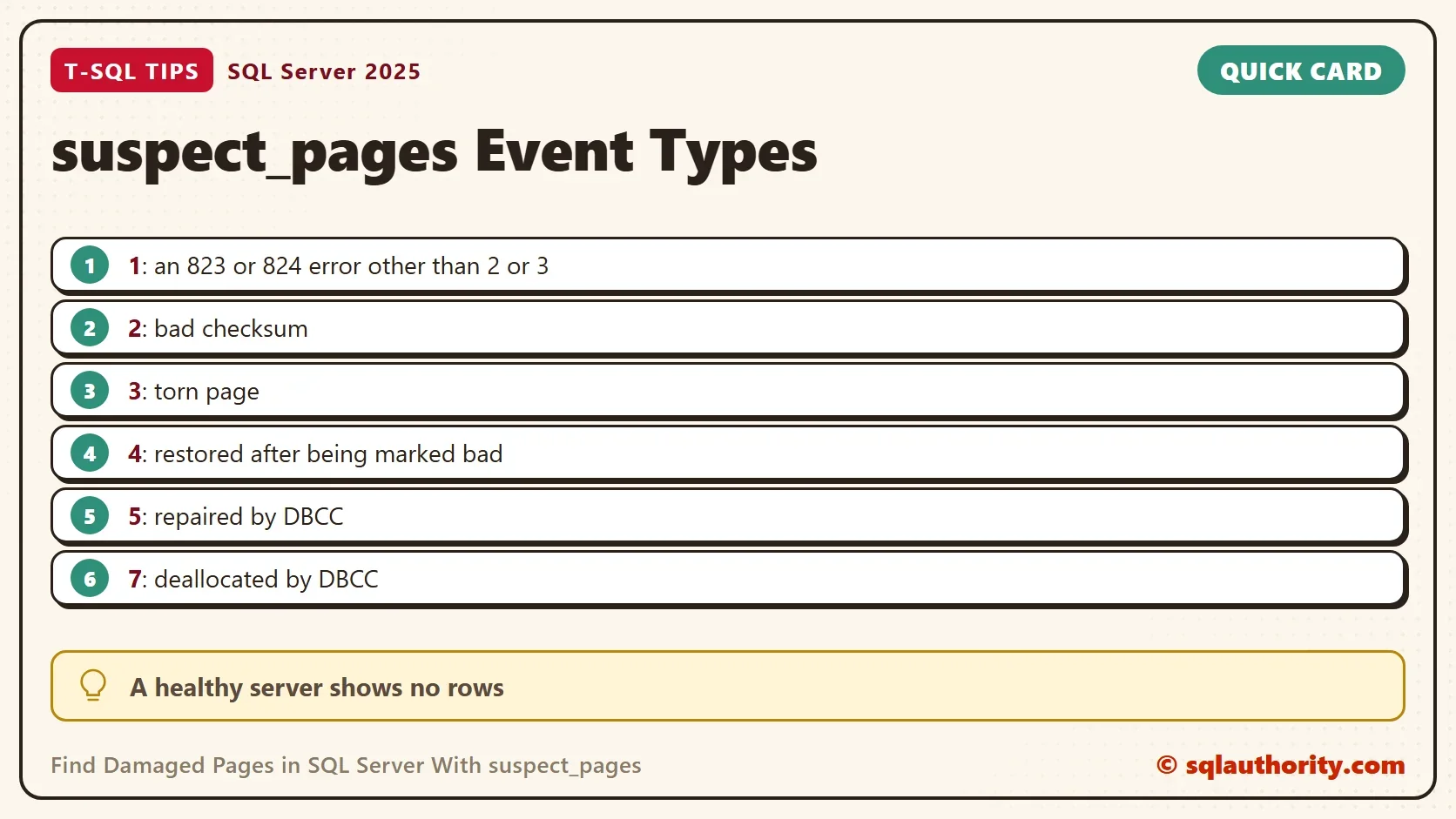
The row says that page 424 of file 1 failed a checksum test once. Event type 2 means a bad checksum. The other types are listed on the card below. Type 4 means the page was restored after SQL Server marked it bad. Type 5 means DBCC repaired it, and type 7 means DBCC deallocated it.
Find the Table Behind the Page
A page number alone does not tell you what is damaged. SQL Server 2019 and later has sys.dm_db_page_info. It reads the page header and returns the object that owns the page. The query below passes each suspected page to it. The database must be online.
SELECT DB_NAME(sp.database_id) AS DatabaseName, sp.page_id AS PageID,
       OBJECT_NAME(pi.object_id, sp.database_id) AS TableName, pi.index_id AS IndexID
FROM msdb.dbo.suspect_pages AS sp
CROSS APPLY sys.dm_db_page_info(sp.database_id, sp.file_id, sp.page_id, 'LIMITED') AS pi;| DatabaseName | PageID | TableName | IndexID |
|---|---|---|---|
| SuspectPageDemo | 424 | Teas | 1 |
Page 424 belongs to the table Teas, and IndexID 1 means its clustered index. That is the worst place for a bad page, because the clustered index holds the table rows themselves. A damaged page in a nonclustered index is easier. You rebuild the index from the table.
What the Error Looks Like
The user who read that page saw a severity 24 error. The message names the page, the file and both checksum values.
Msg 824, Level 24, State 2, Line 1
SQL Server detected a logical consistency-based I/O error: incorrect checksum (expected: 0xf64d637c; actual: 0x2992bca3). It occurred during a read of page (1:424) in database ID 25 at offset 0x00000000350000 in file 'D:\data\SuspectPageDemo.mdf'.  Additional messages in the SQL Server error log or operating system error log may provide more detail. This is a severe error condition that threatens database integrity and must be corrected immediately. Complete a full database consistency check (DBCC CHECKDB). This error can be caused by many factors; for more information, see https://go.microsoft.com/fwlink/?linkid=2252374.
The message also says what to do first: run a full consistency check with DBCC CHECKDB on that database. The check reads every page, so it finds damage that nobody has touched yet.
What to Do Next
Treat suspected pages as a signal, not as a diagnosis. Run DBCC CHECKDB and read its full output. Do not start with a repair option such as REPAIR_ALLOW_DATA_LOSS. It can delete data. Restore from a backup, or restore only the page, when you can. Check the last good backup, and note where the damage sits. Look at the storage layer as well, because a bad checksum can point to the disk or the controller. Fix the cause, or the next page follows.
After the repair or the restore, the rows change to event types 4, 5 or 7. Delete the old rows when you are sure nothing else needs them, so the next real row stands out.
You could argue that this table is a weak alarm. That is fair. It lists only pages that a read has already failed on. A page that nobody reads stays unseen for months. A scheduled DBCC CHECKDB finds those pages, and the table then confirms what a read has found.
What to Remember
Find damaged pages on every server you look after by reading msdb.dbo.suspect_pages. An empty result is normal. A row with event type 1, 2 or 3 needs action the same day. Map the page to its table, run DBCC CHECKDB, and keep the backups ready.
A suspected page is not a failed query, it is a warning from the disk.
Published by Pinal Dave on SQLAuthority. More of my work at pinaldave.com.
Discover more from SQL Authority with Pinal Dave
Subscribe to get the latest posts sent to your email.