
Question: Can I capture deleted rows without a trigger? Yes. Put OUTPUT DELETED... in the DELETE statement and use INTO to capture the deleted values. It covers that statement, not every possible deletion performed by every application.

A client asked this during a Comprehensive Database Performance Health Check. I prefer straightforward, visible DML to hiding simple logging work in a trigger. But my original qualification matters: OUTPUT is not a complete replacement for an AFTER DELETE trigger or an audit design.
Delete one row and keep its values
This is the original two-row demonstration, using session-local table variables so the experiment neither creates nor drops application tables:
DECLARE @MainTab TABLE (ID1 int, Col1 varchar(100));
DECLARE @DeletedTab TABLE (ID3 int, Col3 varchar(100));
INSERT @MainTab(ID1,Col1) VALUES (1,'Col'),(2,'Col2');
SELECT ID3,Col3 FROM @DeletedTab;
SELECT ID1,Col1 FROM @MainTab ORDER BY ID1;
DELETE FROM @MainTab
OUTPUT DELETED.ID1, DELETED.Col1 INTO @DeletedTab(ID3,Col3)
WHERE ID1=1;
SELECT ID3,Col3 FROM @DeletedTab;
SELECT ID1,Col1 FROM @MainTab ORDER BY ID1;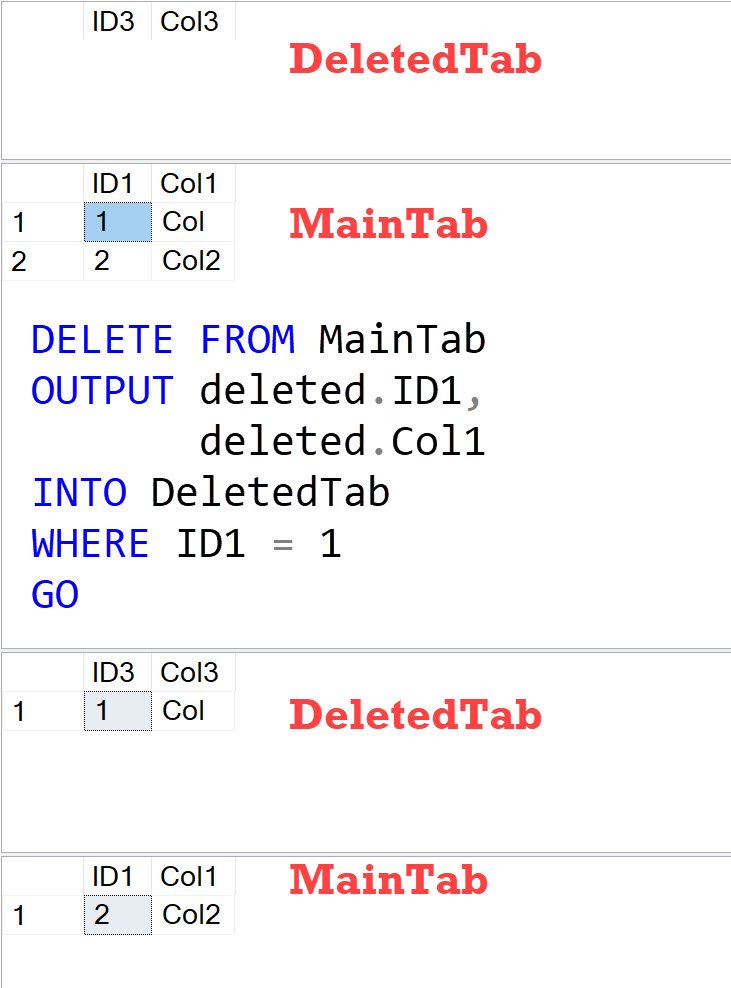
Before DELETE, DeletedTab is empty and MainTab has both rows. Afterwards, DeletedTab contains 1, Col, while MainTab contains 2, Col2. The original annotated diagram earns its place because it shows where the deleted row went.
The limitations change the design decision
Every relevant deletion path must use this pattern if it is your capture mechanism. It does not automatically catch someone else’s DELETE, a cascading action elsewhere, or TRUNCATE. Decide who needs to enforce the audit policy before choosing it.
An OUTPUT destination has restrictions, including enabled triggers, foreign keys and CHECK constraints. Output row order is not guaranteed. Rows returned directly to a client are not proof that a transaction committed; discard them when the statement reports an error.
The variables here demonstrate the mechanism, not durable auditing. A real archive needs a suitable persistent destination, transaction handling, retention and access controls. Measure your workload instead of assuming either triggers or OUTPUT are always faster.
My INSERT with OUTPUT example uses the other inserted-row direction. Its original video is retained:
Published by Pinal Dave on SQLAuthority. More of my work at pinaldave.com.
Discover more from SQL Authority with Pinal Dave
Subscribe to get the latest posts sent to your email.




2 Comments. Leave new
Hi Pinal,
Very nicely explained.
Looking for another article on CDC feature to capture the same as normally application doesn’t delete data in this way of query. Tq as posting all good learning articles.
2005