
Boost SQL Server Priority appeared in the historical SSMS 18.5.1 interface. I showed where to inspect that engine setting.

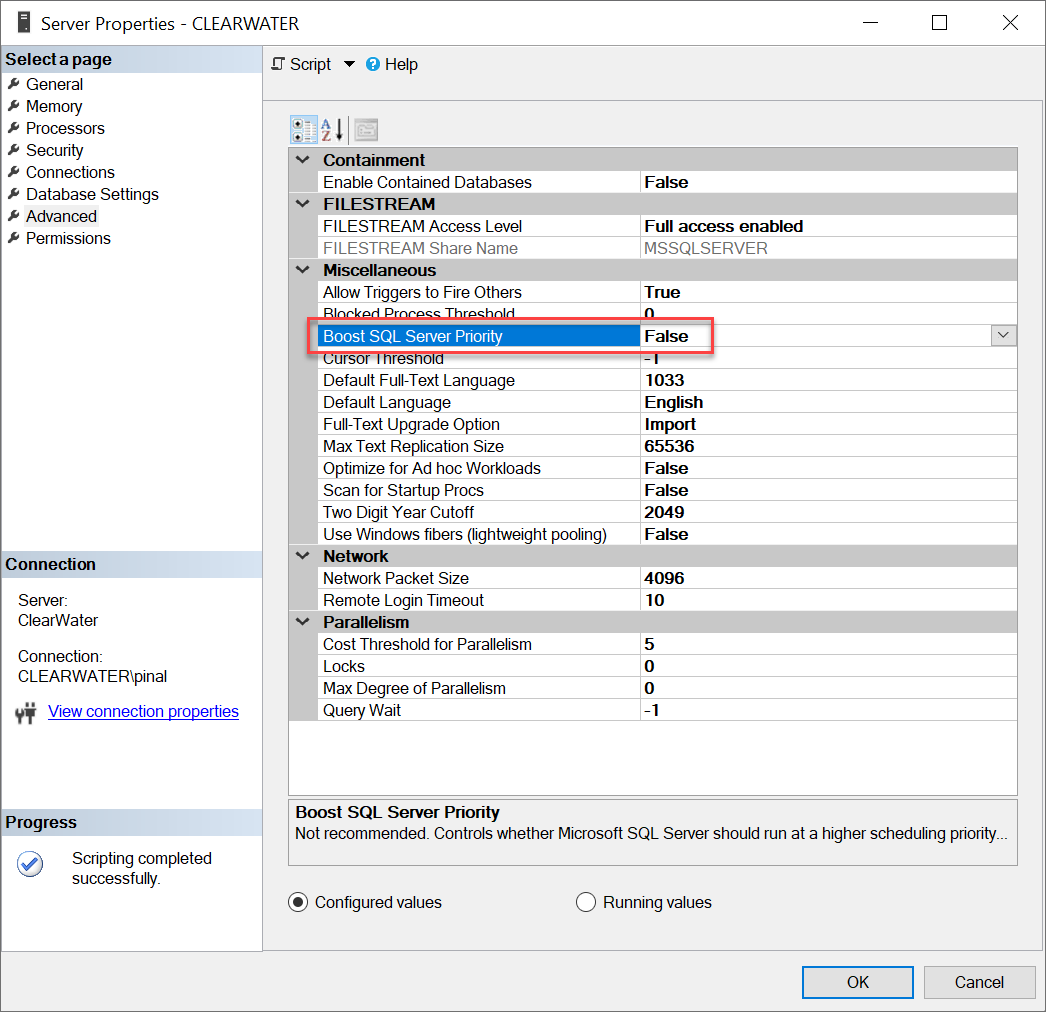
SELECT name, value, value_in_use, is_dynamic FROM sys.configurations WHERE name = N'priority boost';Right-click the server, open Properties, choose Advanced and inspect Miscellaneous in that interface. SSMS 18 names the client release. My reference to SQL Server 2018 was an incorrect engine name.
Microsoft advises against enabling priority boost because it can harm responsiveness and resource balance. It is deprecated. False, or zero, is the normal setting. An enabled value does not prove it caused a particular slowdown.
The setting is not dynamic. Compare value and value_in_use, then schedule any approved correction and restart. Saving False does not establish that the running engine has changed.
Reference: Priority boost guidance and restart requirement.
Related reading
- Comprehensive Database Performance Health Check
- SQL SERVER – Priority Boost and SSMS 18
- SQL SERVER – Turning Off Priority Boost Server Configuration Option on SSMS 18 Onwards
A saved priority setting is not an effective running value, it is a configuration whose change requires restart.
Published by Pinal Dave on SQLAuthority. More of my work at pinaldave.com.
Discover more from SQL Authority with Pinal Dave
Subscribe to get the latest posts sent to your email.




2 Comments. Leave new
“I have written about how SQL Server 2018 is missing the option to turn off the settings for Boost SQL Server Priority you can read about that here.”
“If you are interested to read why I am asking one should disable Priority Boost settings, you should my blog post here.”
Hyperlink in both above statement are same, I think it should be different, right?
Thanks for bringing to my attention. I have updated the link. I appreciate it.