
Question: How do you decode @@OPTIONS? Test each option’s bit with &. The integer describes several switches in the current session, not the settings of every session.

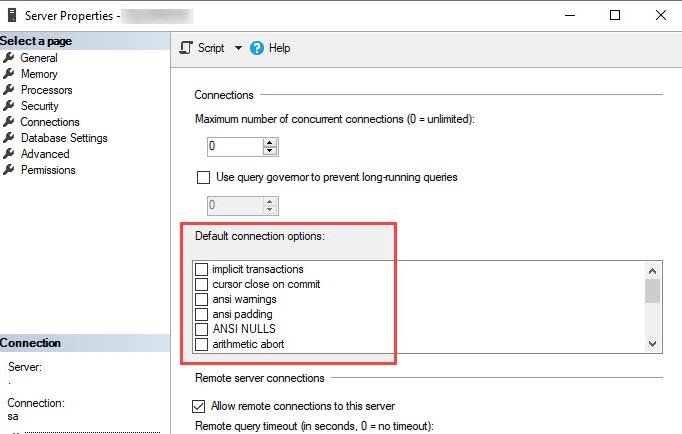
I noticed this approach in a Profiler trace while working on another article. SSMS was reading the default connection options from the server’s Properties, Connections page. Those defaults and your present session settings are related, but they are not necessarily equal.
DECLARE @SessionOptions int = @@OPTIONS;
DECLARE @ServerOptions int =
    (SELECT CONVERT(int, value_in_use)
     FROM sys.configurations WHERE name = 'user options');

SELECT o.option_name, o.bit_value,
       CAST(@SessionOptions & o.bit_value AS bit) AS session_option,
       CAST(@ServerOptions & o.bit_value AS bit) AS server_default
FROM (VALUES (1, 'DISABLE_DEF_CNST_CHK'),
       (2, 'IMPLICIT_TRANSACTIONS'),
       (4, 'CURSOR_CLOSE_ON_COMMIT'),
       (8, 'ANSI_WARNINGS'),
       (16, 'ANSI_PADDING'),
       (32, 'ANSI_NULLS'),
       (64, 'ARITHABORT'),
       (128, 'ARITHIGNORE'),
       (256, 'QUOTED_IDENTIFIER'),
       (512, 'NOCOUNT'),
       (1024, 'ANSI_NULL_DFLT_ON'),
       (2048, 'ANSI_NULL_DFLT_OFF'),
       (4096, 'CONCAT_NULL_YIELDS_NULL'),
       (8192, 'NUMERIC_ROUNDABORT'),
       (16384, 'XACT_ABORT')) AS o(bit_value, option_name)
ORDER BY o.bit_value;
The session_option column decodes @@OPTIONS. The server_default column decodes the current user options configuration value. A result of 1 means that bit is present; 0 means it is absent.
Why does the bit test work?
My original example used three colors. Give red the value 1, green 2 and blue 4. The combined value 5 contains blue and red because 4 + 1 = 5.
DECLARE @Color int = 5;
SELECT CAST(@Color & 4 AS bit) AS Blue,
       CAST(@Color & 2 AS bit) AS Green,
       CAST(@Color & 1 AS bit) AS Red;
The result is Blue = 1, Green = 0 and Red = 1. Testing each power of two finds one independent switch in the combined integer.
| Included colors | Combined value |
|---|---|
| None | 0 |
| Red | 1 |
| Green | 2 |
| Green, red | 3 |
| Blue | 4 |
| Blue, red | 5 |
| Blue, green | 6 |
| Blue, green, red | 7 |
@@OPTIONS is one useful inspection method, not a complete inventory of every SET setting or stored-object behavior. For a readable list of active connection options, also try DBCC USEROPTIONS. Stored modules can retain options captured when they were created.
Don’t use this decoding query as a reason to change server defaults. Some older OFF behavior is deprecated or no longer supported in newer SQL Server versions. Interpret the bit with the documentation for that option and your version.
Have you used bit flags in an application? The small color example is often the easiest way to explain them.
Published by Pinal Dave on SQLAuthority. More of my work at pinaldave.com.
Discover more from SQL Authority with Pinal Dave
Subscribe to get the latest posts sent to your email.




1 Comment. Leave new
Hi Pinal,
here is my solution:
SELECT [name] AS CONFIGURATION
,CASE SIGN(@@OPTIONS & number)
WHEN 1 THEN ‘ON’
WHEN 0 THEN ‘OFF’
END AS setting
FROM master.dbo.spt_values
WHERE [type] = ‘SOP’ AND number > 0
ORDER BY number;