
Question: How to DELETE Multiple Table Together Via SQL Server Management Studio (SSMS)?
Answer: I just received this question the other day during Comprehensive Database Performance Health Check. My initial answer was that you can easily script it out like following:
DROP TABLE [dbo].[InMemory_Columnstore_People]
GO
DROP TABLE [dbo].[InMemory_People]
GO
However, the DBA asked me the question once again saying, he is quite familiar with the T-SQL script but he would love to know if there is a shortcut to do that via SSMS. Essentially he would love to drop multiple tables via keyboard in SQL Server Management Studio.
Fortunately, it is totally possible to do so. Here are the steps:
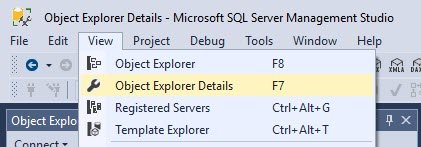
First, go to SSMS and select the menu View and there select the option “Object Explorer Details”. Alternatively, you can also hit keyboard option F7 and it will open up Object Explorer Details.
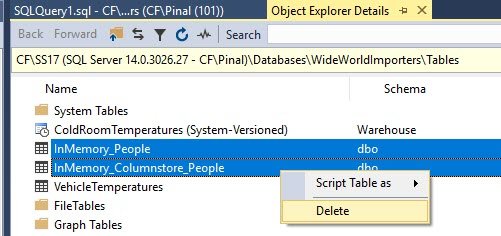
In Object Explorer Details, select the tables which you want to delete and either hit the keyboard button DELETE or just go right click on the tables and select the option DELETE.
Well, I personally prefer to delete the scripts with the help of T-SQL but if you are one of those people who love to drop objects via SSMS, you can follow the guidance from this blog post.
Published by Pinal Dave on SQLAuthority. More of my work at pinaldave.com.
Discover more from SQL Authority with Pinal Dave
Subscribe to get the latest posts sent to your email.




5 Comments. Leave new
Is the question related to delete the data or drop the table ??
It will drop the table
helppful
thanks a lot!!!
thanks, very helpful