I check STUFF boundaries before editing a string by position. A valid deletion can also insert replacement text. An invalid position can instead produce NULL, so I test the arguments before relying on the result.

Read deletion and insertion as one operation
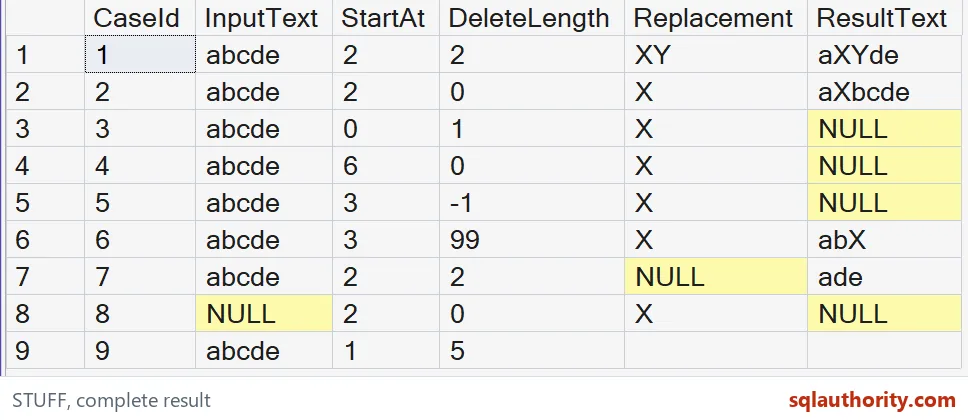
The first supplied row starts at the second character of abcde, removes two characters, and inserts XY at that location. Its expected result is aXYde. The function doesn’t search for bc or verify the meaning of those characters.
It follows the requested position and length. If the position comes from another calculation, I review that calculation separately. A valid edit can still replace the wrong characters.
WITH Cases AS (
 SELECT CaseId,InputText,StartAt,DeleteLength,Replacement
 FROM (VALUES
  (1,CAST(N'abcde' AS nvarchar(12)),2,2,CAST(N'XY' AS nvarchar(12))),
  (2,N'abcde',2,0,N'X'), (3,N'abcde',0,1,N'X'),
  (4,N'abcde',6,0,N'X'), (5,N'abcde',3,-1,N'X'),
  (6,N'abcde',3,99,N'X'), (7,N'abcde',2,2,NULL),
  (8,NULL,2,0,N'X'), (9,N'abcde',1,5,N'')
 ) AS v(CaseId,InputText,StartAt,DeleteLength,Replacement)
)
SELECT CaseId,InputText,StartAt,DeleteLength,Replacement,
 CAST(STUFF(InputText,StartAt,DeleteLength,Replacement)
      AS nvarchar(40)) AS ResultText
FROM Cases
ORDER BY CaseId;
Use zero length for insertion inside the string
The second row asks for deletion length zero at position two. It keeps the original characters and inserts X before the original b, giving aXbcde.
This is useful when inserting a separator at a known location, but it isn’t a general append rule. In particular, start position six for the five-character input is beyond the string. That row is expected to return NULL rather than append X after the final character.
Keep invalid boundaries distinct from empty text
A start of zero and a negative deletion length both produce NULL in these supplied cases. The final row, however, has valid bounds and replaces the whole input with an empty replacement. Its result is an empty string.
A blank grid cell is easy to overlook. I retain the case identifiers and the typed result column. Application code should likewise distinguish a valid empty result from a missing result.

Allow deletion to reach the end deliberately
A deletion count of ninety-nine at position three exceeds the remaining input. The expected operation removes the rest of the string and inserts X, leaving abX.
A long deletion count is therefore not the same boundary failure as a negative count. This behavior can be useful when replacing a known suffix. It is still important to establish that the requested start points to the intended suffix before accepting the output.
Understand the special replacement NULL rule
A NULL replacement removes the selected characters without inserting text. The seventh case therefore deletes bc and expects ade. That differs from a NULL input string, which remains NULL in the eighth case.
A NULL replacement has a different meaning from NULL input. Treating both as failure would misdescribe a deletion-only expression. Replacing missing inputs with empty strings would hide another distinction.
Type and review the result explicitly
The example casts its result to nvarchar(40). A missing result therefore has an explicit type. All supplied non-NULL strings fit that size.
A larger real edit must also fit the function’s supported result type. Supplementary-character collations affect character counting, so a position in bytes isn’t automatically a valid character position. I keep these position-based examples separate from text parsing, collation policy and storage-length checks.
Small edits are easy to get wrong, so give each boundary its own test.
A NULL result is not an empty string, it is a boundary condition that deserves its own test.
Published by Pinal Dave on SQLAuthority. More of my work at pinaldave.com.
Discover more from SQL Authority with Pinal Dave
Subscribe to get the latest posts sent to your email.