
An open transaction holds free log space hostage until it commits or rolls back. Reading the log’s used and free space before and after the commit shows exactly how.

What the Log Holds
The transaction log records every change before it can be undone or recovered. In the SIMPLE recovery model, SQL Server frees the space of finished transactions at each checkpoint. It can’t free anything that belongs to a transaction still open. A single long transaction can pin the log while thousands of small ones come and go behind it.
The demo uses a SIMPLE recovery database with a small log and one wide table. A helper function reads the free log space and the reuse wait in one result. Each check is then one short query. The view reads the current database only, so the function lives in the demo database.
SET NOCOUNT ON;
IF DB_ID(N'OpenTransactionLogDemo') IS NULL CREATE DATABASE OpenTransactionLogDemo;
GO
ALTER DATABASE OpenTransactionLogDemo SET RECOVERY SIMPLE;
ALTER DATABASE OpenTransactionLogDemo MODIFY FILE (NAME = OpenTransactionLogDemo_log, FILEGROWTH = 8MB);
GO
USE OpenTransactionLogDemo;
GO
CREATE OR ALTER FUNCTION dbo.LogSpace()
RETURNS TABLE
AS
RETURN (
    SELECT CONVERT(decimal(10,1), u.total_log_size_in_bytes / 1048576.0) AS TotalMB,
           CONVERT(decimal(10,1), u.used_log_space_in_bytes / 1048576.0) AS UsedMB,
           CONVERT(decimal(10,1), (u.total_log_size_in_bytes - u.used_log_space_in_bytes) / 1048576.0) AS FreeMB,
           d.log_reuse_wait_desc AS ReuseWait
    FROM sys.dm_db_log_space_usage AS u
    CROSS JOIN sys.databases AS d
    WHERE d.database_id = DB_ID()
);
GO
DROP TABLE IF EXISTS dbo.Seedlings;
CREATE TABLE dbo.Seedlings (Col1 char(4000) NOT NULL, Col2 char(4000) NOT NULL);
Start a Transaction and Check the Baseline
Open the transaction first, then run a checkpoint. A checkpoint writes dirty pages to disk and lets SQL Server free log space it no longer needs. This reading is the starting point.
BEGIN TRANSACTION;
CHECKPOINT;
SELECT * FROM dbo.LogSpace();
| TotalMB | UsedMB | FreeMB | ReuseWait |
|---|---|---|---|
| 8.0 | about 0.5 | about 7.5 | NOTHING |
Almost all of the 8 MB log is free. Values can move by 0.1 MB between runs. If the last column already says ACTIVE_TRANSACTION, run the checkpoint and the query once more. Keep every step of this demo in one query window, because the transaction stays open between blocks.
Write Data Inside the Transaction
Each row holds 8,000 bytes, so 1,000 rows fill about 8 MB of data pages. The load runs inside the open transaction. Then the script runs a checkpoint and reads the log again.
INSERT INTO dbo.Seedlings (Col1, Col2)
SELECT TOP (1000) 'a', 'b'
FROM sys.all_objects AS a CROSS JOIN sys.all_objects AS b;
CHECKPOINT;
SELECT * FROM dbo.LogSpace();
SELECT @@TRANCOUNT AS OpenTransactions;
| TotalMB | UsedMB | FreeMB | ReuseWait |
|---|---|---|---|
| 16.0 | about 10.5 | about 5.5 | ACTIVE_TRANSACTION |
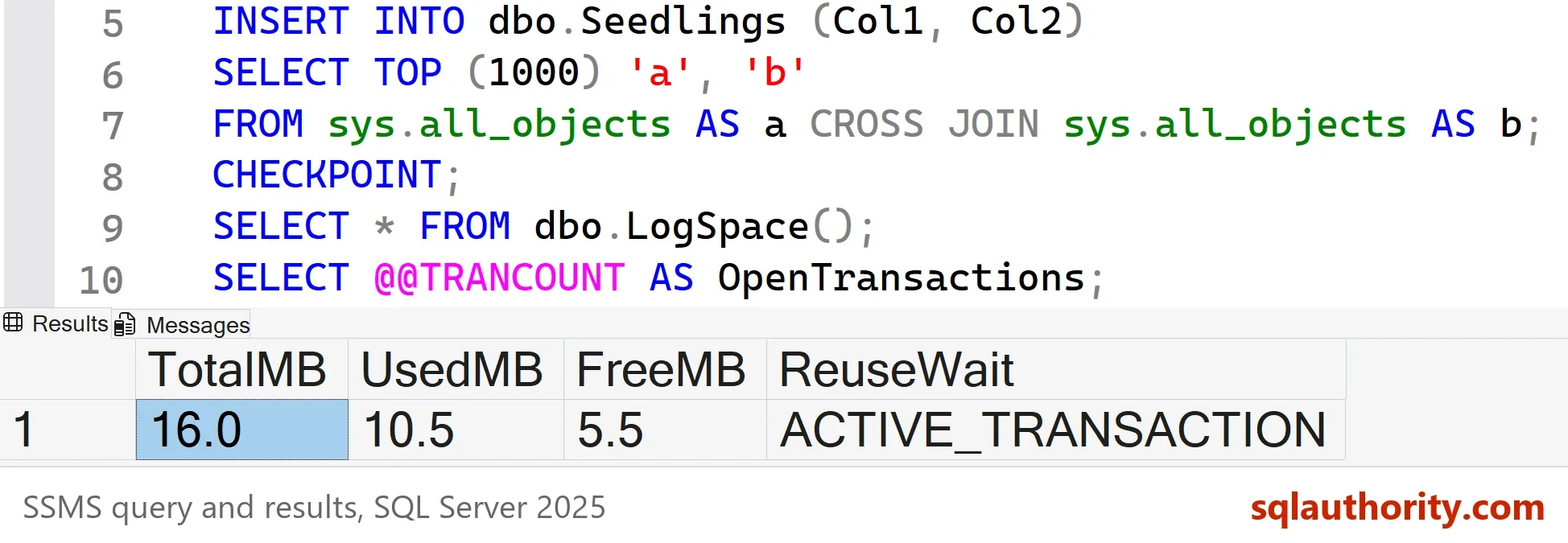
The used space jumped from about 0.5 MB to about 10.5 MB, and the checkpoint freed none of it. ACTIVE_TRANSACTION is the reason. The log file also grew from 8 MB to 16 MB, because 8 MB couldn’t hold the load. That is one step of the 8 MB growth size set in the first script.
Why the Log Grows Before COMMIT
It’s natural to expect that nothing reaches the log before the commit. That isn’t how it works. SQL Server writes log records as changes happen, and it must write them before the data pages they describe. A page can reach disk before its transaction commits, so its log records must already be there. A commit flushes any records still in memory and ends the transaction.
The log also holds more than the rows. A transaction reserves room for the records a rollback would write. The next section shows that reserve as its own number.
Find the Transaction Holding the Log
In a real incident you aren’t standing in the session that holds the transaction. Three views join to show the holder. The query lists open transactions that have written to the current database. It shows the log each one has written and the log it has reserved for a rollback.
SELECT st.session_id, at.transaction_begin_time,
       CONVERT(decimal(10,1), dt.database_transaction_log_bytes_used / 1048576.0) AS LogUsedMB,
       CONVERT(decimal(10,1), dt.database_transaction_log_bytes_reserved / 1048576.0) AS LogReservedMB
FROM sys.dm_tran_database_transactions AS dt
JOIN sys.dm_tran_session_transactions AS st ON st.transaction_id = dt.transaction_id
JOIN sys.dm_tran_active_transactions AS at ON at.transaction_id = dt.transaction_id
WHERE dt.database_id = DB_ID();| session_id | transaction_begin_time | LogUsedMB | LogReservedMB |
|---|---|---|---|
| 135 | 2026-10-06 20:01:15.583 | 8.2 | 1.4 |
The result has one row for the demo transaction. The session ID and start time are specific to your run. The transaction wrote 8.2 MB and reserved 1.4 MB for a rollback. Together that is 9.6 MB, close to the 10.5 MB the database reported. An old start time and a growing log figure point at the transaction to ask about. Commit it, or roll it back, and the log frees up at the next checkpoint.
Commit and Check Again
COMMIT;
CHECKPOINT;
SELECT * FROM dbo.LogSpace();
| TotalMB | UsedMB | FreeMB | ReuseWait |
|---|---|---|---|
| 16.0 | about 0.9 | about 15.0 | NOTHING |
Once the transaction ends, the checkpoint frees almost everything. The file keeps its 16 MB size, so free space is high. A log that stays large after an open transaction isn’t a sign of a leak. It is the size the transaction needed.
What About FULL Recovery
A new database in FULL recovery behaves like SIMPLE until its first full backup. Its log is truncated at each checkpoint, because no log backup could use the records yet. A second demo database shows it. The load runs with no explicit transaction. One reading follows the load, and a second follows a checkpoint.
IF DB_ID(N'OpenTransactionLogDemoFull') IS NULL CREATE DATABASE OpenTransactionLogDemoFull;
GO
ALTER DATABASE OpenTransactionLogDemoFull SET RECOVERY FULL;
GO
USE OpenTransactionLogDemoFull;
DROP TABLE IF EXISTS dbo.Seedlings;
CREATE TABLE dbo.Seedlings (Col1 char(4000) NOT NULL, Col2 char(4000) NOT NULL);
INSERT INTO dbo.Seedlings (Col1, Col2)
SELECT TOP (1000) 'a', 'b' FROM sys.all_objects AS a CROSS JOIN sys.all_objects AS b;
SELECT CONVERT(decimal(10,1), used_log_space_in_bytes / 1048576.0) AS UsedMB FROM sys.dm_db_log_space_usage;
CHECKPOINT;
SELECT CONVERT(decimal(10,1), used_log_space_in_bytes / 1048576.0) AS UsedMB FROM sys.dm_db_log_space_usage;
The used space falls from 8.8 MB to 1.0 MB after the checkpoint, even though the database is in FULL. After the first full backup, a log backup becomes the only way to free it.
What to Remember
Look for open transactions first when a log grows in SIMPLE recovery. A long transaction is the first suspect, and ACTIVE_TRANSACTION names it. Commit in smaller batches when you load a lot of data. Each batch then pins only its own share of the log, and the next checkpoint frees it. In FULL recovery after the first full backup, log backups free the space instead of checkpoints. Run the cleanup script when you finish.
USE master;
GO
IF DB_ID(N'OpenTransactionLogDemoFull') IS NOT NULL
BEGIN
    ALTER DATABASE OpenTransactionLogDemoFull SET SINGLE_USER WITH ROLLBACK IMMEDIATE;
    DROP DATABASE OpenTransactionLogDemoFull;
END;
IF DB_ID(N'OpenTransactionLogDemo') IS NOT NULL
BEGIN
    ALTER DATABASE OpenTransactionLogDemo SET SINGLE_USER WITH ROLLBACK IMMEDIATE;
    DROP DATABASE OpenTransactionLogDemo;
END;
Free log space is not a gauge, it is a promise that every open transaction has to keep.
Published by Pinal Dave on SQLAuthority. More of my work at pinaldave.com.
Discover more from SQL Authority with Pinal Dave
Subscribe to get the latest posts sent to your email.

1 Comment. Leave new
Hi,
I’ve tested it. And I’m confused.
How is it possible that before the commit operation log file grew?
As Microsoft says: “Log records are written to disk when the transactions are committed.” So it couldn’t be possible to write records to disk when the transaction is not commited.
Please, clarify it.
Regards