
To find who dropped a table, read the transaction log for the drop and look up the login behind it. SQL Server records the security ID of the account that runs a transaction. For a drop, that is enough to name the account.

What the Log Remembers
Every transaction in the log carries a name, a start time and the SID of the login that started it. A DROP TABLE is logged as a transaction named DROPOBJ. Search the log for that name, and each row is one dropped object with its time and its owner’s SID.
To find who dropped a table, act while the log still holds the records. In FULL recovery, the records stay until a log backup frees them. In SIMPLE recovery, a checkpoint can free them within minutes. So this is a first-hour tool: run it as soon as the loss is noticed.
Build a Demo Database
The demo uses a FULL recovery database with one full backup. It also has a user with no login, named CarelessUser, who stands in for the account to find. The user is a member of the owner role, so the drop is allowed. The backup file goes to the instance’s default backup folder.
IF DB_ID(N'DroppedTableAuditDemo') IS NULL CREATE DATABASE DroppedTableAuditDemo;
GO
ALTER DATABASE DroppedTableAuditDemo SET RECOVERY FULL;
GO
DECLARE @f nvarchar(300) = CONVERT(nvarchar(260), SERVERPROPERTY('InstanceDefaultBackupPath')) + N'\DroppedTableAuditDemo.bak';
BACKUP DATABASE DroppedTableAuditDemo TO DISK = @f WITH INIT;
GO
USE DroppedTableAuditDemo;
GO
DROP USER IF EXISTS CarelessUser;
CREATE USER CarelessUser WITHOUT LOGIN;
ALTER ROLE db_owner ADD MEMBER CarelessUser;
DROP TABLE IF EXISTS dbo.Orders;
CREATE TABLE dbo.Orders (OrderID int NOT NULL PRIMARY KEY, Item nvarchar(40) NOT NULL);
INSERT INTO dbo.Orders (OrderID, Item) VALUES (1, N'Seeds');
Drop the Table as Someone Else
EXECUTE AS USER makes the next statements run as CarelessUser. REVERT switches back. The drop is the only change in between.
EXECUTE AS USER = N'CarelessUser';
DROP TABLE dbo.Orders;
REVERT;
Read the Log to See Who Dropped a Table
fn_dblog returns the active log as rows. The query keeps the DROPOBJ rows only. SUSER_SNAME turns a SID into a login name. A user without a login has no login name. So the query also joins the database users and falls back to the user’s name.
SELECT l.[Begin Time], l.[Transaction Name],
       COALESCE(SUSER_SNAME(l.[Transaction SID]), p.name) AS WhoDidIt
FROM fn_dblog(NULL, NULL) AS l
LEFT JOIN sys.database_principals AS p ON p.sid = l.[Transaction SID]
WHERE l.[Transaction Name] = N'DROPOBJ';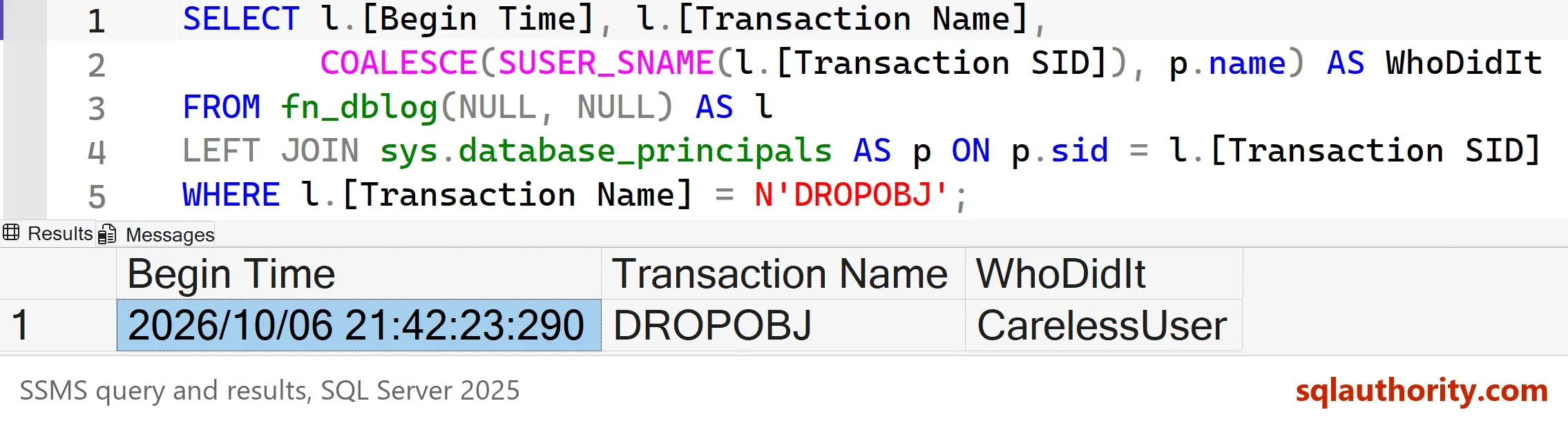
One transaction, one name. The Begin Time is the time of your own drop, so it will differ from mine. The DROPOBJ row carries the transaction, not the table name. With several drops in the window, match the Begin Time to the moment the table vanished. On a real server the SID belongs to a login, and SUSER_SNAME returns it directly. The join exists only because the demo user has no login. The Begin Time tells you when to restore to, if you need the data back.
A large log means a long read. Keep the WHERE clause on the transaction name, and run the query in a quiet hour. Run it in the affected database only, since the function reads the log of the current database. Save the result somewhere safe once you have the name, because the next log backup can erase the evidence.
When the Log Has Moved On
A log backup, a checkpoint in SIMPLE recovery or a restart can remove the records. fn_dblog is also undocumented and unsupported, so don’t build monitoring on it. The default trace is a second source that is on by default. It records object creation and deletion as events 46 and 47, with the login, the host and the application.
DECLARE @path nvarchar(260) = (SELECT [path] FROM sys.traces WHERE is_default = 1);
SELECT t.StartTime, t.EventClass, t.ObjectName, t.ApplicationName
FROM sys.fn_trace_gettable(@path, DEFAULT) AS t
WHERE t.EventClass = 47 AND t.EventSubClass = 1
  AND t.DatabaseName = N'DroppedTableAuditDemo' AND t.ObjectName = N'Orders'
  AND t.StartTime >= DATEADD(MINUTE, -2, SYSDATETIME())
ORDER BY t.StartTime;
| StartTime | EventClass | ObjectName | ApplicationName |
|---|---|---|---|
| 2026-10-06 20:06:39.567 | 47 | Orders | SQLCMD |
Each drop is logged twice, as a begin (subclass 0) and a commit (subclass 1). The filter keeps event 47 and the commit. Widen the two minute window to match your incident. Add LoginName and HostName to the column list, and you have the account and the machine. The trace keeps a limited history in small rollover files, so the drop needs to be recent here as well.
When Everyone Shares a Login
You could argue that finding the person is the only goal. It isn’t. If the application, the developers and the nightly jobs all use sa, the answer is sa every time. The log can’t separate them.
Give every person and every application its own login, and grant only the permissions each one needs. That is the fix for the next incident. For drops, a DDL trigger or SQL Server Audit can record the account at the moment of the drop. Then you aren’t searching afterwards.
Get the Table Back
Finding the name is half the work. The data returns from a backup. Restore the full backup and the log backups to a new database. Stop the log restore before the drop with STOPAT. Use a moment before the Begin Time from the log as the stop time, so the drop itself isn’t replayed. Then copy the table back.
What to Remember
Finding out who dropped a table is a race with the log. Search it fast, and check the default trace when the log is gone. Look at the application name too, because it tells you whether a person or a job did it.
Before you clean up, list the backup file the demo made. The query reads its path from the backup history, which the cleanup script removes.
SELECT bmf.physical_device_name
FROM msdb.dbo.backupset AS bs
JOIN msdb.dbo.backupmediafamily AS bmf ON bmf.media_set_id = bs.media_set_id
WHERE bs.database_name = N'DroppedTableAuditDemo';
Then run the cleanup script.
USE master;
GO
IF DB_ID(N'DroppedTableAuditDemo') IS NOT NULL
BEGIN
    ALTER DATABASE DroppedTableAuditDemo SET SINGLE_USER WITH ROLLBACK IMMEDIATE;
    DROP DATABASE DroppedTableAuditDemo;
END;
EXEC msdb.dbo.sp_delete_database_backuphistory @database_name = N'DroppedTableAuditDemo';
SQL Server doesn’t delete the backup file. Delete it with the path from the query. This PowerShell line is not T-SQL, and the path is an example.
Remove-Item -LiteralPath 'D:\SqlBackups\DroppedTableAuditDemo.bak'
A dropped table is not a mystery, it is a log row nobody read in time.
Published by Pinal Dave on SQLAuthority. More of my work at pinaldave.com.
Discover more from SQL Authority with Pinal Dave
Subscribe to get the latest posts sent to your email.




1 Comment. Leave new
Awesome tip! Thanks