
One Statement normally updates one target table in SQL Server. I use a transaction when two changes must succeed together.

Joining tables in UPDATE does not make every joined table an update target. Triggers can cause additional side effects, but that is different from naming two target tables in one ordinary UPDATE.
SET XACT_ABORT ON;
CREATE TABLE #Table1 (ID int PRIMARY KEY, Col1 varchar(20));
CREATE TABLE #Table2 (ID int PRIMARY KEY, Col2 varchar(20));
INSERT #Table1 VALUES (1, 'Before');
INSERT #Table2 VALUES (1, 'Before');
BEGIN TRY
    BEGIN TRANSACTION;
    UPDATE #Table1 SET Col1 = 'After' WHERE ID = 1;
    UPDATE #Table2 SET Col2 = 'After' WHERE ID = 1;
    COMMIT TRANSACTION;
END TRY
BEGIN CATCH
    IF XACT_STATE() <> 0 ROLLBACK TRANSACTION;
    THROW;
END CATCH;
SELECT * FROM #Table1;
SELECT * FROM #Table2;
DROP TABLE #Table1, #Table2;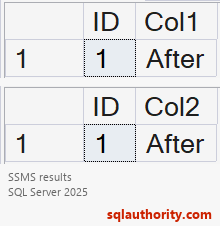
This temporary-table example uses two UPDATE statements in one transaction. TRY/CATCH rolls back an outstanding transaction and rethrows the error. XACT_ABORT handles many runtime errors by aborting the transaction. BEGIN followed by COMMIT alone doesn’t handle every failure.
I choose specific predicates and keep application transactions short. A zero-row update isn’t automatically an error. If exactly one row is required, check @@ROWCOUNT immediately after each update. Raise an error when that business rule fails.
Reference: XACT_ABORT and transaction error handling.
One transaction is not one UPDATE target, it is a boundary around the changes that must succeed together.
Published by Pinal Dave on SQLAuthority. More of my work at pinaldave.com.
Discover more from SQL Authority with Pinal Dave
Subscribe to get the latest posts sent to your email.




16 Comments. Leave new
I’m stunned that this needs discussing in 2017.
There’s probably an article from 20 years covering this.
Anybody asking such a question needs to read a manual and feel lucky they exist.
I used to learn without manuals and before Google was invented.
Adam, I agree with you but trust me the question which still get asked are surprising.
Adam, regarding your statement ‘read a manual and feel lucky they exist’; so, you came right out of the womb knowing everything, or perhaps you learn by osmosis? Amazing. That would lead one to wonder why you are reading this in the first place. Furthermore, who made you the judge as to the value of the existence of another? Go read some manuals or Google how not to be so judgemental and miserable.
Fact is, as time progresses, technological advancements are made.
Are you still coding with the same techniques/restrictions you had 20 years ago? If you are, then that would be something to be stunned at.
Of course you are right, but I think this is due to the fact that most of the IT professionals are not focused only to a single technology like SQL but are full stack.
In my (well, by now, short) experience, I had to learn both client side and server side technology, all on demand. If a frontend developer needs to create (or modify) a functionality in SQL, he has no time to read manuals, but only to have a glimpse on the topics related to the new functionality.
Thanks @bellons91 – That’s the precise reason of this blog..
Can’t we update using join?
You can use update with join, but you can only update one of the joint tables.
Update a
set a.value1 = b.value2
from a join b on…
but not (or similar):
Update a, b
set a.value1 = b.value2, b.value5 = ‘x’
from a join b on…
you can use view with INSTEAD OF trigger:
CREATE TABLE [dbo].[t1]( [id] [uniqueidentifier] NOT NULL, [FirstName] [varchar](50) NULL)
go
CREATE TABLE [dbo].[t2]( [id] [uniqueidentifier] NOT NULL, [LastName] [varchar](50) NULL)
GO
insert into t1
values(’76CC1607-1DAE-4878-A549-26518696CEF8′,’Alexandr’)
insert into t2
values(’76CC1607-1DAE-4878-A549-26518696CEF8′,’Pechenko’)
go
create VIEW dbo.v1 with schemabinding
as
select dbo.t1.id, dbo.t1.FirstName, dbo.t2.LastName
from dbo.t1
join dbo.t2 on dbo.t2.id = dbo.t1.id
go
CREATE TRIGGER tr_v1_upd
ON dbo.v1
INSTEAD OF UPDATE
AS
UPDATE s
SET s.FirstName = i.FirstName
FROM dbo.t1 s
JOIN inserted i
ON s.id = i.id;
UPDATE s
SET s.LastName = i.LastName
FROM dbo.t2 s
JOIN inserted i
ON s.id = i.id;
go
update dbo.v1 set
FirstName = ‘FN’,
LastName = ‘LN’
where id = ’76CC1607-1DAE-4878-A549-26518696CEF8′
go
select * from v1
Nice Trick!
Still it’s not in single statement!
In one way, it is. I call such things are workaround and tricks.
Hi Pinal,
It might be workaround, but why we do need to complicate it by creating view and trigger to achieve this? The same can be achieved using transactions easily.
Thanks,
Srinivas
You are absolutely right. Sometimes things are not as simple as they sound in implementation. Will you be able to ask question to your manager if he says – “If SQL have some way, do it”
Hi Pinal,
Yeah, I agree sometimes we don’t have choices.
Thanks,
Srini
Thanks for the agreement.