
This MERGE Statement Quiz asks what happens when two source rows match the same target row. Most people expect one of the rows to win. Pick your answer first, then run the script to see what SQL Server does.

The Quiz
Quinn keeps a menu price list in a table called MenuPrice, with one row per item code. Each morning, new prices land in a second table, PriceUpdate. A MERGE statement applies them. A matching item gets its new price, and an item that isn’t on the menu yet is added.
Today’s update has three rows. The lentil soup appears twice, because its price was corrected and both entries stayed. The third row is a new item, a mango lassi.
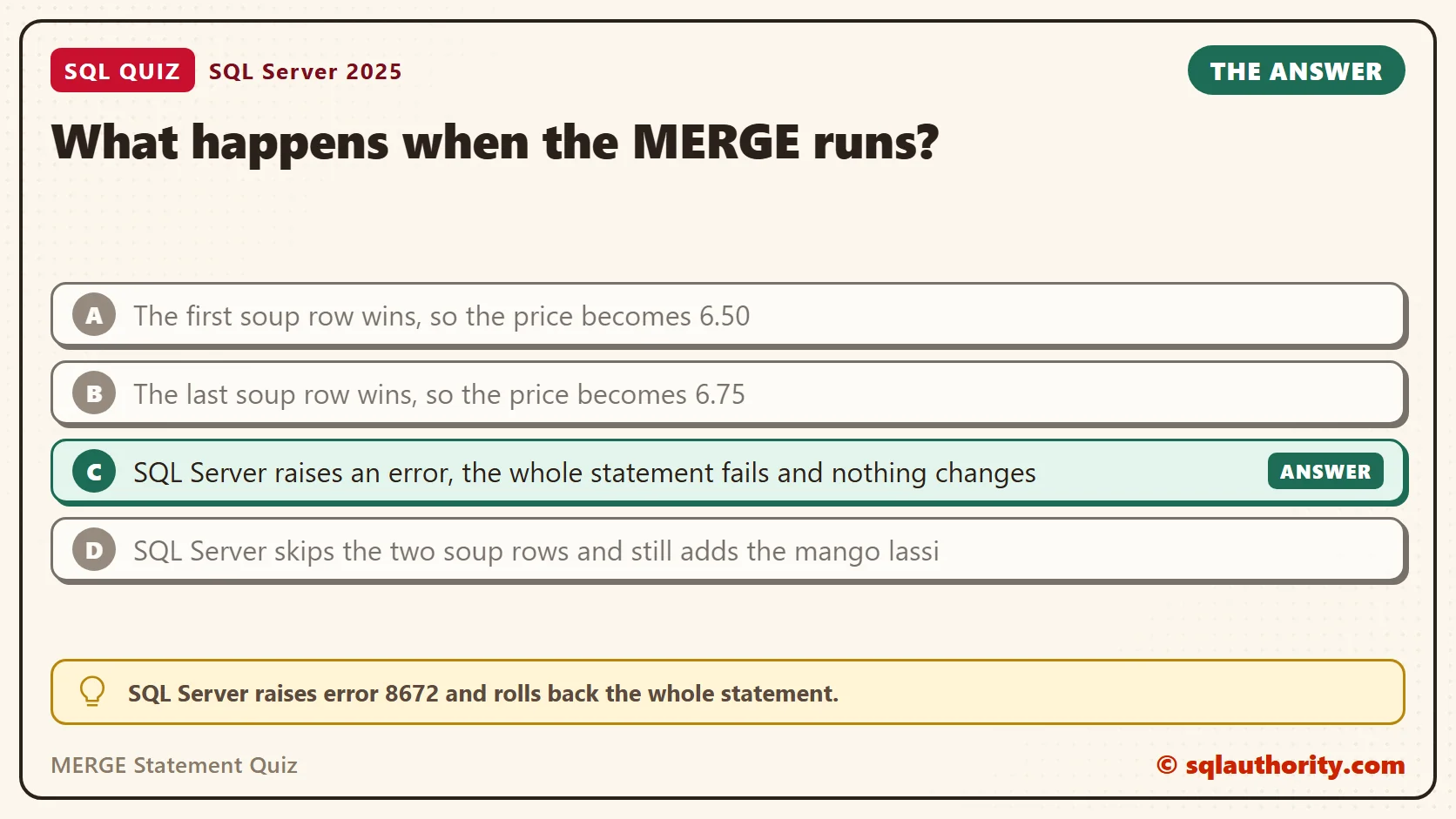
What happens when the MERGE runs?
A. The first soup row wins, so the price becomes 6.50
B. The last soup row wins, so the price becomes 6.75
C. SQL Server raises an error, the whole statement fails and nothing changes
D. SQL Server skips the two soup rows and still adds the mango lassi
Take a moment and pick one before you read on.
The Answer
The answer is C. SQL Server raises error 8672 and rolls back the whole statement. That includes the mango lassi, even though it had nothing to do with the problem.
MERGE refuses to update or delete the same target row twice in one statement. With two soup rows, it can’t know which price you mean, so it stops instead of guessing.
Prove It
This script creates a database called SqlQuizMergeStatement, used only for this example, so run it on a test server. It builds Quinn’s two tables, then runs the MERGE.
IF DB_ID(N'SqlQuizMergeStatement') IS NULL CREATE DATABASE SqlQuizMergeStatement;
GO
USE SqlQuizMergeStatement;
GO
DROP VIEW IF EXISTS dbo.LatestPriceUpdate;
DROP TABLE IF EXISTS dbo.PriceUpdate;
DROP TABLE IF EXISTS dbo.MenuPrice;
CREATE TABLE dbo.MenuPrice
(
    ItemCode char(4) PRIMARY KEY,
    ItemName nvarchar(40) NOT NULL,
    Price decimal(6,2) NOT NULL
);
CREATE TABLE dbo.PriceUpdate
(
    UpdateID int IDENTITY(1,1) PRIMARY KEY,
    ItemCode char(4) NOT NULL,
    ItemName nvarchar(40) NOT NULL,
    Price decimal(6,2) NOT NULL
);
INSERT INTO dbo.MenuPrice (ItemCode, ItemName, Price)
VALUES ('SOUP', N'Lentil soup', 6.25), ('WRAP', N'Paneer wrap', 8.50);
INSERT INTO dbo.PriceUpdate (ItemCode, ItemName, Price)
VALUES ('SOUP', N'Lentil soup', 6.50), ('SOUP', N'Lentil soup', 6.75), ('LASI', N'Mango lassi', 4.00);
GO
MERGE dbo.MenuPrice AS target
USING dbo.PriceUpdate AS source ON target.ItemCode = source.ItemCode
WHEN MATCHED THEN UPDATE SET target.Price = source.Price
WHEN NOT MATCHED BY TARGET THEN INSERT (ItemCode, ItemName, Price) VALUES (source.ItemCode, source.ItemName, source.Price);
GO
SELECT ItemCode, Price FROM dbo.MenuPrice ORDER BY ItemCode;
This is the text SSMS shows in the Messages tab. It is output, not code to run.
Msg 8672, Level 16, State 1, Line 1
The MERGE statement attempted to UPDATE or DELETE the same row more than once. This happens when a target row matches more than one source row. A MERGE statement cannot UPDATE/DELETE the same row of the target table multiple times. Refine the ON clause to ensure a target row matches at most one source row, or use the GROUP BY clause to group the source rows.
The final query shows that nothing changed. The soup kept its old price, and the mango lassi never arrived.
| ItemCode | Price |
|---|---|
| SOUP | 6.25 |
| WRAP | 8.50 |
Why the Other Answers Are Wrong
A and B both picture MERGE as a loop that reads the source one row at a time. In that picture, the first or last row ends up in the table. MERGE doesn’t work that way. It compares two sets, and a set has no order to break the tie.
A plain UPDATE with a join behaves differently, and that’s the reason the error is a gift. Run this next.
UPDATE m SET m.Price = u.Price
FROM dbo.MenuPrice AS m
JOIN dbo.PriceUpdate AS u ON u.ItemCode = m.ItemCode;
SELECT ItemCode, Price FROM dbo.MenuPrice ORDER BY ItemCode;
The UPDATE ran without any complaint, and the soup became 6.50. One of the two rows won, and SQL Server doesn’t promise which one wins next time. A silent wrong price is worse than a loud error.
D invents a safety net that doesn’t exist. MERGE never skips rows to protect you, and its failure takes the whole statement with it.
One more detail: the error appears only when a matched row would be updated or deleted twice. A MERGE with only an insert branch, run on the same source rows, raised no error in my test.
Find the Duplicates Before You Merge
You don’t have to wait for error 8672 to find the problem. This query lists every key that appears more than once in the source. Run it before a MERGE that reads a table you don’t control.
SELECT ItemCode, COUNT(*) AS RowsForKey
FROM dbo.PriceUpdate
GROUP BY ItemCode
HAVING COUNT(*) > 1;
It returned one row: SOUP with 2 rows. An empty result means the source passes this one-row-per-ItemCode check.
| ItemCode | RowsForKey |
|---|---|
| SOUP | 2 |
The count tells you a key repeats. It doesn’t tell you which rows collide. This query lists them, so you can decide which one should win.
SELECT UpdateID, ItemCode, Price
FROM dbo.PriceUpdate
WHERE ItemCode IN (SELECT ItemCode FROM dbo.PriceUpdate GROUP BY ItemCode HAVING COUNT(*) > 1)
ORDER BY ItemCode, UpdateID;
| UpdateID | ItemCode | Price |
|---|---|---|
| 1 | SOUP | 6.50 |
| 2 | SOUP | 6.75 |
Keep in mind what the check covers. It looks at ItemCode only, and my MERGE joins on ItemCode. If your ON clause uses other columns, run the same check on exactly those columns. Constraints and concurrent writers need a separate review.
The Fix: Give Every Key One Source Row
Decide which row should win, then keep only that row. Here the latest entry wins, so the view ranks the rows for each item and keeps the newest. That rule is a business decision, not a SQL one. Ask the people who own the data.
A common mistake is adding DISTINCT to the source and calling it done. DISTINCT removes only identical rows. The two soup rows differ in price, so DISTINCT still returned three rows, and the error would come back.
CREATE OR ALTER VIEW dbo.LatestPriceUpdate
AS
SELECT ItemCode, ItemName, Price
FROM (SELECT ItemCode, ItemName, Price,
             ROW_NUMBER() OVER (PARTITION BY ItemCode ORDER BY UpdateID DESC) AS RowRank
      FROM dbo.PriceUpdate) AS ranked
WHERE RowRank = 1;
GO
DELETE FROM dbo.MenuPrice;
INSERT INTO dbo.MenuPrice (ItemCode, ItemName, Price)
VALUES ('SOUP', N'Lentil soup', 6.25), ('WRAP', N'Paneer wrap', 8.50);
MERGE dbo.MenuPrice AS target
USING dbo.LatestPriceUpdate AS source ON target.ItemCode = source.ItemCode
WHEN MATCHED THEN UPDATE SET target.Price = source.Price
WHEN NOT MATCHED BY TARGET THEN INSERT (ItemCode, ItemName, Price) VALUES (source.ItemCode, source.ItemName, source.Price)
OUTPUT $action AS MergeAction, inserted.ItemCode, inserted.Price;
SELECT ItemCode, Price FROM dbo.MenuPrice ORDER BY ItemCode;
This time the MERGE worked. The OUTPUT clause lists what it did.
| MergeAction | ItemCode | Price |
|---|---|---|
| INSERT | LASI | 4.00 |
| UPDATE | SOUP | 6.75 |
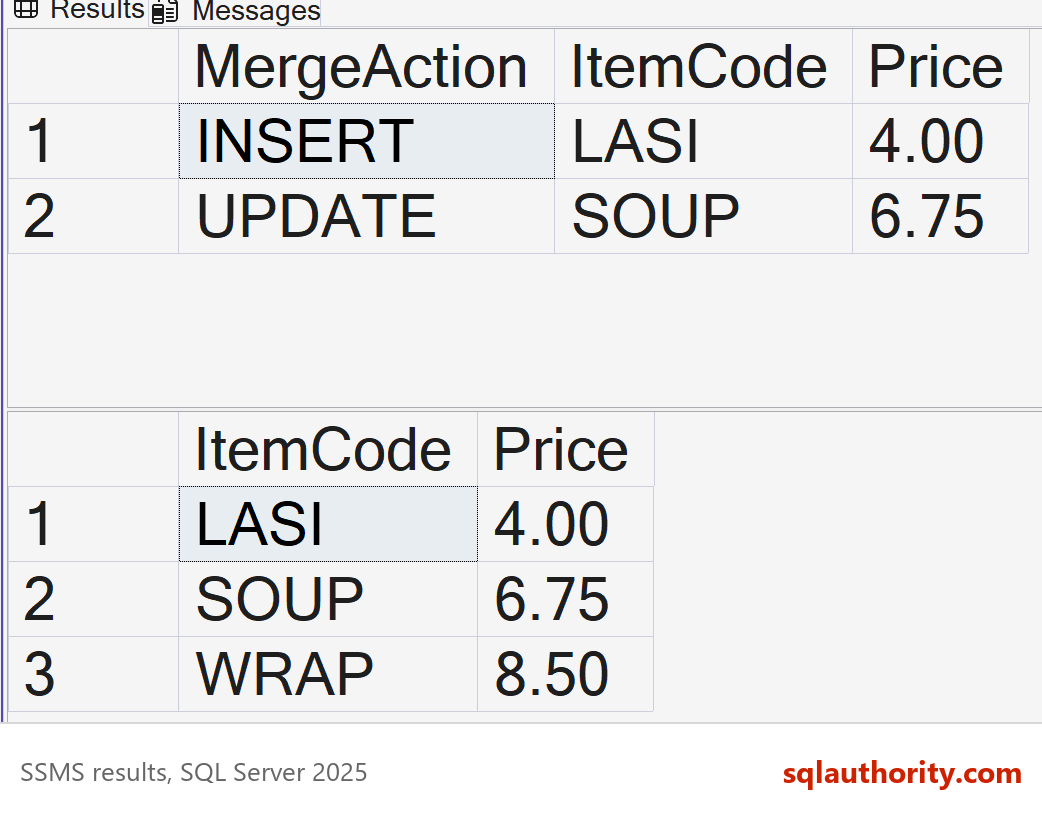
The table ended with LASI 4.00, SOUP 6.75 and WRAP 8.50. The latest soup price won, and the mango lassi was added.
The Same Change Without MERGE
You can write the same change as an UPDATE followed by an INSERT, inside one transaction. Many people find it easier to read, and it needs the same one-row-per-key source. This block resets the table first, so you can compare the result.
DELETE FROM dbo.MenuPrice;
INSERT INTO dbo.MenuPrice (ItemCode, ItemName, Price)
VALUES ('SOUP', N'Lentil soup', 6.25), ('WRAP', N'Paneer wrap', 8.50);
BEGIN TRANSACTION;
UPDATE m SET m.Price = s.Price
FROM dbo.MenuPrice AS m
JOIN dbo.LatestPriceUpdate AS s ON s.ItemCode = m.ItemCode;
INSERT INTO dbo.MenuPrice (ItemCode, ItemName, Price)
SELECT s.ItemCode, s.ItemName, s.Price
FROM dbo.LatestPriceUpdate AS s
WHERE NOT EXISTS (SELECT 1 FROM dbo.MenuPrice AS m WHERE m.ItemCode = s.ItemCode);
COMMIT TRANSACTION;
SELECT ItemCode, Price FROM dbo.MenuPrice ORDER BY ItemCode;
The final table was the same: LASI 4.00, SOUP 6.75 and WRAP 8.50. Both versions need the deduplicated source. The difference is only how the work is written.
What to Remember
Before a MERGE touches a table, check that the source holds at most one row for each key. If it can’t be sure, rank the rows and keep the one that wins. Error 8672 means the source needs cleaning.
When I review a MERGE, I read the ON clause first and ask whether the source can repeat a key. I also check concurrency. By default, two sessions that run the same MERGE together can both insert one missing key. The HOLDLOCK hint on the target closes that gap. When you finish testing, remove the example database.
USE master;
GO
ALTER DATABASE SqlQuizMergeStatement SET SINGLE_USER WITH ROLLBACK IMMEDIATE;
DROP DATABASE SqlQuizMergeStatement;
A MERGE is not a loop where the last row wins, it is one set operation.
Published by Pinal Dave on SQLAuthority. More of my work at pinaldave.com.
Discover more from SQL Authority with Pinal Dave
Subscribe to get the latest posts sent to your email.


4 Comments. Leave new
hi pinel garu how ru?
u blog is really awesome i felt wondered about ur blog i have an lot of interest to learn all aspects of sql server could you please give me a mail id i have a lot of doubts in sql please help me out pinel
thanking you,
Avinash Reddy
Please post all your question here, so that all users can know and learn.
Agree with Nandu
So true. Its my blog readers who are helping each other and making a good community.