FIFO inventory costing means the oldest purchase lot pays for the first sale. The hard part is not the rule. The hard part is that one sale often eats the end of one lot and the start of the next. Today I will show you a set-based way to split that cost, with no cursor and no loop.

Why a sale needs more than one price
A finance person once asked me why the cost of goods sold on one report did not match the stock value on another. Both used FIFO. One had a cursor, the other had a rough average. Neither could show which lot paid for which sale.
Think of lots as buckets of stock, each with its own unit cost. A sale drains the oldest bucket first. When it is empty, the sale keeps pulling from the next bucket at a different price. So one sale can carry two or three costs. We want one row for every sale and lot pair, with the quantity taken and the money it cost.
Two small tables
Item 1 has three purchase lots and three sales. Item 2 has one lot and one sale that asks for more than we bought. That second item will be useful later. Run each block in order in one query window.
DROP TABLE IF EXISTS #Sales;
DROP TABLE IF EXISTS #Lots;
CREATE TABLE #Lots (LotId int PRIMARY KEY, ItemId int NOT NULL, PurchaseDate date NOT NULL,
                    Qty int NOT NULL, UnitCost decimal(10,2) NOT NULL);
CREATE TABLE #Sales (SaleId int PRIMARY KEY, ItemId int NOT NULL, SaleDate date NOT NULL, Qty int NOT NULL);
INSERT #Lots VALUES (1, 1, '2026-01-02', 10, 5.00), (2, 1, '2026-01-10', 20, 6.00),
                    (3, 1, '2026-01-20', 15, 7.50), (4, 2, '2026-01-03', 12, 2.00);
INSERT #Sales VALUES (1, 1, '2026-01-05', 8), (2, 1, '2026-01-12', 10),
                     (3, 1, '2026-01-25', 20), (4, 2, '2026-01-15', 15);
Put lots and sales on the same number line
Here is the trick. Lay the lots end to end for each item, oldest first. Lot 1 covers units 0 to 10, lot 2 covers 10 to 30, and so on. A running total gives you both ends of every lot.
SELECT LotId, ItemId, Qty, UnitCost,
       SUM(Qty) OVER (PARTITION BY ItemId ORDER BY PurchaseDate, LotId
                      ROWS UNBOUNDED PRECEDING) - Qty AS StartQty,
       SUM(Qty) OVER (PARTITION BY ItemId ORDER BY PurchaseDate, LotId
                      ROWS UNBOUNDED PRECEDING) AS EndQty
FROM #Lots
ORDER BY ItemId, PurchaseDate, LotId;
Do the same for sales, oldest sale first. Sale 1 covers units 0 to 8. Sale 2 covers 8 to 18. Sale 3 covers 18 to 38. FIFO is now just overlap. Sale 2 sits on units 8 to 18, which touches lot 1 for two units (8 to 10) and lot 2 for eight units (10 to 18). That is the whole algorithm.
Two details matter. The ORDER BY inside the window needs a tie-breaker, here the id, or two lots bought on the same day could swap places between runs. And the frame must say ROWS UNBOUNDED PRECEDING. Without it, SQL Server uses a RANGE frame, which is slower and treats equal values as one group.

Match the overlaps and price them
Join each sale to the lots whose range it touches. The units taken are the end of the overlap minus the start. LEAST and GREATEST exist in SQL Server 2022 and later. On older versions, write the same thing with CASE.
DROP TABLE IF EXISTS #Matched;
WITH LotRange AS (
    SELECT LotId, ItemId, PurchaseDate, UnitCost,
           SUM(Qty) OVER (PARTITION BY ItemId ORDER BY PurchaseDate, LotId ROWS UNBOUNDED PRECEDING) - Qty AS StartQty,
           SUM(Qty) OVER (PARTITION BY ItemId ORDER BY PurchaseDate, LotId ROWS UNBOUNDED PRECEDING) AS EndQty
    FROM #Lots),
SaleRange AS (
    SELECT SaleId, ItemId, SaleDate,
           SUM(Qty) OVER (PARTITION BY ItemId ORDER BY SaleDate, SaleId ROWS UNBOUNDED PRECEDING) - Qty AS StartQty,
           SUM(Qty) OVER (PARTITION BY ItemId ORDER BY SaleDate, SaleId ROWS UNBOUNDED PRECEDING) AS EndQty
    FROM #Sales)
SELECT s.SaleId, l.LotId, s.SaleDate, l.PurchaseDate, l.UnitCost,
       LEAST(s.EndQty, l.EndQty) - GREATEST(s.StartQty, l.StartQty) AS QtyTaken
INTO #Matched
FROM SaleRange AS s
JOIN LotRange AS l ON l.ItemId = s.ItemId AND l.StartQty < s.EndQty AND s.StartQty < l.EndQty;

SELECT SaleId, LotId, QtyTaken, UnitCost, QtyTaken * UnitCost AS Cost
FROM #Matched
ORDER BY SaleId, LotId;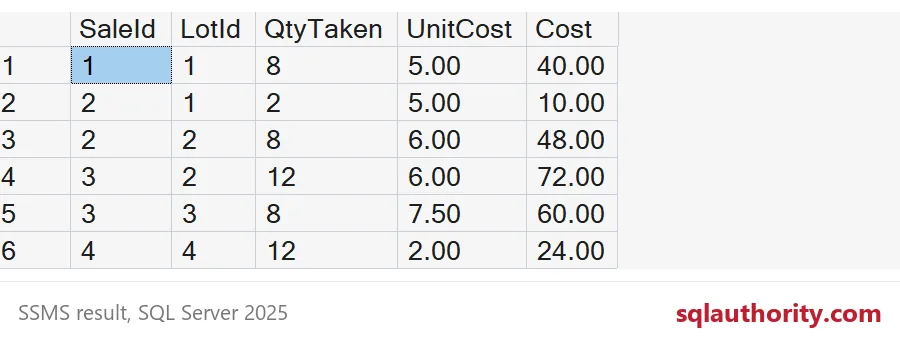
Sale 1 takes 8 units from lot 1 for 40.00. Sale 2 takes 2 from lot 1 and 8 from lot 2, for 10.00 plus 48.00. Sale 3 takes 12 from lot 2 and 8 from lot 3, for 72.00 plus 60.00. Add up each sale and you have its cost of goods sold: 40.00, 58.00 and 132.00.
Check what is left and what went wrong
Stock on hand is each lot minus what was taken. Lot 3 should show 7 units left, worth 52.50. Run the second query to see sales the lots could not cover. Sale 4 asked for 15 units but item 2 only has 12, so it comes back 3 units short.
SELECT l.LotId, l.Qty - ISNULL(SUM(m.QtyTaken), 0) AS QtyLeft,
       (l.Qty - ISNULL(SUM(m.QtyTaken), 0)) * l.UnitCost AS StockValue
FROM #Lots AS l
LEFT JOIN #Matched AS m ON m.LotId = l.LotId
GROUP BY l.LotId, l.Qty, l.UnitCost
ORDER BY l.LotId;

SELECT s.SaleId, s.Qty - ISNULL(SUM(m.QtyTaken), 0) AS QtyShort
FROM #Sales AS s
LEFT JOIN #Matched AS m ON m.SaleId = s.SaleId
GROUP BY s.SaleId, s.Qty
HAVING s.Qty > ISNULL(SUM(m.QtyTaken), 0);

SELECT SaleId, LotId
FROM #Matched
WHERE PurchaseDate > SaleDate;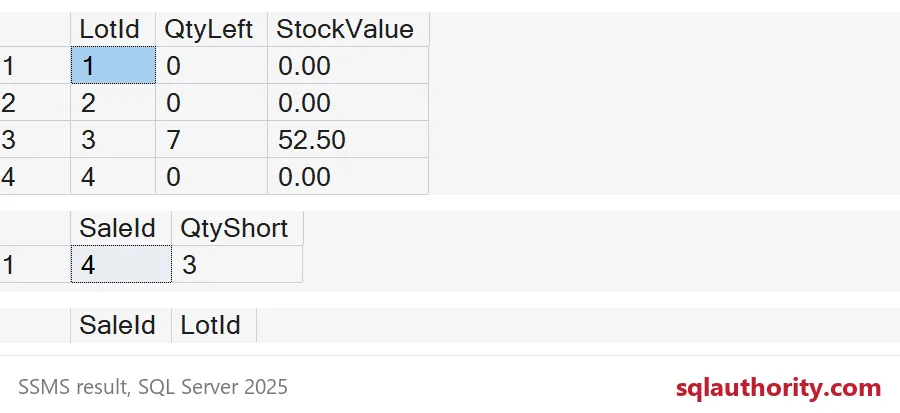
The last query hunts for the real trap. The number lines ignore dates. If a sale happens before a lot arrives, the units still overlap that lot, and the query happily prices the sale with stock you did not own yet. Any row returned there means your data sells stock before it exists. Fix the data first. Here it returns nothing.
DROP TABLE IF EXISTS #Matched;
DROP TABLE IF EXISTS #Sales;
DROP TABLE IF EXISTS #Lots;
Next time someone asks which purchase paid for a sale, you can answer with a query instead of an apology.
FIFO costing is not a loop over stock, it is an overlap between two running totals.
Published by Pinal Dave on SQLAuthority. More of my work at pinaldave.com.
Discover more from SQL Authority with Pinal Dave
Subscribe to get the latest posts sent to your email.