Statement terminators, the semicolons at the end of T-SQL statements, are optional almost everywhere, and required in a few places that bite. A pasted CTE, a THROW and a MERGE are the usual victims.

The error that points at the wrong line
You copy a nice query from a forum into your stored procedure. It starts with WITH. You run it and get: Incorrect syntax near the keyword ‘with’. You stare at the CTE for ten minutes. The CTE is fine.
The mistake is on the line above it. A statement that starts with WITH needs the statement before it to end with a semicolon. The parser reports the problem where it gets confused, which is one line too late.
Let me show you each case, starting with the good news: most statements do not care at all.
Most statements do not need a semicolon
Two plain SELECT statements, separated only by a line break, run without a complaint. A newline is just whitespace. The parser works out where one statement ends and the next begins.
SELECT 1 AS a
SELECT 2 AS b
You get two results, a and b. No semicolons, no errors. That is why so many people never learn the rule. It only matters for a few statements.
The CTE, THROW and MERGE cases
The next blocks run the broken statements through sp_executesql, so the parser error is caught and the script keeps going. Each caught error comes back as a row with a test name and an error number. First the CTE. The broken version has no semicolon after DECLARE, and the fixed version has one.
BEGIN TRY
    EXEC sys.sp_executesql
        N'DECLARE @n int = 1 WITH Numbers AS (SELECT @n AS n) SELECT n FROM Numbers;';
END TRY
BEGIN CATCH
    SELECT N'Missing terminator' AS Test, ERROR_NUMBER() AS ErrorNumber;
END CATCH;

DECLARE @n int = 1;
WITH Numbers AS (SELECT @n AS n) SELECT n FROM Numbers;
The broken one fails with error 319. The fixed one returns 1. THROW has the same habit: it also wants the previous statement closed. Here it raises a custom error, 50010, on purpose, and the CATCH block reports its number.
BEGIN TRY
    THROW 50010, 'Controlled demonstration error.', 1;
END TRY
BEGIN CATCH
    SELECT N'THROW' AS Test, ERROR_NUMBER() AS ErrorNumber;
END CATCH;
The caught error number is 50010. Now MERGE, which is the strictest of the three. It must end with a semicolon itself. Leave it off and you get error 10713. Add it and the row is inserted.
BEGIN TRY
    EXEC sys.sp_executesql N'DECLARE @t table (Id int PRIMARY KEY);
        MERGE @t AS t USING (VALUES (1)) AS s (Id) ON t.Id = s.Id
        WHEN NOT MATCHED THEN INSERT (Id) VALUES (s.Id)';
END TRY
BEGIN CATCH
    SELECT N'MERGE without terminator' AS Test, ERROR_NUMBER() AS ErrorNumber;
END CATCH;

DECLARE @target table (Id int PRIMARY KEY);
MERGE @target AS t USING (VALUES (1)) AS s (Id) ON t.Id = s.Id
WHEN NOT MATCHED THEN INSERT (Id) VALUES (s.Id);
SELECT Id FROM @target;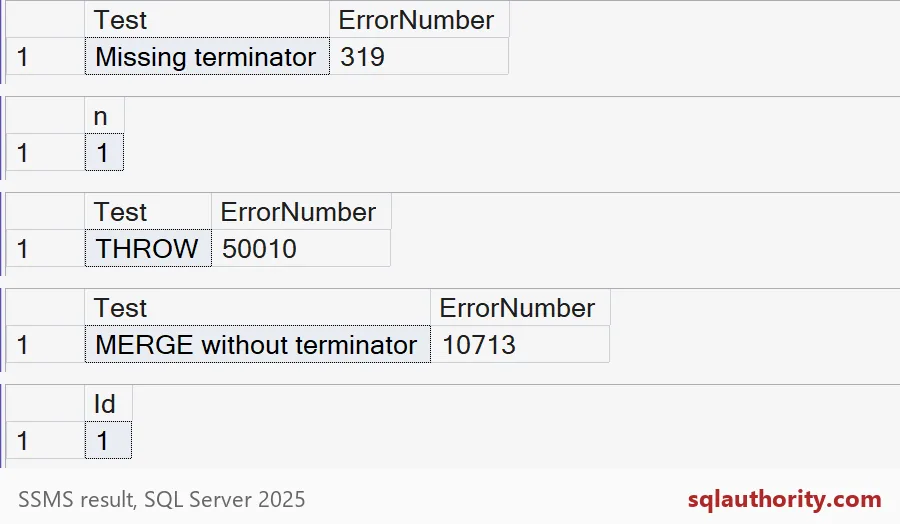
Those are the five results in the picture: 319, then n of 1, then 50010, then 10713, then Id of 1.

Two things that look like terminators
First, GO. It is not a T-SQL statement. SSMS and sqlcmd read it and split your script into batches before anything reaches the server. If GO ends up inside a batch, the server rejects it. Second, THROW with an unterminated line before it fails with a plain syntax error.
The old habit of typing a semicolon right before WITH also works. It simply gives the previous line the terminator it should have had.
BEGIN TRY
    EXEC sys.sp_executesql N'SELECT 1 AS a THROW 50010, ''Boom'', 1;';
END TRY
BEGIN CATCH
    SELECT N'THROW without terminator' AS Test, ERROR_NUMBER() AS ErrorNumber;
END CATCH;

BEGIN TRY
    EXEC sys.sp_executesql N'SELECT 1 AS a;
GO
SELECT 2 AS b;';
END TRY
BEGIN CATCH
    SELECT N'GO inside a batch' AS Test, ERROR_NUMBER() AS ErrorNumber;
END CATCH;

EXEC sys.sp_executesql
    N'DECLARE @n int = 1 ;WITH Numbers AS (SELECT @n AS n) SELECT n AS LeadingSemicolon FROM Numbers;';
Both failures report error 102, the general syntax error, and the last query returns 1. Notice that error 102 does not tell you a semicolon is missing. Only the CTE and MERGE errors say so. That is one more reason to end every statement yourself.
So write a semicolon after every statement in new code. It costs you nothing. And when a pasted fragment fails near WITH or THROW, look at the line above it first. Do not reach for GO as the fix, because GO is not a terminator at all. This demo creates no tables, so there is nothing to clean up.
Next time the error points at your new code, check the line before it.
A newline is not a statement boundary, it is whitespace the parser still reads.
Published by Pinal Dave on SQLAuthority. More of my work at pinaldave.com.
Discover more from SQL Authority with Pinal Dave
Subscribe to get the latest posts sent to your email.