
SQL Server Denali has many new interesting feature – one of the interesting feature is New DMVs. Today I look at sys.dm_os_volume_stats.
This DMV returns information about the operating system volume (directory) on which the specified databases and files are stored. Here is the quick example I have created for the same.
SELECT DB_NAME(f.database_id) DatabaseName,

f.FILE_ID, size DBSize, file_system_type,

volume_mount_point, total_bytes, available_bytes

FROM sys.master_files AS f

CROSS APPLY sys.dm_os_volume_stats(f.database_id, f.FILE_ID);
Here is the screenshot of the same:
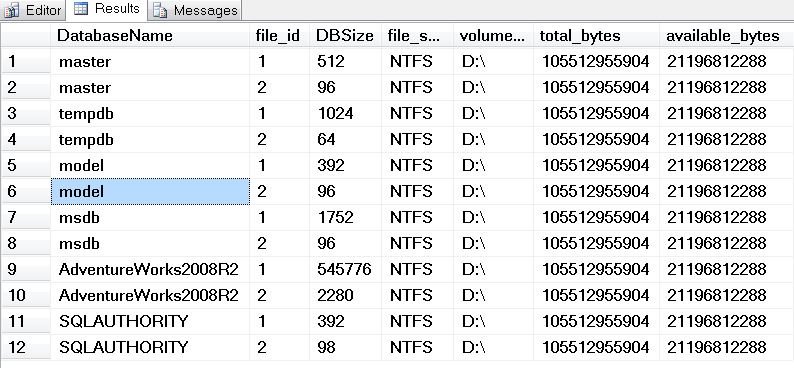
In the result set we can see the file system and volume database is mounted on as well database size.
How to Turn sys.dm_os_volume_stats into a Disk Space Alert
The raw output of this DMV is in bytes, which is hard to read at a glance. A small change makes it much friendlier. Divide total_bytes and available_bytes by 1073741824 to get gigabytes, and work out the free space as a percentage with available_bytes * 100.0 / total_bytes. Also note that the size column from sys.master_files is counted in 8 KB pages, not bytes, so divide it by 128 to see megabytes.
Many database files usually sit on the same drive, so select only the volume columns with DISTINCT when you want one row per drive. That gives you a quick list of every volume that holds a data or log file, together with its free space.
Here is how I like to use it:
- Run it on a schedule with a SQL Server Agent job and raise an alert when free space drops below a limit you pick for each drive.
- Save the results in a small table every day. After a few weeks you can see how fast each drive fills up and ask for more space before it runs out.
- Check it before large operations such as index rebuilds, bulk loads or restoring a big database, since they can need a lot of extra room.
One limit to remember: sys.dm_os_volume_stats only reports volumes that hold database files. It will not show a drive that SQL Server does not use for data or log files, such as a drive that holds only backups, so watch those another way.
A failed autogrowth on a full drive is one of the easiest outages to avoid, and this small query gives you the warning in time.
Published by Pinal Dave on SQLAuthority. More of my work at pinaldave.com.




4 Comments. Leave new
DMV’s are a neat feature, one of the challenges i have is keeping up with them. There is a lot of information that can be retrieved using DMV’s.
good
Hello Pinal,
This DMF it is already in SQL Server 2008 R2 SP1. BTW nice info.
Cheers,
Marcos Freccia
its giving an error that Invalid object name ‘sys.dm_os_volume_stats’.
can anybody help