
I have received following question nearly 10 times in last week though emails. Many users have received following error while connecting to the database. This error happens when database is dropped for which is default for some of the database user. When user try to login and their default database is dropped following error shows up. The message is Error 4064, and the fix takes a minute. In other words, SQL Server cannot open user default database, so the login fails.
Cannot open user default database. Login failed.
Login failed for user ‘UserName’. (Microsoft SQL Server, Error: 4064)
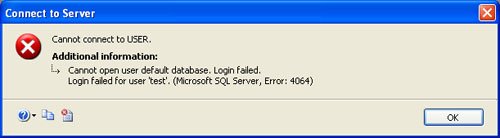
The fix for this problem is very simple.
Fix, Workaround, Solution
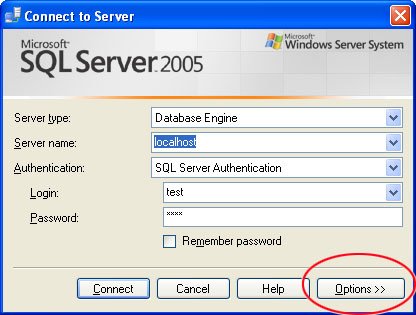
First click on Option>> Button of “Connect to Server” Prompt.
Now change the connect to database to any existing database on your server like master or msdb.
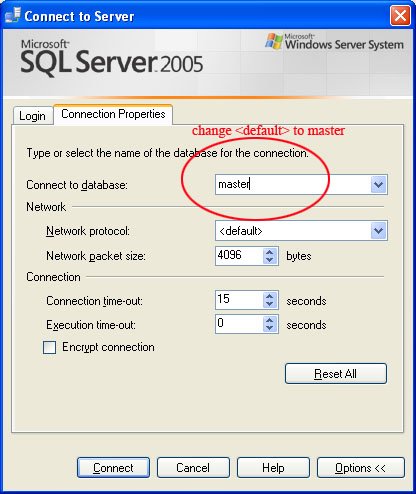
Now click on connect and it will successfully log you in. Once you login in the system run following statement for your username and it should fix your problem. Make sure to replace [test] with your username and master with your database name.
ALTER LOGIN [test] WITH DEFAULT_DATABASE = master
GO
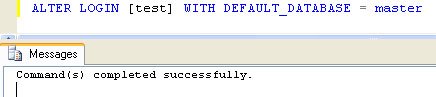
If you cannot get to that screen
Sometimes the Options button is not an option, because you are on a server with no Management Studio, or you are already in a remote session and just want it fixed. sqlcmd does the same thing in one line. The -d master is the whole trick: it says connect to master instead of my default.
sqlcmd -S YourServerName -E -d master
-- then, at the prompt
ALTER LOGIN [test] WITH DEFAULT_DATABASE = master
GO
Use -E for a Windows login. If you are using a SQL login instead, swap it for -U yourlogin -P yourpassword.
There is also a dedicated admin connection for the really bad days, when nothing else will connect at all. Add -A to the sqlcmd line above and SQL Server keeps a reserved path open for exactly this kind of problem.
Fix everybody at once
If one login was pointing at a database you dropped, others probably were too, and you would rather find out now than one support call at a time. This query lists every login whose default database no longer exists.
SELECT sp.name AS LoginName,
       sp.default_database_name AS MissingDefaultDatabase
FROM sys.server_principals AS sp
WHERE sp.type IN ('S', 'U', 'G')
  AND sp.is_disabled = 0
  AND sp.default_database_name IS NOT NULL
  AND DB_ID(sp.default_database_name) IS NULL
ORDER BY sp.name;
DB_ID returns nothing at all when the database is not there, so a null is the giveaway. Every name that comes back is a person who will hit Error 4064 the next time they connect.
If the list is long, build the fix from the list rather than typing it out.
SELECT 'ALTER LOGIN [' + sp.name + '] WITH DEFAULT_DATABASE = master;' AS FixScript
FROM sys.server_principals AS sp
WHERE sp.type IN ('S', 'U', 'G')
  AND sp.default_database_name IS NOT NULL
  AND DB_ID(sp.default_database_name) IS NULL;
Read what it produced, then run it. Never run generated SQL without looking at it first, however tempting it is.
Why it happened, so it does not happen again
A default database is just a convenience. It saves typing USE when you connect. The trouble is that SQL Server stores it as a name and does not stop you dropping that database, so the setting quietly points at nothing.
Two habits avoid it. Before dropping or renaming a database, run the query above and move anybody who is pointing at it. And for service accounts, set the default to master deliberately. A service that has to name its database in the connection string anyway gains nothing from a default, and cannot be broken by one.
Watch SQL in Sixty Seconds video to Resolve Connection Error:
Published by Pinal Dave on SQLAuthority. More of my work at pinaldave.com.
Discover more from SQL Authority with Pinal Dave
Subscribe to get the latest posts sent to your email.



282 Comments. Leave new
Thank you so much!
Thank you. Keep up your good work!
Hello, how put this command “ALTER LOGIN [test] WITH DEFAULT_DATABASE = master” please
Thanks you so much i faced the issue today and resolved as per step provided by you.
Life saver!
Muchas gracias Muy Bueno
After dropping the default database the login failure error started to appear. Due to stress I forgot the simple tip you illustrate very succinctly. The issue was resolved after finding your post.
Thank you for reducing stress and make life a little better.
Thanks man
Cool Mate. Thanx.