
SQL is great with String operations. Many times, I use T-SQL to do my string operation. Let us see User Defined Function, which I wrote few days ago, which will return only Numeric values from AlphaNumeric values. It strips out every character that is not a digit from an alpha numeric string.
CREATE FUNCTION dbo.udf_GetNumeric
(@strAlphaNumeric VARCHAR(256))
RETURNS VARCHAR(256)
AS
BEGIN
DECLARE @intAlpha INT
SET @intAlpha = PATINDEX('%[^0-9]%', @strAlphaNumeric)
BEGIN
WHILE @intAlpha > 0
BEGIN
SET @strAlphaNumeric = STUFF(@strAlphaNumeric, @intAlpha, 1, '' )
SET @intAlpha = PATINDEX('%[^0-9]%', @strAlphaNumeric )
END
END
RETURN ISNULL(@strAlphaNumeric,0)
END
GO
/* Run the UDF with different test values */
SELECT dbo.udf_GetNumeric('') AS 'EmptyString';
SELECT dbo.udf_GetNumeric('asdf1234a1s2d3f4@@@') AS 'asdf1234a1s2d3f4@@@';
SELECT dbo.udf_GetNumeric('123456') AS '123456';
SELECT dbo.udf_GetNumeric('asdf') AS 'asdf';
SELECT dbo.udf_GetNumeric(NULL) AS 'NULL';
GO
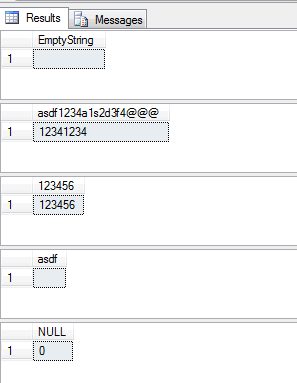
As result of above script self explainary, I will be not describing it in detail. If you use any alternative method to do the same task, please let me know.
What to Watch When You Clean an Alpha Numeric String
This function keeps digits and throws away everything else. That sounds simple, but it has a few side effects you should know before you use it on real data:
- Numbers from different parts of the text are glued together. The value
'Room 12, Floor 3'comes back as'123', which may not be what you want. - Decimal points and minus signs are removed as well, so
'-12.50'becomes'1250'. For prices or measurements, change the pattern to keep those characters. - The input is
VARCHAR(256). Longer text is cut off silently when it is passed in, so increase the size if your column is wider. - A
NULLinput returns'0'because of theISNULLat the end, while an empty string or a value with no digits returns an empty string.
The result is still text. If you need a number, convert it yourself and think about the empty case. CAST('' AS INT) returns 0, which can hide bad data, and a long run of digits can be too big for INT. On SQL Server 2012 and later, TRY_CAST returns NULL instead of an error when the value does not fit.
Also keep in mind that a scalar function with a loop runs once for every row. It is fine for a quick cleanup or a few thousand rows. For a large table, test the timing first, and if you run this cleanup often, store the cleaned value in its own column instead of calculating it again and again.
Finally, test with your own messy values before trusting the output. Real data always has a surprise or two that sample strings do not.
Published by Pinal Dave on SQLAuthority. More of my work at pinaldave.com.



34 Comments. Leave new
As always, your answer to a irritating problem has saved me a lot of time. Thank you.
Hi Dave,
thanks a lot, it saved us some time.
When a long string is passed to the function, the function will iterate char by char from the second occurance of non-numeric char.
I made a small improvement, so function is not iterating across a series of non-numeric chars.
CREATE FUNCTION dbo.FGetNumericFromAlphaNumericString (
@strAlphaNumeric VARCHAR(max)
)
RETURNS VARCHAR(max)
AS
BEGIN
DECLARE @intAlpha INT
DECLARE @intNumber INT
SET @intAlpha = PATINDEX(‘%[^0-9]%’, @strAlphaNumeric)
SET @intNumber = PATINDEX(‘%[0-9]%’, @strAlphaNumeric)
BEGIN
WHILE @intAlpha > 0
BEGIN
SET @strAlphaNumeric = STUFF(@strAlphaNumeric, @intAlpha, @intNumber – 1, ” )
SET @intAlpha = PATINDEX(‘%[^0-9]%’, @strAlphaNumeric )
SET @intNumber = PATINDEX(‘%[0-9]%’, SUBSTRING(@strAlphaNumeric, @intAlpha, LEN(@strAlphaNumeric)) )
SELECT @intNumber = CASE WHEN @intNumber = 0 THEN LEN(@strAlphaNumeric) ELSE @intNumber END
END
END
RETURN ISNULL(@strAlphaNumeric,0)
END
GO
Thanks man, If I want the logic to take only the numeric number that appears before the “_”, . that is if I have “AMT_ef_bc_21123_45.AF then I want to get 21123 and not 2112345. Thanks for your help.
SELECT NAME
,STUFF(substring(NAME, PatIndex(‘%[0-9]%’, NAME), len(NAME)), PatIndex(‘%[^0-9]%’, substring(NAME, PatIndex(‘%[0-9]%’, NAME), len(NAME))), (len(substring(NAME, PatIndex(‘%[0-9]%’, NAME), len(NAME))) – (PatIndex(‘%[^0-9]%’, substring(NAME, PatIndex(‘%[0-9]%’, NAME), len(NAME)))) + 1), ”)
FROM #test
You can achieve this using a select query too.without using a while loop and function.
I have a product names like this SAN Ports – 6 EMC/HDS Tier 1 864GB,SAN Ports – 8 EMC/HDS Tier 1 1152GB. I need to extract 864 and 1152 for the GB value only.How do I get the values.I have used getnumeric functions(using PATINDEX) but it returns 1684 and 811152 like this.Please help me to solve the issue.its very urgent
Really Good Job.Thank You.
If anyone is having a problem that is stating that “the function already exists…” etc. Try changing CREATE to ALTER. Just FYI
Hi There is just a six digit number in my column data. How to do it then?
Hi Pinal – I have always gotten help from your post but this the first time I am posting a question. Please help.
1) I have a column which has pharmacy name, street Address, city, State, Zip code. I need to put address in separate fields.
Field starts with Pharmacy name and then hyphen’-‘ and the address in different order like sometimes it has city and state after hyphen and then street address and other times its street address following hyphen. I am able to get just the pharmacy name just looking for the first hyphen but it’s challenging to get the street address which is starting with a number.
Alia.
Hi Pinal,
is it possible from this query to select only big int from the column name
eg
apple12_5678_9apple –> 5678
apple12-567_78901 –> 78901
Thanks
Shankar
how can I get these number to be separated by commas like
before using function string : ‘asdhh126728,yuiyiu23333 40030j kjjj 88’
result should be : ‘126728,23333,40030,88’
This was helpful. I appreciate your work.