ZIP codes are identifiers, not numbers, so store them as text. An int column quietly turns 01234 into 1234, and the zero never comes back by itself. You can rebuild it later, but only when you know every value was a five-digit US code.

Where the zero goes
Here is a support ticket I have seen in many shapes. A customer in the US Northeast says the shipping label has the wrong ZIP. Their code starts with 0. Someone, years ago, picked int for that column because “it is all digits.” Every zero in the table has been disappearing since the first insert.
An int keeps a value, not the characters you typed. The first query below converts the same text both ways. It also tries a phone number, which is too large for an int, so TRY_CONVERT returns NULL.
SELECT CONVERT(int, '01234') AS NumericZip,
       CONVERT(varchar(5), '01234') AS TextZip,
       TRY_CONVERT(int, '12025550123') AS PhoneAsInt;
The numeric column shows 1234, the text column keeps 01234, and the phone number does not fit at all. No validation rule can bring back a character the column never stored.
Give the column a text type and a rule
For a strict five-digit US ZIP, char(5) with a digit check works well. The check below accepts exactly five digits. The first insert is fine, and DATALENGTH confirms five bytes are stored.
DROP TABLE IF EXISTS #ZipText;

CREATE TABLE #ZipText
(AddressId int PRIMARY KEY,
 ZipCode char(5) NOT NULL
   CHECK (ZipCode LIKE '[0-9][0-9][0-9][0-9][0-9]'));

INSERT #ZipText VALUES (1, '01234');

SELECT AddressId, ZipCode, DATALENGTH(ZipCode) AS StoredBytes
FROM #ZipText
ORDER BY AddressId;
Now try two bad values: a four-digit code and a code with a letter. Both fail with error 547, the constraint violation. The short code fails because char(5) pads it with a space, and a space is not a digit.
INSERT #ZipText VALUES (2, '1234');
INSERT #ZipText VALUES (3, '12A45');
One warning. This rule is for US five-digit codes only. ZIP+4 and international postal codes need other shapes, so do not make one US rule the contract for every address.
Repair old data only under a known rule
Say a legacy table holds ZIP codes as int, and you know they are all US five-digit codes. Then padding on the left can rebuild them. The query below proposes a code only for values from 0 to 99999, and flags the rest for review.
DROP TABLE IF EXISTS #LegacyZip;

CREATE TABLE #LegacyZip (AddressId int PRIMARY KEY, ZipAsInt int NULL);
INSERT #LegacyZip VALUES (1, 1234), (2, 90210), (3, 123456), (4, NULL);

SELECT AddressId, ZipAsInt,
       CASE WHEN ZipAsInt BETWEEN 0 AND 99999
            THEN RIGHT('00000' + CONVERT(varchar(10), ZipAsInt), 5) END AS ProposedUsZip,
       CASE WHEN ZipAsInt BETWEEN 0 AND 99999 THEN 'Review under US rule'
            ELSE 'Needs source evidence' END AS RepairStatus
FROM #LegacyZip
ORDER BY AddressId;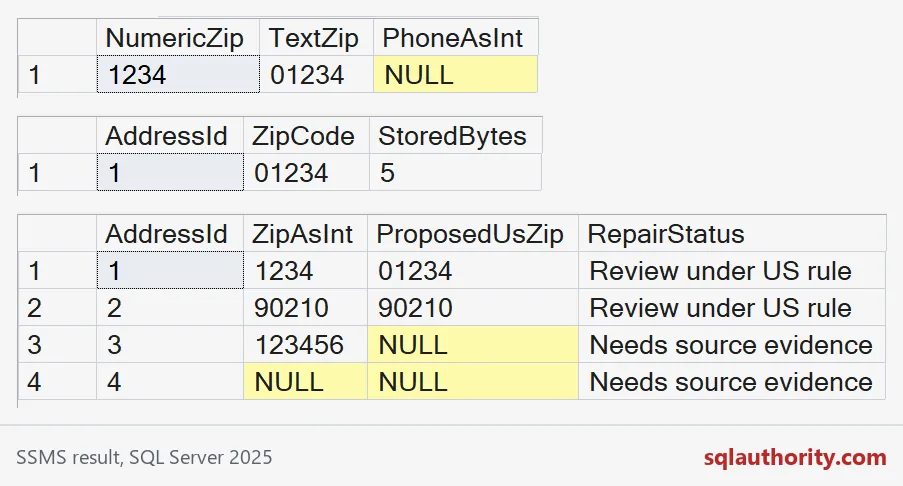
The range check matters. Skip it and RIGHT happily keeps the last five characters of a six-digit number. That produces a code that looks valid and is wrong.
SELECT AddressId, ZipAsInt,
       RIGHT('00000' + CONVERT(varchar(10), ZipAsInt), 5) AS BlindRepair
FROM #LegacyZip
WHERE ZipAsInt IS NOT NULL
ORDER BY AddressId;
Look at row 3. The value 123456 became 23456, a clean five-digit code that belongs to nobody. Even a correct repair only fixes the format. It does not prove the code matches the address.

Migrate through a reviewed mapping
Add the new text column next to the old one. Fill it only for the confirmed repairs, and leave the rest NULL until someone finds the source. Switch the application over after you have checked the result, and keep a backup before you drop anything.
ALTER TABLE #LegacyZip ADD ZipCode char(5) NULL;
GO
UPDATE #LegacyZip
SET ZipCode = RIGHT('00000' + CONVERT(varchar(10), ZipAsInt), 5)
WHERE ZipAsInt BETWEEN 0 AND 99999;

SELECT AddressId, ZipAsInt, ZipCode
FROM #LegacyZip
ORDER BY AddressId;
Rows 1 and 2 get a text code. Row 3 and row 4 stay NULL, so nobody mistakes a guess for a fact. Fixing the table is not enough, though. If the loader or the report still parses the value as int, the zero disappears again.
Test the values that expose the mistake
Keep a few regression values: a leading zero, a six-digit number, a NULL and a code with a letter. Push them through the table, the application parameter, the import and the export. Postal codes are for lookup and display, not for SUM or AVG, so text tells the next developer what they are.
DROP TABLE IF EXISTS #LegacyZip;
DROP TABLE IF EXISTS #ZipText;
Next time a column holds digits that name something, ask whether you will ever add them up.
A postal code is not a quantity, it is a label.
Published by Pinal Dave on SQLAuthority. More of my work at pinaldave.com.
Discover more from SQL Authority with Pinal Dave
Subscribe to get the latest posts sent to your email.