To convert empty string to NULL in a date column, wrap the text in NULLIF before you cast it. A plain CAST of an empty string to a date does not fail. It returns the date 1900-01-01, and from then on that value looks like real data.

Convert Empty String to NULL: What It Becomes First
To convert empty string to NULL you first have to know what SQL Server does with it. For date and most number types, SQL Server turns an empty string into the zero value of the target type. For a date type, zero is 1900-01-01. For a time it is midnight. For an int it is 0. No error is raised, so the bad value flows into your table without a sound. The query below casts an empty string to five types.
SELECT CAST('' AS date) AS AsDate, CAST('' AS datetime) AS AsDateTime, CAST('' AS smalldatetime) AS AsSmallDateTime,
CAST('' AS datetime2(0)) AS AsDateTime2, CAST('' AS int) AS AsInt;| AsDate | AsDateTime | AsSmallDateTime | AsDateTime2 | AsInt |
|---|---|---|---|---|
| 1900-01-01 | 1900-01-01 00:00:00.000 | 1900-01-01 00:00:00 | 1900-01-01 00:00:00 | 0 |
Not every type is so forgiving. Casting an empty string to decimal fails with Msg 8114, Level 16, State 5. The text reads Error converting data type varchar to numeric. The date types never complain, and that is the danger. A string made only of spaces gives the same 1900-01-01.
A Small Import to Test Four Fixes
The demo database EmptyDateDemo holds a table of six text values. They stand for a column that arrived from a file. Two are real dates. One is a real date in 1900, the year that many systems use as a placeholder. The rest are an empty string, three spaces and a tab. The cleanup at the end drops the database.
IF DB_ID(N'EmptyDateDemo') IS NULL CREATE DATABASE EmptyDateDemo;
GO
USE EmptyDateDemo;
GO
DROP TABLE IF EXISTS dbo.ImportRow;
CREATE TABLE dbo.ImportRow (RowID int IDENTITY(1,1) NOT NULL PRIMARY KEY, Description varchar(20) NOT NULL, OrderDateText varchar(20) NOT NULL);
GO
INSERT INTO dbo.ImportRow (Description, OrderDateText)
VALUES ('a real date', '2026-10-07'), ('empty', ''), ('three spaces', '   '),
       ('a real 1900 date', '1900-01-01'), ('a real date', '2026-11-02'), ('a tab', CHAR(9));
The query below applies five expressions to the same values. PlainCast is the naive version. NullIfAfter casts first and then turns 1900-01-01 into NULL, which is a common patch. A CASE that tests for 1900-01-01 also runs on every row. NullIfBefore turns the empty string into NULL first. TrimThenNullIf trims the tab, the line breaks and the spaces before the test. SafeLoad adds TRY_CONVERT with style 23, the format yyyy-mm-dd, so an invalid date also becomes NULL. TRIM with a list of characters needs SQL Server 2017 or later.
SELECT Description,
       CAST(OrderDateText AS date) AS PlainCast,
       NULLIF(CAST(OrderDateText AS date), '19000101') AS NullIfAfter,
       CAST(NULLIF(OrderDateText, '') AS date) AS NullIfBefore,
       CAST(NULLIF(TRIM(CHAR(9) + CHAR(10) + CHAR(13) + ' ' FROM OrderDateText), '') AS date) AS TrimThenNullIf,
       TRY_CONVERT(date, NULLIF(TRIM(CHAR(9) + CHAR(10) + CHAR(13) + ' ' FROM OrderDateText), ''), 23) AS SafeLoad
FROM dbo.ImportRow
ORDER BY RowID;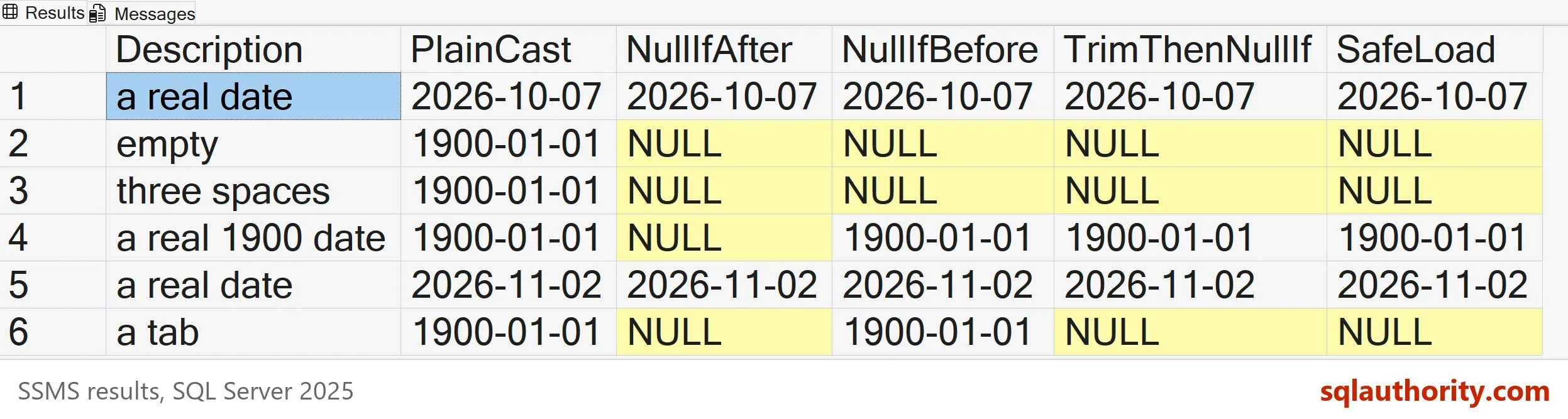
| Description | PlainCast | NullIfAfter | NullIfBefore | TrimThenNullIf | SafeLoad |
|---|---|---|---|---|---|
| a real date | 2026-10-07 | 2026-10-07 | 2026-10-07 | 2026-10-07 | 2026-10-07 |
| empty | 1900-01-01 | NULL | NULL | NULL | NULL |
| three spaces | 1900-01-01 | NULL | NULL | NULL | NULL |
| a real 1900 date | 1900-01-01 | NULL | 1900-01-01 | 1900-01-01 | 1900-01-01 |
| a real date | 2026-11-02 | 2026-11-02 | 2026-11-02 | 2026-11-02 | 2026-11-02 |
| a tab | 1900-01-01 | NULL | 1900-01-01 | NULL | NULL |
Read the Results Column by Column
PlainCast gives 1900-01-01 for the empty string, the spaces and the tab. The real 1900 date looks identical, so after the load nobody can tell which rows were empty. That is the real cost of the plain cast.
NullIfAfter fixes the empty rows and breaks the real one. The row with the real date 1900-01-01 becomes NULL. A cleanup that turns 1900 into NULL is correct only when no true 1900 date exists. You cannot know that from the data.
NullIfBefore is correct for the empty string and the spaces. NULLIF compares text, and SQL Server ignores trailing spaces in that comparison, so three spaces equal an empty string. The tab is a different character, so it survives and still becomes 1900-01-01. TrimThenNullIf removes the tab as well, and every row ends right. SafeLoad gives the same result and also guards against text that is not a date.
Put the Expression in the Load
The fix to convert empty string to NULL belongs in the load. That is the statement that moves data from the staging table into the real table. The next script loads the six rows into a table with a nullable date column. Then it counts how many rows ended with a date.
DROP TABLE IF EXISTS dbo.OrderClean;
CREATE TABLE dbo.OrderClean (RowID int NOT NULL PRIMARY KEY, OrderDate date NULL);
INSERT INTO dbo.OrderClean (RowID, OrderDate)
SELECT RowID, TRY_CONVERT(date, NULLIF(TRIM(CHAR(9) + CHAR(10) + CHAR(13) + ' ' FROM OrderDateText), ''), 23)
FROM dbo.ImportRow;
SELECT COUNT(*) AS LoadedRows, COUNT(OrderDate) AS RowsWithDate FROM dbo.OrderClean;
| LoadedRows | RowsWithDate |
|---|---|
| 6 | 3 |
All six rows load. Three of them hold a date, and the other three hold NULL. A query for missing dates now finds the rows that were empty. A query for dates in 1900 finds only the true one.
TRY_CAST Does Not Help Here
A natural idea is to use TRY_CAST, because it returns NULL for bad input. An empty string is not bad input for a date type. In the test, TRY_CAST and TRY_CONVERT both returned 1900-01-01 for an empty string. ISDATE returns 0 for it, which tests the text. But ISDATE depends on the language and date format of the session. TRY_CONVERT with style 23 does not.
Is NULLIF the Only Way?
You could argue that the better fix lies at the source. If you control the export, write real NULLs instead of empty strings, and the problem never reaches SQL Server. That is true when the source is yours. A file from another team or a form field still arrives with empty strings. The load has to handle them. Put the expression in the staging step, once, and every later query reads clean dates.
What to Remember
To convert empty string to NULL, use NULLIF before the cast. Trim tabs and line breaks when the data comes from files. Add TRY_CONVERT with style 23 when invalid dates are possible. Do not patch 1900-01-01 after the cast, because real 1900 dates exist. Run the cleanup script when you finish.
USE master;
GO
IF DB_ID(N'EmptyDateDemo') IS NOT NULL
BEGIN
    ALTER DATABASE EmptyDateDemo SET SINGLE_USER WITH ROLLBACK IMMEDIATE;
    DROP DATABASE EmptyDateDemo;
END;
An empty string is not a date, it is the absence of one.
Published by Pinal Dave on SQLAuthority. More of my work at pinaldave.com.
Discover more from SQL Authority with Pinal Dave
Subscribe to get the latest posts sent to your email.