Multiple aggregates in one query need one pass over the table, not one pass for each. A query with the latest order date in one subquery and the smallest backorder in another reads the table twice. Put both in one SELECT and SQL Server reads the table once.

Two Subqueries Mean Two Scans
The demo database is MultiAggScanDemo. Its Orders table holds 200,000 rows, and a 100 character note column makes each row wide. That makes the table big enough to see the cost. The script can run twice.
IF DB_ID(N'MultiAggScanDemo') IS NULL CREATE DATABASE MultiAggScanDemo;
GO
USE MultiAggScanDemo;
GO
DROP TABLE IF EXISTS dbo.Orders;
CREATE TABLE dbo.Orders (
    OrderID      int IDENTITY(1,1) NOT NULL PRIMARY KEY,
    CustomerID   int           NOT NULL,
    OrderDate    date          NOT NULL,
    BackorderQty int           NULL,
    Region       nvarchar(10)  NOT NULL,
    Amount       decimal(10,2) NOT NULL,
    Note         char(100)     NOT NULL DEFAULT 'x'
);
INSERT INTO dbo.Orders (CustomerID, OrderDate, BackorderQty, Region, Amount)
SELECT n % 5000 + 1,
       DATEADD(DAY, n % 1000, '2023-01-01'),
       CASE WHEN n % 7 = 0 THEN n % 40 + 1 END,
       CHOOSE(n % 3 + 1, N'East', N'West', N'South'),
       (n % 900) + 10.5
FROM (SELECT TOP (200000) ROW_NUMBER() OVER (ORDER BY (SELECT NULL)) AS n
      FROM sys.all_objects AS a CROSS JOIN sys.all_objects AS b) AS x;
Check the size first. The table has 3,637 data pages, so one full scan reads a little more than that.
SELECT in_row_data_page_count AS DataPages, row_count AS TableRows
FROM sys.dm_db_partition_stats
WHERE object_id = OBJECT_ID(N'dbo.Orders') AND index_id = 1;
The slow shape puts each aggregate in its own scalar subquery. Turn on STATISTICS IO first, so the Messages tab reports the reads. The setting stays on for the rest of the session.
SET STATISTICS IO ON;
SELECT (SELECT MAX(OrderDate) FROM dbo.Orders) AS LastOrder,
       (SELECT MIN(BackorderQty) FROM dbo.Orders) AS SmallestBackorder;
The Messages tab reports Table 'Orders'. Scan count 2, logical reads 7304, followed by more counters. Each subquery scanned the whole table. Now ask for both aggregates in one SELECT.
SELECT MAX(OrderDate) AS LastOrder,
       MIN(BackorderQty) AS SmallestBackorder
FROM dbo.Orders;| Form | Scan count | Logical reads |
|---|---|---|
| Two subqueries | 2 | 7,304 |
| One SELECT | 1 | 3,652 |
Both forms return the same two values, 2025-09-26 and 1. The second form reads half as many pages, because the aggregates share one pass. Two subqueries over one table show the table twice in the plan, which makes the pattern easy to spot. Putting multiple aggregates in one query takes a minute, and the saving grows with the table. The picture adds OPTION (MAXDOP 1) to both statements, so the plans stay serial and easy to read.
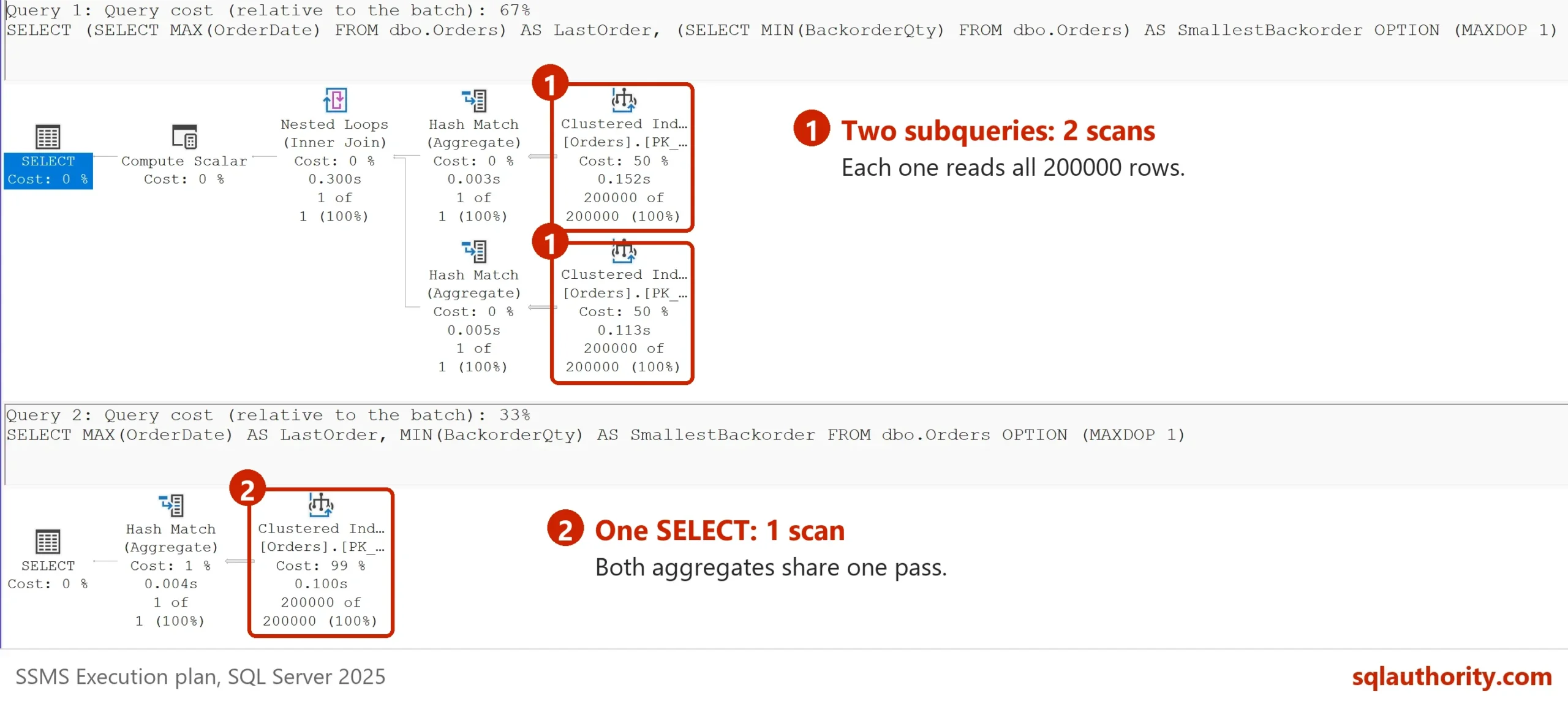
These counts come from the test server. A server that runs the subqueries in parallel shows a higher scan count and a few more reads. The single SELECT still reads half as much.
Conditional Aggregates for Different Filters
People write subqueries when multiple aggregates in one query need different filters. Three regional totals are the usual example.
SELECT (SELECT SUM(Amount) FROM dbo.Orders WHERE Region = N'East') AS EastTotal,
       (SELECT SUM(Amount) FROM dbo.Orders WHERE Region = N'West') AS WestTotal,
       (SELECT SUM(Amount) FROM dbo.Orders WHERE Region = N'South') AS SouthTotal;
That is three scans and 10,956 reads. Move the filter inside the aggregate with CASE and the table is read once.
SELECT SUM(CASE WHEN Region = N'East' THEN Amount END) AS EastTotal,
       SUM(CASE WHEN Region = N'West' THEN Amount END) AS WestTotal,
       SUM(CASE WHEN Region = N'South' THEN Amount END) AS SouthTotal
FROM dbo.Orders;| EastTotal | WestTotal | SouthTotal |
|---|---|---|
| 30576726.00 | 30643403.50 | 30710070.50 |
A CASE without an ELSE returns NULL for every row outside the filter, and SUM skips NULL. So each total counts only its own region. If no row matches, the total is NULL. Wrap it in COALESCE(SUM(…), 0) when a report needs 0. The statement reads 3,652 pages in one scan, against 10,956 for the three subqueries.
When One Scan Does Not Win
You could argue that one scan is always the better plan. It isn’t. An index changes the answer. Create one on OrderDate and run the first pair again.
CREATE INDEX IX_Orders_OrderDate ON dbo.Orders (OrderDate);
GO
SELECT (SELECT MAX(OrderDate) FROM dbo.Orders) AS LastOrder,
       (SELECT MIN(BackorderQty) FROM dbo.Orders) AS SmallestBackorder;
SELECT MAX(OrderDate) AS LastOrder,
       MIN(BackorderQty) AS SmallestBackorder
FROM dbo.Orders;
With that index, MAX(OrderDate) costs two pages, because SQL Server reads one end of the index. MIN(BackorderQty) still needs the full scan. The two-subquery form now reads 3,654 pages and the single SELECT reads 3,652. The rewrite gains nothing here, so measure first.
Two aggregates of the same indexed column show the same thing. MAX(OrderDate) and MIN(OrderDate) each read one end of the index. The subquery form and the single SELECT both read 4 pages, so there is nothing to save.
SELECT (SELECT MAX(OrderDate) FROM dbo.Orders) AS LastOrder,
       (SELECT MIN(OrderDate) FROM dbo.Orders) AS FirstOrder;
SELECT MAX(OrderDate) AS LastOrder, MIN(OrderDate) AS FirstOrder
FROM dbo.Orders;
The filtered case is worse. Add an index on CustomerID that carries Amount, then total two customers, first with subqueries and then with CASE.
CREATE INDEX IX_Orders_CustomerID ON dbo.Orders (CustomerID) INCLUDE (Amount);
GO
SELECT (SELECT SUM(Amount) FROM dbo.Orders WHERE CustomerID = 42) AS Customer42,
       (SELECT SUM(Amount) FROM dbo.Orders WHERE CustomerID = 77) AS Customer77;
SELECT SUM(CASE WHEN CustomerID = 42 THEN Amount END) AS Customer42,
       SUM(CASE WHEN CustomerID = 77 THEN Amount END) AS Customer77
FROM dbo.Orders;
The subqueries read 6 pages in total, because each one seeks to its customer. The CASE version reads 573 pages, because it scans the whole narrow index. The single statement lost, and by a wide margin. Both give 17660.00 and 19060.00.
The fix is to repeat the filter outside the CASE. With WHERE CustomerID IN (42, 77) the same statement seeks twice and reads 6 pages again.
SELECT SUM(CASE WHEN CustomerID = 42 THEN Amount END) AS Customer42,
       SUM(CASE WHEN CustomerID = 77 THEN Amount END) AS Customer77
FROM dbo.Orders
WHERE CustomerID IN (42, 77);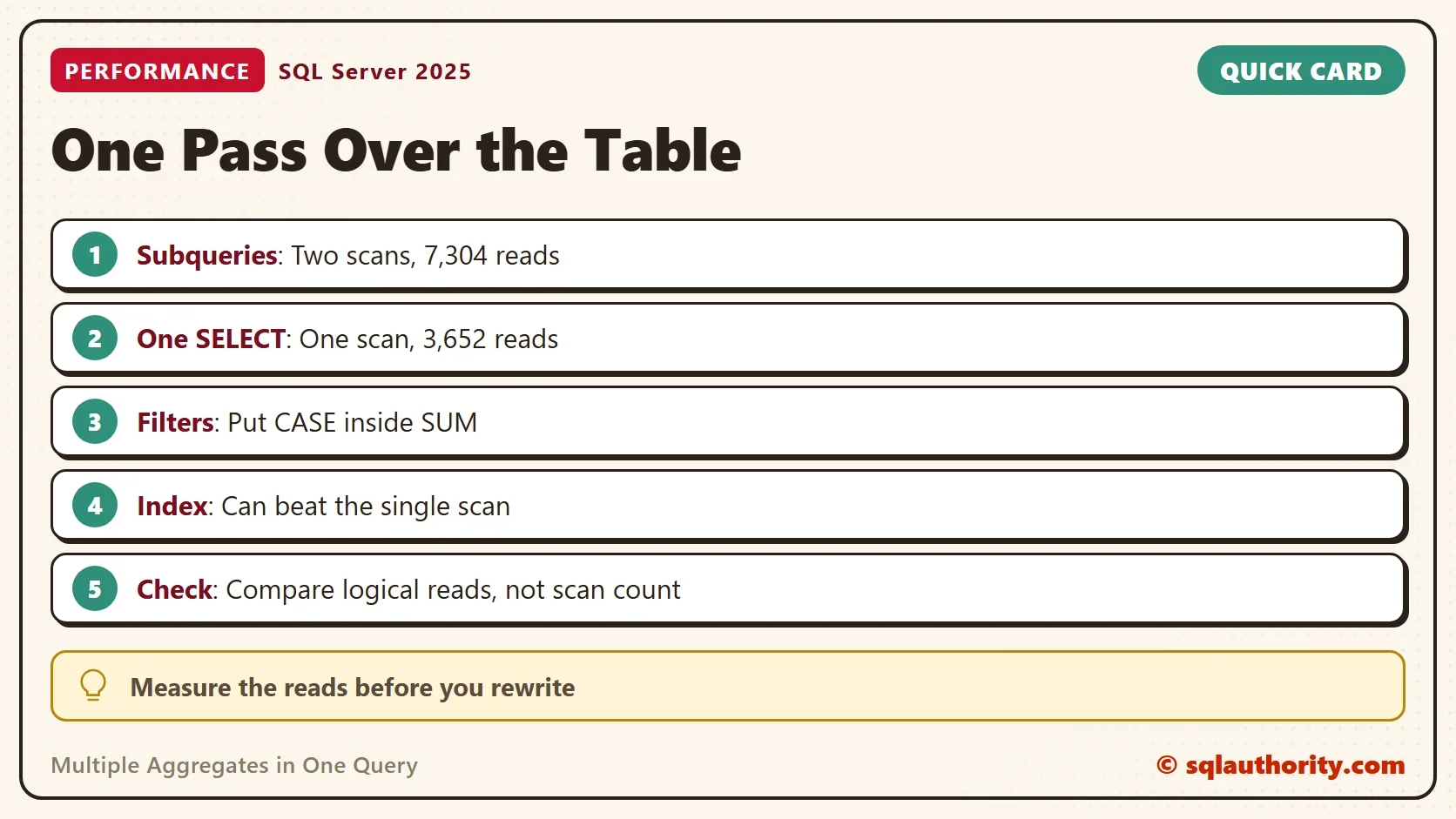
Count and Average Need Care
The same trick works for COUNT and AVG, with one trap. COUNT counts every value that isn’t NULL, and a zero is a value. An ELSE branch therefore changes the result.
SELECT COUNT(CASE WHEN Region = N'East' THEN 1 END) AS EastOrders,
       COUNT(CASE WHEN Region = N'East' THEN 1 ELSE 0 END) AS EveryOrder,
       AVG(CASE WHEN Region = N'South' THEN Amount END) AS SouthAverage,
       AVG(CASE WHEN Region = N'South' THEN Amount ELSE 0 END) AS DilutedAverage
FROM dbo.Orders;| EastOrders | EveryOrder | SouthAverage | DilutedAverage |
|---|---|---|---|
| 66666 | 200000 | 460.648754 | 153.550352 |
Without an ELSE, COUNT sees 66,666 East orders and AVG averages only South. With ELSE 0, COUNT sees all 200,000 rows and AVG mixes zeros into the average. Leave the ELSE out of COUNT, AVG, MIN and MAX.
Compare Reads, Not Scan Count
Scan count says how many times SQL Server started a search. It doesn’t say how much was read. The last query above has scan count 2 and 6 reads. It beats a query with scan count 1 that read 573 pages. Compare logical reads, and check that both forms return the same values.
What to Remember
Look for two or more scalar subqueries over the same table. Move them into one SELECT, and put each filter inside its aggregate with CASE. Then compare the logical reads of both forms before you keep the rewrite.
An index can answer a selective aggregate in a few pages. When each filter picks few rows, keep the seeks, or repeat the filter outside the CASE. Multiple aggregates in one query win when the table must be scanned anyway. When you finish testing, drop the example database.
USE master;
GO
ALTER DATABASE MultiAggScanDemo SET SINGLE_USER WITH ROLLBACK IMMEDIATE;
DROP DATABASE MultiAggScanDemo;
A second subquery over the same table is not another query, it is another read of the table.
Published by Pinal Dave on SQLAuthority. More of my work at pinaldave.com.
Discover more from SQL Authority with Pinal Dave
Subscribe to get the latest posts sent to your email.