
SELECT INTO table variable fails with Msg 102. SELECT INTO creates its target table, and a table variable has to be declared first. Two small changes make the same job work. Which one you pick depends on what happens to the rows afterward.

Why SELECT INTO Table Variable Fails
A DBA at a client tried to copy a list of cities into a table variable with one statement. The statement looked reasonable, and SQL Server rejected it. The demo below rebuilds that situation with a small database named TableVarDemo and a table of five cities.
IF DB_ID(N'TableVarDemo') IS NULL CREATE DATABASE TableVarDemo;
GO
USE TableVarDemo;
GO
DROP TABLE IF EXISTS dbo.Cities;
CREATE TABLE dbo.Cities (
    CityID    int IDENTITY(1,1) NOT NULL PRIMARY KEY,
    CityName  varchar(100) NOT NULL,
    StateCode char(2) NOT NULL
);
INSERT INTO dbo.Cities (CityName, StateCode)
VALUES ('Austin', 'TX'), ('Boise', 'ID'), ('Denver', 'CO'), ('Portland', 'OR'), ('Tampa', 'FL');
SELECT CityName
INTO @Cities
FROM dbo.Cities;
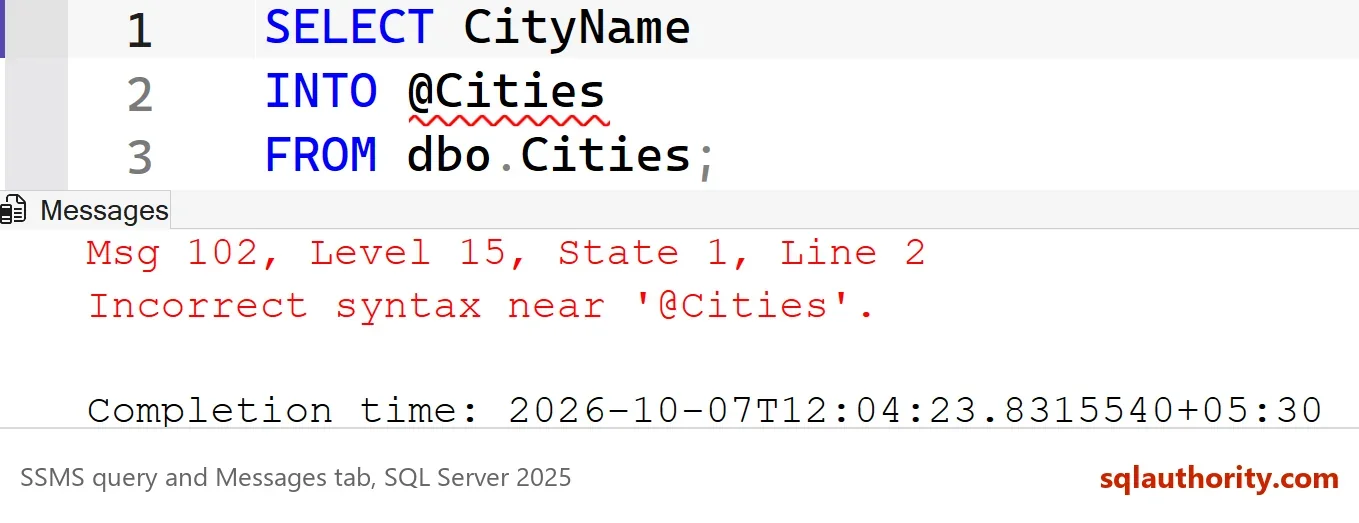
Msg 102, Level 15, State 1, Line 2
Incorrect syntax near '@Cities'.
In SELECT INTO table variable code, the error points at the variable name. The reason is in the syntax. SELECT INTO builds a new table from the shape of the query. The name after INTO must be a table name. A table variable is not created at run time that way. Its columns are written out in a DECLARE statement before any row goes in.
Fix One: Declare the Variable, Then Insert
The first way around SELECT INTO table variable errors splits the job in two. Declare the table variable with the columns you need, and then fill it with INSERT and SELECT. The column list is the price. You choose each name and type yourself, and a wrong type shows up as a conversion or truncation problem later.
DECLARE @Cities TABLE (CityName varchar(100));
INSERT INTO @Cities (CityName)
SELECT CityName
FROM dbo.Cities;
SELECT CityName FROM @Cities ORDER BY CityName;
| CityName |
|---|
| Austin |
| Boise |
| Denver |
| Portland |
| Tampa |
Fix Two: SELECT INTO a Temp Table
The second fix keeps SELECT INTO and changes the target. A permanent table name after INTO works too, but it leaves the table behind until someone drops it. A temp table, named with a # sign, is a real table that SQL Server creates for you. The column names and types come from the query, so nobody writes a column list. The table lives in tempdb and disappears when the session ends or its scope ends.
SELECT CityName
INTO #Cities
FROM dbo.Cities;
SELECT COUNT(*) AS TempRows FROM #Cities;
| TempRows |
|---|
| 5 |
Run the same statement again in the same session. SQL Server refuses, because SELECT INTO never writes into an existing table.
SELECT CityName
INTO #Cities
FROM dbo.Cities;
Msg 2714, Level 16, State 6, Line 1
There is already an object named '#Cities' in the database.
Put DROP TABLE IF EXISTS #Cities; in front, as in the next block. The script then runs any number of times. That form needs SQL Server 2016 or later. To copy only the structure, add TOP (0) to the query. The result is an empty table with the same column types.
One reader asked about the rows that a stored procedure returns. SELECT INTO cannot take EXEC. Create the temp table first, and fill it with INSERT INTO #Cities (CityName) EXEC dbo.YourProcedure;. A table variable takes the rows the same way.
DROP TABLE IF EXISTS #Cities;
SELECT CityName
INTO #Cities
FROM dbo.Cities;
SELECT COUNT(*) AS TempRows FROM #Cities;
| TempRows |
|---|
| 5 |
Three Differences Worth Knowing
The two fixes fill the same rows, but the objects behave differently. The first difference shows up with a rollback. Both objects receive the cities inside a transaction, and then the transaction is rolled back.
DECLARE @Kept TABLE (CityName varchar(100));
CREATE TABLE #Lost (CityName varchar(100));
BEGIN TRANSACTION;
INSERT INTO @Kept SELECT CityName FROM dbo.Cities;
INSERT INTO #Lost SELECT CityName FROM dbo.Cities;
ROLLBACK TRANSACTION;
SELECT (SELECT COUNT(*) FROM @Kept) AS TableVariableRows, (SELECT COUNT(*) FROM #Lost) AS TempTableRows;
DROP TABLE #Lost;
| TableVariableRows | TempTableRows |
|---|---|
| 5 | 0 |
The table variable still holds all five rows, because a table variable ignores the rollback. The temp table lost its rows with the transaction. That makes a table variable handy for keeping a log of what a failed batch tried to do.
The second difference is scope. Dynamic SQL runs in its own batch. It can read a temp table of its caller, but it cannot see the caller’s table variable.
CREATE TABLE #Seen (CityName varchar(100));
INSERT INTO #Seen VALUES ('Austin');
DECLARE @Hidden TABLE (CityName varchar(100));
INSERT INTO @Hidden VALUES ('Austin');
EXEC sys.sp_executesql N'SELECT COUNT(*) AS TempTableSeen FROM #Seen;';
EXEC sys.sp_executesql N'SELECT COUNT(*) AS VariableSeen FROM @Hidden;';| TempTableSeen |
|---|
| 1 |
Msg 1087, Level 15, State 2, Line 1
Must declare the table variable "@Hidden".
The third difference is the row estimate. A table variable has no column statistics. Before SQL Server 2019 the optimizer assumed one row, whatever the table variable held. With compatibility level 150 or higher, SQL Server waits to compile a statement until the table variable is filled. Then it counts the rows. A temp table gets real statistics at any level.
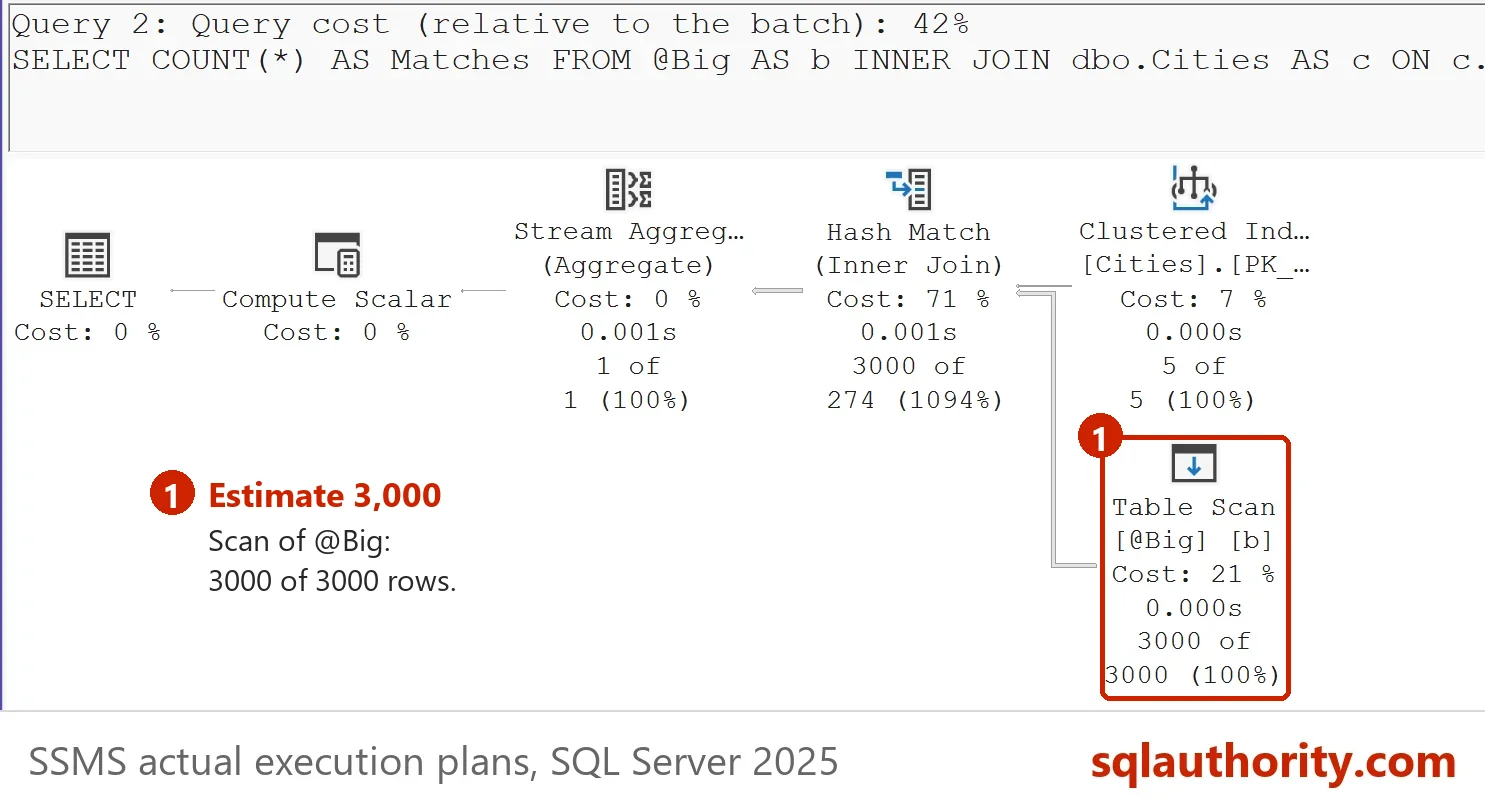
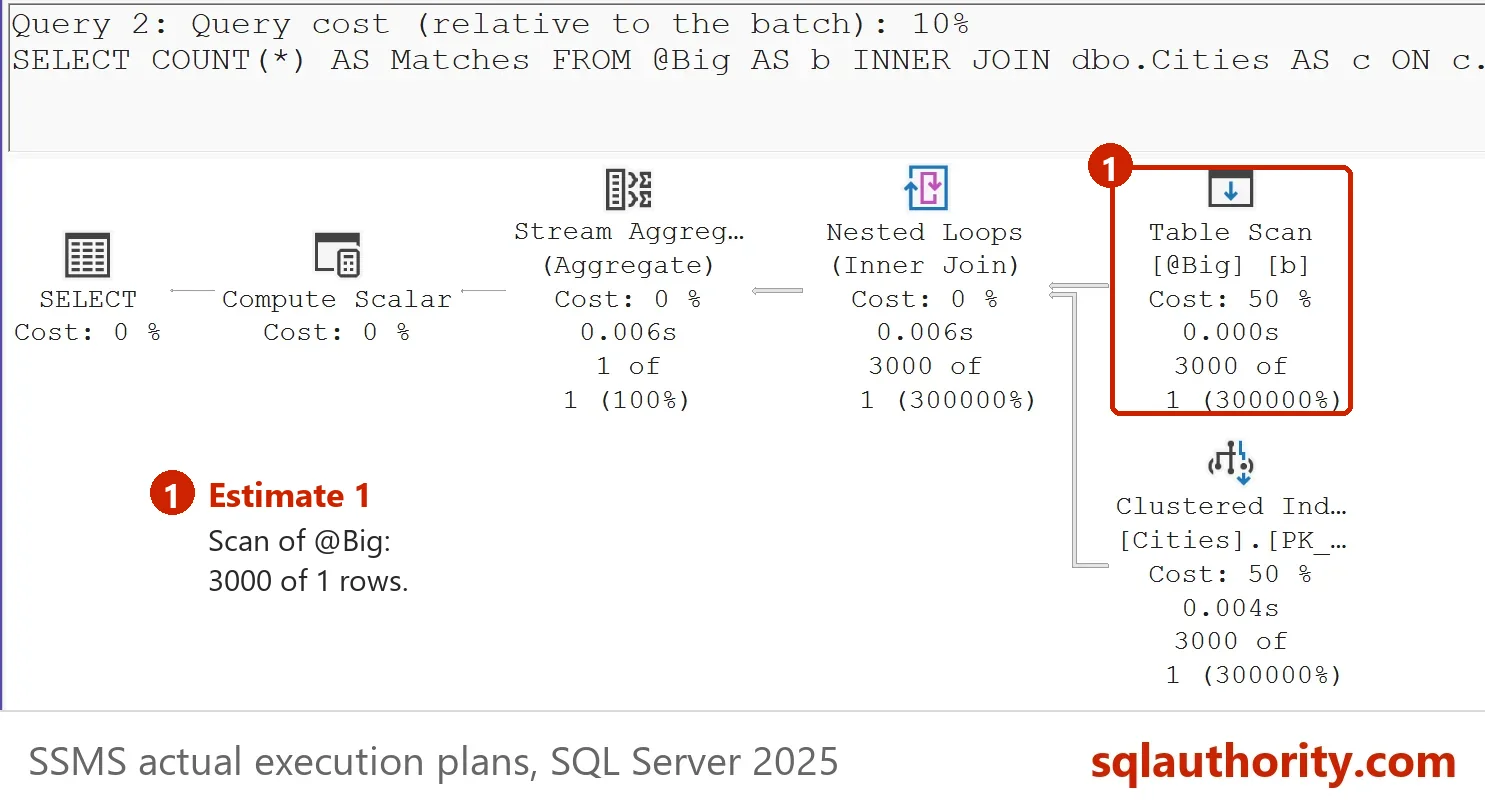
The next script fills a table variable with 3,000 rows and joins it to the cities. Turn on the actual execution plan and read the estimate on the scan of the table variable. The demo database starts at the current level of the server, 170 on SQL Server 2025. There the plan estimates 3,000 rows. Then lower the level to 140 and run the script again. The plan estimates 1 row, while 3,000 rows still come back.
DECLARE @Big TABLE (CityID int NOT NULL);
INSERT INTO @Big (CityID)
SELECT TOP (3000) 1 + ABS(CHECKSUM(NEWID())) % 5
FROM sys.all_objects AS a CROSS JOIN sys.all_objects AS b;
SELECT COUNT(*) AS Matches
FROM @Big AS b INNER JOIN dbo.Cities AS c ON c.CityID = b.CityID;
ALTER DATABASE TableVarDemo SET COMPATIBILITY_LEVEL = 140;
| Compatibility level | Estimated rows for the table variable | Actual rows |
|---|---|---|
| 170 | 3000 | 3000 |
| 140 | 1 | 3000 |
A database restored from an older server can sit at a lower level. Then the estimate is 1 row on SQL Server 2025 too. In the pictures, the first plan runs at level 170 and estimates 3,000 rows. The second runs at level 140 and estimates 1.
When a Table Variable Still Makes Sense
You could argue that a temp table is always the safer choice. For large row counts that is a fair rule. A temp table has statistics, supports extra indexes and works with dynamic SQL. A table variable wins for a short list of a few rows. It also wins when the rows must survive a rollback.
What to Remember
SELECT INTO table variable never works. Declare the variable and use INSERT with SELECT, or use SELECT INTO with a temp table. Pick the table variable for small lists and rollback-proof logs. Pick the temp table for large sets, for dynamic SQL and for any query where the estimate matters.
When you finish the demo, drop the example database.
USE master;
GO
DROP DATABASE IF EXISTS TableVarDemo;
A table variable is not a shortcut to a temp table, it is a different object with its own rules.
Published by Pinal Dave on SQLAuthority. More of my work at pinaldave.com.
Discover more from SQL Authority with Pinal Dave
Subscribe to get the latest posts sent to your email.



1 Comment. Leave new
Is there a way to do this with output from a stored procedure into a temp table?