
SQL job schedules live in msdb as numeric codes, and a query can turn them into plain words. The built-in description in sp_help_jobschedule still reads “at 60000”, so the codes still need decoding. This post builds demo jobs, then decodes every schedule with one query.

Three Tables Hold One Schedule
A job sits in msdb.dbo.sysjobs. A schedule sits in msdb.dbo.sysschedules. A third table, msdb.dbo.sysjobschedules, links them. The link is many to many. One job can have several schedules, and one schedule can serve several jobs. That sharing matters, because changing a shared schedule changes every job on it.
The demo needs jobs with a mix of schedules, so the first script builds four jobs and five schedules. Run it on a test server. The jobs have no steps and no server target, so they never run.
USE msdb;
GO
EXEC dbo.sp_add_job @job_name = N'JobScheduleDemo Backup';
EXEC dbo.sp_add_job @job_name = N'JobScheduleDemo Reports';
EXEC dbo.sp_add_job @job_name = N'JobScheduleDemo Startup Check';
EXEC dbo.sp_add_job @job_name = N'JobScheduleDemo Manual Only';
EXEC dbo.sp_add_schedule @schedule_name = N'JobScheduleDemo Daily 2 AM', @freq_type = 4, @freq_interval = 1, @active_start_time = 20000;
EXEC dbo.sp_add_schedule @schedule_name = N'JobScheduleDemo Every 4 Hours', @freq_type = 4, @freq_interval = 1, @freq_subday_type = 8, @freq_subday_interval = 4, @active_start_time = 0, @active_end_time = 235959;
EXEC dbo.sp_add_schedule @schedule_name = N'JobScheduleDemo Weekdays 6 AM', @freq_type = 8, @freq_interval = 62, @freq_recurrence_factor = 1, @active_start_time = 60000;
EXEC dbo.sp_add_schedule @schedule_name = N'JobScheduleDemo Last Friday', @freq_type = 32, @freq_interval = 6, @freq_relative_interval = 16, @freq_recurrence_factor = 1, @active_start_time = 223000, @enabled = 0;
EXEC dbo.sp_add_schedule @schedule_name = N'JobScheduleDemo Agent Start', @freq_type = 64;
EXEC dbo.sp_attach_schedule @job_name = N'JobScheduleDemo Backup', @schedule_name = N'JobScheduleDemo Daily 2 AM';
EXEC dbo.sp_attach_schedule @job_name = N'JobScheduleDemo Backup', @schedule_name = N'JobScheduleDemo Every 4 Hours';
EXEC dbo.sp_attach_schedule @job_name = N'JobScheduleDemo Reports', @schedule_name = N'JobScheduleDemo Weekdays 6 AM';
EXEC dbo.sp_attach_schedule @job_name = N'JobScheduleDemo Reports', @schedule_name = N'JobScheduleDemo Last Friday';
EXEC dbo.sp_attach_schedule @job_name = N'JobScheduleDemo Reports', @schedule_name = N'JobScheduleDemo Daily 2 AM';
EXEC dbo.sp_attach_schedule @job_name = N'JobScheduleDemo Startup Check', @schedule_name = N'JobScheduleDemo Agent Start';
What SQL Job Schedules Mean in Code
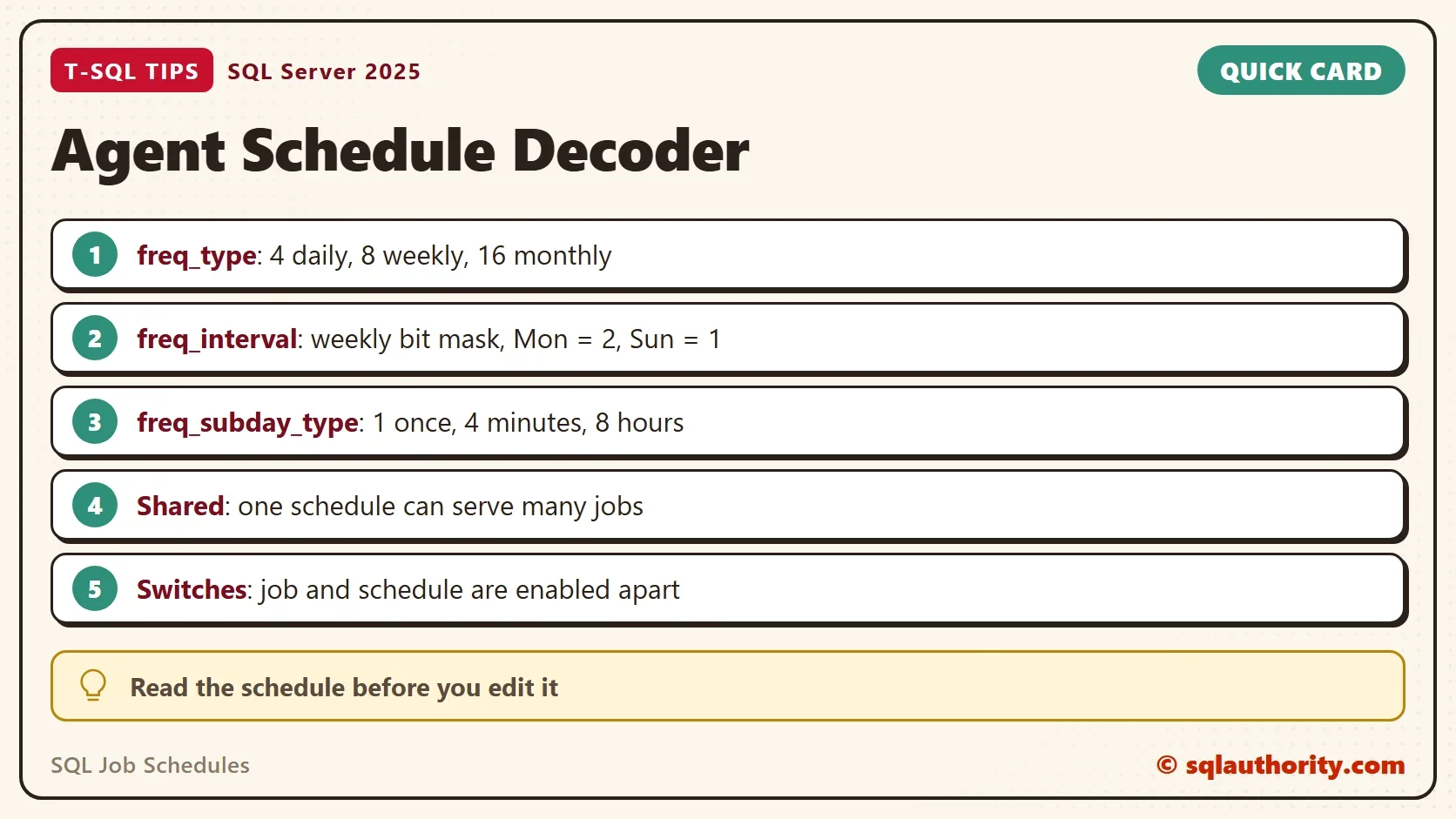
The column freq_type says what kind of schedule it is. The other freq_ columns refine it. This table lists the values the query below decodes.
| Column | Value and meaning |
|---|---|
| freq_type | 1 once, 4 daily, 8 weekly, 16 monthly, 32 monthly relative, 64 when the Agent starts, 128 when the computer is idle |
| freq_interval | Daily: every N days. Weekly: a bit mask of days (Sunday 1, Monday 2, Tuesday 4, Wednesday 8, Thursday 16, Friday 32, Saturday 64). Monthly: the day of the month. Monthly relative: 1 to 7 is Sunday to Saturday, 8 day, 9 weekday, 10 weekend day |
| freq_relative_interval | 1 first, 2 second, 4 third, 8 fourth, 16 last |
| freq_subday_type | 1 once at the start time, 2 seconds, 4 minutes, 8 hours |
The weekly bit mask is the part that surprises people. Monday is 2, Tuesday is 4, and so on, and the values add up. Monday through Friday is 2 + 4 + 8 + 16 + 32, which is 62. The query tests each bit and lists the day names.
Decode Every Schedule
The query starts at the job and keeps jobs with no schedule. It tests the weekday bits in a small VALUES list, and it turns the numeric times into clock times. The last column counts how many jobs share each schedule. The filter on the job name keeps the output to the demo jobs, so remove it on your own server. The query needs SQL Server 2017 or later because of STRING_AGG.
SELECT j.name AS JobName,
       CASE j.enabled WHEN 1 THEN N'Yes' ELSE N'No' END AS JobOn,
       ISNULL(s.name, N'(no schedule)') AS ScheduleName,
       CASE s.enabled WHEN 1 THEN N'Yes' WHEN 0 THEN N'No' END AS ScheduleOn,
       CASE s.freq_type
            WHEN 1   THEN N'Once on ' + CONVERT(nvarchar(10), s.active_start_date)
            WHEN 4   THEN IIF(s.freq_interval = 1, N'Every day', N'Every ' + CONVERT(nvarchar(10), s.freq_interval) + N' days')
            WHEN 8   THEN N'Weekly on ' + d.DayList
            WHEN 16  THEN N'Monthly on day ' + CONVERT(nvarchar(10), s.freq_interval)
            WHEN 32  THEN N'Monthly on the '
                          + CHOOSE(CASE s.freq_relative_interval WHEN 1 THEN 1 WHEN 2 THEN 2 WHEN 4 THEN 3 WHEN 8 THEN 4 WHEN 16 THEN 5 END, N'first', N'second', N'third', N'fourth', N'last')
                          + N' ' + CHOOSE(s.freq_interval, N'Sunday', N'Monday', N'Tuesday', N'Wednesday', N'Thursday', N'Friday', N'Saturday', N'day', N'weekday', N'weekend day')
            WHEN 64  THEN N'When the Agent service starts'
            WHEN 128 THEN N'When the computer is idle'
       END AS Days,
       CASE WHEN s.freq_type IN (64, 128) THEN N''
            WHEN s.freq_subday_type IN (0, 1) THEN N'At ' + CONVERT(char(8), t.StartAt, 108)
            ELSE N'Every ' + CONVERT(nvarchar(10), s.freq_subday_interval) + CHOOSE(s.freq_subday_type, N'', N' seconds', N'', N' minutes', N'', N'', N'', N' hours')
                 + N' from ' + CONVERT(char(8), t.StartAt, 108) + N' to ' + CONVERT(char(8), t.EndAt, 108)
       END AS TimeOfDay,
       COUNT(js.job_id) OVER (PARTITION BY s.schedule_id) AS JobsOnSchedule
FROM msdb.dbo.sysjobs AS j
LEFT JOIN msdb.dbo.sysjobschedules AS js ON js.job_id = j.job_id
LEFT JOIN msdb.dbo.sysschedules AS s ON s.schedule_id = js.schedule_id
OUTER APPLY (SELECT STRING_AGG(v.DayName, N', ') WITHIN GROUP (ORDER BY v.Pos) AS DayList
             FROM (VALUES (1, 2, N'Mon'), (2, 4, N'Tue'), (3, 8, N'Wed'), (4, 16, N'Thu'), (5, 32, N'Fri'), (6, 64, N'Sat'), (7, 1, N'Sun')) AS v(Pos, Bit, DayName)
             WHERE s.freq_interval & v.Bit = v.Bit) AS d
OUTER APPLY (SELECT TIMEFROMPARTS(s.active_start_time / 10000, s.active_start_time / 100 % 100, s.active_start_time % 100, 0, 0) AS StartAt,
                    TIMEFROMPARTS(s.active_end_time / 10000, s.active_end_time / 100 % 100, s.active_end_time % 100, 0, 0) AS EndAt) AS t
WHERE j.name LIKE N'JobScheduleDemo%'
ORDER BY j.name, s.name;| JobName | JobOn | ScheduleName | ScheduleOn | Days | TimeOfDay | JobsOnSchedule |
|---|---|---|---|---|---|---|
| JobScheduleDemo Backup | Yes | JobScheduleDemo Daily 2 AM | Yes | Every day | At 02:00:00 | 2 |
| JobScheduleDemo Backup | Yes | JobScheduleDemo Every 4 Hours | Yes | Every day | Every 4 hours from 00:00:00 to 23:59:59 | 1 |
| JobScheduleDemo Manual Only | Yes | (no schedule) | NULL | NULL | NULL | 0 |
| JobScheduleDemo Reports | Yes | JobScheduleDemo Daily 2 AM | Yes | Every day | At 02:00:00 | 2 |
| JobScheduleDemo Reports | Yes | JobScheduleDemo Last Friday | No | Monthly on the last Friday | At 22:30:00 | 1 |
| JobScheduleDemo Reports | Yes | JobScheduleDemo Weekdays 6 AM | Yes | Weekly on Mon, Tue, Wed, Thu, Fri | At 06:00:00 | 1 |
| JobScheduleDemo Startup Check | Yes | JobScheduleDemo Agent Start | Yes | When the Agent service starts | 1 |
Read the Result
Each row of the decoded SQL job schedules is one job and schedule pair. Backup runs at 2 AM and every four hours. Reports runs at 2 AM, on weekdays at 6 AM and on the last Friday of the month. The Daily 2 AM schedule shows a 2 in the last column, because both Backup and Reports use it. Edit that schedule once and both jobs move.
Two rows deserve a second look. Manual Only has no schedule, so it runs only when someone starts it. The Last Friday schedule says No in the ScheduleOn column. A job has one switch, and each schedule has its own. A job that is on with all schedules off never runs by itself. The job list alone doesn’t show that.
Edit a Shared Schedule Once
A shared schedule is one row, so one edit reaches every job on it. The next script moves Daily 2 AM to 3 AM and reads the two jobs that use it. The last line puts the time back.
EXEC dbo.sp_update_schedule @name = N'JobScheduleDemo Daily 2 AM', @active_start_time = 30000;
SELECT j.name AS JobName, s.name AS ScheduleName, s.active_start_time AS StartTime
FROM dbo.sysjobs AS j
INNER JOIN dbo.sysjobschedules AS js ON js.job_id = j.job_id
INNER JOIN dbo.sysschedules AS s ON s.schedule_id = js.schedule_id
WHERE s.name = N'JobScheduleDemo Daily 2 AM'
ORDER BY j.name;
EXEC dbo.sp_update_schedule @name = N'JobScheduleDemo Daily 2 AM', @active_start_time = 20000;
| JobName | ScheduleName | StartTime |
|---|---|---|
| JobScheduleDemo Backup | JobScheduleDemo Daily 2 AM | 30000 |
| JobScheduleDemo Reports | JobScheduleDemo Daily 2 AM | 30000 |
Both jobs moved with one call. The stored time is a number in the form hhmmss, so 30000 means 3:00:00 AM. Give a job its own schedule when it needs its own time.
The query leaves out two details to stay readable. The column freq_recurrence_factor turns a weekly schedule into every second week when it holds 2. The columns active_start_date and active_end_date set the first and last day a schedule can fire. A schedule whose end date has passed never fires again. The query doesn’t show that, so add both columns when you audit old jobs.
Schedule times are in the server’s local time. The link table also holds next_run_date and next_run_time, which the Agent service fills in. The query leaves out next_run_date and next_run_time to stay readable.
You could argue that the Job Properties dialog already describes a schedule in words. It does, one job at a time. The query lists every job at once, and it shows sharing and disabled schedules that the dialog hides.
What to Remember
To read SQL job schedules, use the table above and remember the weekday bit mask. Check the last column before you edit a schedule, because shared schedules change several jobs. Look for jobs whose schedules are all disabled. Pair this list with List All Jobs With Owners in SQL Server Agent. Together they show who owns each job and when it runs.
When you finish, remove the demo. sp_delete_job also removes the schedules that no other job uses.
USE msdb;
GO
IF EXISTS (SELECT 1 FROM dbo.sysjobs WHERE name = N'JobScheduleDemo Backup') EXEC dbo.sp_delete_job @job_name = N'JobScheduleDemo Backup';
IF EXISTS (SELECT 1 FROM dbo.sysjobs WHERE name = N'JobScheduleDemo Reports') EXEC dbo.sp_delete_job @job_name = N'JobScheduleDemo Reports';
IF EXISTS (SELECT 1 FROM dbo.sysjobs WHERE name = N'JobScheduleDemo Startup Check') EXEC dbo.sp_delete_job @job_name = N'JobScheduleDemo Startup Check';
IF EXISTS (SELECT 1 FROM dbo.sysjobs WHERE name = N'JobScheduleDemo Manual Only') EXEC dbo.sp_delete_job @job_name = N'JobScheduleDemo Manual Only';
A schedule is not a calendar entry, it is a set of codes until you decode it.
Published by Pinal Dave on SQLAuthority. More of my work at pinaldave.com.
Discover more from SQL Authority with Pinal Dave
Subscribe to get the latest posts sent to your email.


1 Comment. Leave new
Hello Pinal.
I understand how busy you are and will be very glad if you reply whenever you have time
I am POCing AlwaysON DAG for my company, and i have come into a very interesting debacle.
Seems like even though primary and replica’s and all synced up, the log file in the primary DB does not get truncated automatically even with a checkpoint. It would wait for a log backup to be issued. Does it mean that even with AG, we still need to have scheduled TLOG backups running?