
To get partition info in SQL Server, join sys.partitions to the scheme, function and filegroup views. One query then lists every partition with its range, its row count and its home.

How Partitioning Is Recorded
A partition function lists boundary values. A partition scheme maps each partition that the function creates to a filegroup. A table is partitioned when its clustered index, or its heap, is created on a scheme. Every table has at least one partition in sys.partitions, so a partitioned table is the one with more than one.
The demo creates a database named PartitionInfoDemo and a function with four boundary dates. With RANGE RIGHT, each boundary date belongs to the partition on its right. The function makes five partitions: before July, then one for each month from July to September, then October and later. The scheme puts all five on the PRIMARY filegroup. Two tables use it, and a third table doesn’t.
IF DB_ID(N'PartitionInfoDemo') IS NULL CREATE DATABASE PartitionInfoDemo;
GO
USE PartitionInfoDemo;
GO
DROP TABLE IF EXISTS dbo.MonthlySales, dbo.MonthlyReturns, dbo.StoreList;
IF EXISTS (SELECT 1 FROM sys.partition_schemes WHERE name = N'psSalesByMonth') DROP PARTITION SCHEME psSalesByMonth;
IF EXISTS (SELECT 1 FROM sys.partition_functions WHERE name = N'pfSalesByMonth') DROP PARTITION FUNCTION pfSalesByMonth;
CREATE PARTITION FUNCTION pfSalesByMonth (date) AS RANGE RIGHT FOR VALUES ('2026-07-01', '2026-08-01', '2026-09-01', '2026-10-01');
CREATE PARTITION SCHEME psSalesByMonth AS PARTITION pfSalesByMonth ALL TO ([PRIMARY]);
CREATE TABLE dbo.MonthlySales (
    SaleID   int           NOT NULL,
    SaleDate date          NOT NULL,
    Amount   decimal(10,2) NOT NULL,
    CONSTRAINT PK_MonthlySales PRIMARY KEY CLUSTERED (SaleDate, SaleID)
) ON psSalesByMonth (SaleDate);
CREATE TABLE dbo.MonthlyReturns (ReturnID int NOT NULL, ReturnDate date NOT NULL, Amount decimal(10,2) NOT NULL) ON psSalesByMonth (ReturnDate);
CREATE TABLE dbo.StoreList (StoreID int NOT NULL PRIMARY KEY, StoreName nvarchar(40) NOT NULL);
INSERT INTO dbo.MonthlySales (SaleID, SaleDate, Amount)
VALUES (1, '2026-06-15', 20.00), (2, '2026-07-03', 35.50), (3, '2026-07-18', 12.25), (4, '2026-07-27', 8.00),
       (5, '2026-08-09', 41.00), (6, '2026-08-30', 19.99), (7, '2026-10-02', 60.00), (8, '2026-11-11', 15.00);
INSERT INTO dbo.MonthlyReturns (ReturnID, ReturnDate, Amount) VALUES (1, '2026-07-20', 12.25), (2, '2026-10-14', 60.00);
INSERT INTO dbo.StoreList VALUES (1, N'Main Street');
List Every Partition
To get partition info for each partition, start from the rows of sys.partitions. Join sys.indexes to find the scheme, then the scheme and function views for the function name. The filegroup comes from sys.destination_data_spaces, which maps each partition number to a filegroup. The two joins to sys.partition_range_values give the boundaries. Partition 3 sits between boundary 2 and boundary 3. Its lower value has boundary id 2, and its upper value has boundary id 3.
SELECT OBJECT_SCHEMA_NAME(p.object_id) AS SchemaName,
       OBJECT_NAME(p.object_id) AS TableName,
       pf.name AS PartitionFunction,
       p.partition_number AS PartitionNumber,
       CONVERT(nvarchar(30), lo.value, 23) AS FromValue,
       CONVERT(nvarchar(30), hi.value, 23) AS UpToValue,
       p.rows AS RowsInPartition,
       fg.name AS FileGroupName
FROM sys.partitions AS p
JOIN sys.indexes AS i ON i.object_id = p.object_id AND i.index_id = p.index_id
JOIN sys.partition_schemes AS ps ON ps.data_space_id = i.data_space_id
JOIN sys.partition_functions AS pf ON pf.function_id = ps.function_id
JOIN sys.destination_data_spaces AS dds ON dds.partition_scheme_id = ps.data_space_id AND dds.destination_id = p.partition_number
JOIN sys.filegroups AS fg ON fg.data_space_id = dds.data_space_id
LEFT JOIN sys.partition_range_values AS lo ON lo.function_id = pf.function_id AND lo.boundary_id = p.partition_number - 1
LEFT JOIN sys.partition_range_values AS hi ON hi.function_id = pf.function_id AND hi.boundary_id = p.partition_number
WHERE i.index_id IN (0, 1)
ORDER BY SchemaName, TableName, p.partition_number;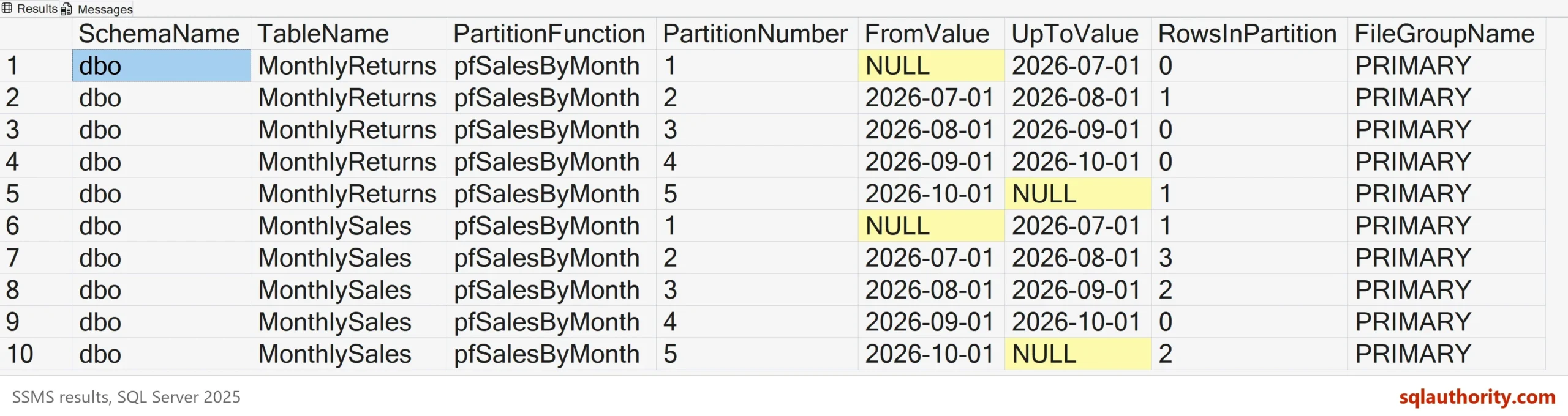
The filter on index_id keeps index 0, the heap, and index 1, the clustered index. Without it, every nonclustered index would repeat the same partitions. The style 23 in CONVERT prints the dates in the yyyy-mm-dd form. For a function on an integer, remove the style. A nonclustered index on the same scheme is aligned, and it has the same partitions.
| SchemaName | TableName | PartitionFunction | PartitionNumber | FromValue | UpToValue | RowsInPartition | FileGroupName |
|---|---|---|---|---|---|---|---|
| dbo | MonthlyReturns | pfSalesByMonth | 1 | NULL | 2026-07-01 | 0 | PRIMARY |
| dbo | MonthlyReturns | pfSalesByMonth | 2 | 2026-07-01 | 2026-08-01 | 1 | PRIMARY |
| dbo | MonthlyReturns | pfSalesByMonth | 3 | 2026-08-01 | 2026-09-01 | 0 | PRIMARY |
| dbo | MonthlyReturns | pfSalesByMonth | 4 | 2026-09-01 | 2026-10-01 | 0 | PRIMARY |
| dbo | MonthlyReturns | pfSalesByMonth | 5 | 2026-10-01 | NULL | 1 | PRIMARY |
| dbo | MonthlySales | pfSalesByMonth | 1 | NULL | 2026-07-01 | 1 | PRIMARY |
| dbo | MonthlySales | pfSalesByMonth | 2 | 2026-07-01 | 2026-08-01 | 3 | PRIMARY |
| dbo | MonthlySales | pfSalesByMonth | 3 | 2026-08-01 | 2026-09-01 | 2 | PRIMARY |
| dbo | MonthlySales | pfSalesByMonth | 4 | 2026-09-01 | 2026-10-01 | 0 | PRIMARY |
| dbo | MonthlySales | pfSalesByMonth | 5 | 2026-10-01 | NULL | 2 | PRIMARY |
Read the Result
Partition 1 has no lower value, and partition 5 has no upper value. With RANGE RIGHT the lower value is included in the partition. With RANGE LEFT the upper value would be. September is empty in both tables, and that’s normal for a month with no data.
Look at the edges. MonthlySales holds one row in partition 1 and two rows in partition 5. Rows outside the boundaries land in the first or the last partition. The row of June 15 is in partition 1. The rows of October 2 and November 11 share partition 5. A last partition that keeps growing is a sign that nobody added a boundary for the new month.
The rows column of sys.partitions is an approximate count. It is right for planning, and it isn’t a substitute for COUNT(*) when exact numbers matter.
Find the Partition for a Value
The function name works as a function of its own. Put $PARTITION in front of it and pass a value, and SQL Server returns the partition number. This answers where a new row will go before you insert it.
SELECT $PARTITION.pfSalesByMonth('2026-08-15') AS PartitionNumber,
       $PARTITION.pfSalesByMonth('2025-12-31') AS BeforeAll,
$PARTITION.pfSalesByMonth('2027-01-01') AS AfterAll;| PartitionNumber | BeforeAll | AfterAll |
|---|---|---|
| 3 | 1 | 5 |
Which Tables Are Partitioned
A partitioned table has more than one partition in the base index. The query counts them per table and lists the tables above one. The unpartitioned StoreList has a single partition and doesn’t appear.
SELECT s.name AS SchemaName, t.name AS TableName, COUNT(*) AS Partitions, SUM(p.rows) AS TotalRows
FROM sys.partitions AS p
JOIN sys.tables AS t ON t.object_id = p.object_id
JOIN sys.schemas AS s ON s.schema_id = t.schema_id
WHERE p.index_id IN (0, 1)
GROUP BY s.name, t.name
HAVING COUNT(*) > 1
ORDER BY s.name, t.name;
| SchemaName | TableName | Partitions | TotalRows |
|---|---|---|---|
| dbo | MonthlyReturns | 5 | 2 |
| dbo | MonthlySales | 5 | 8 |
Add a Boundary
The last partition of MonthlySales holds two months. Close the gap with a new boundary. The scheme needs a filegroup for the new partition first, and then the function splits the range at November 1. Splitting a partition that holds rows moves those rows. On a large table, split an empty partition when you can.
ALTER PARTITION SCHEME psSalesByMonth NEXT USED [PRIMARY];
ALTER PARTITION FUNCTION pfSalesByMonth() SPLIT RANGE ('2026-11-01');
Run the list query again. Both tables now have six partitions, because the split changes the shared function and touches every table on the scheme. The rows below are for MonthlySales, and the October and November rows sit apart.
| PartitionNumber | FromValue | UpToValue | RowsInPartition |
|---|---|---|---|
| 1 | NULL | 2026-07-01 | 1 |
| 2 | 2026-07-01 | 2026-08-01 | 3 |
| 3 | 2026-08-01 | 2026-09-01 | 2 |
| 4 | 2026-09-01 | 2026-10-01 | 0 |
| 5 | 2026-10-01 | 2026-11-01 | 1 |
| 6 | 2026-11-01 | NULL | 1 |
A Query Against the Properties Window
You could argue that the table properties window already shows this. Its Storage page lists the function and the scheme for one table. It doesn’t show every table at once, and it can’t be saved in a script. The query runs on a hundred tables as fast as on two, and you can schedule it.
What to Remember
To get partition info, start from sys.partitions and add the scheme, function, filegroup and boundary views. Filter on index_id 0 and 1 so each table appears once. Read the first and last partitions with care, because they take every row outside the boundaries.
When you finish, drop the demo database.
USE master;
GO
IF DB_ID(N'PartitionInfoDemo') IS NOT NULL
BEGIN
    ALTER DATABASE PartitionInfoDemo SET SINGLE_USER WITH ROLLBACK IMMEDIATE;
    DROP DATABASE PartitionInfoDemo;
END;
A partition is not a place for data, it is a rule that decides where the data goes.
Published by Pinal Dave on SQLAuthority. More of my work at pinaldave.com.
Discover more from SQL Authority with Pinal Dave
Subscribe to get the latest posts sent to your email.




1 Comment. Leave new
Nice article