
DBCC DBREINDEX still runs on SQL Server 2025, but it is deprecated. ALTER INDEX does everything it did and more. Replacing it takes one line per statement. Finding where it hides takes a little more work.

What Deprecated Means Here
A deprecated feature still works today. Microsoft marks it for removal in a later version and adds nothing new to it. A maintenance script that uses it runs fine until the day it fails after an upgrade. The change is cheap now and painful then.
DBCC DBREINDEX is old. It rebuilds indexes, and it never learned online rebuilds, resumable rebuilds or data compression. ALTER INDEX has all three, plus a REORGANIZE option. The next sections show the difference on a demo table.
Build a Fragmented Table
The demo database is named ReindexDemo. The Customers table has a clustered index on Email, a nonclustered primary key and an index on City. The script loads 30,000 rows with scrambled emails, then updates the key of half the rows. That moves rows and splits pages. A view reports the state of every index.
IF DB_ID(N'ReindexDemo') IS NULL CREATE DATABASE ReindexDemo;
GO
USE ReindexDemo;
GO
DROP TABLE IF EXISTS dbo.Customers;
CREATE TABLE dbo.Customers (CustomerID int IDENTITY(1,1) NOT NULL CONSTRAINT PK_Customers PRIMARY KEY NONCLUSTERED, Email nvarchar(100) NOT NULL, City nvarchar(40) NOT NULL);
CREATE CLUSTERED INDEX CIX_Customers_Email ON dbo.Customers (Email);
CREATE INDEX IX_Customers_City ON dbo.Customers (City);
INSERT INTO dbo.Customers (Email, City)
SELECT CONVERT(nvarchar(32), HASHBYTES('MD5', CONVERT(varchar(12), n.n)), 2) + N'@example.com', CHOOSE(1 + n.n % 4, N'Austin', N'Denver', N'Boston', N'Seattle')
FROM (SELECT TOP (30000) ROW_NUMBER() OVER (ORDER BY (SELECT NULL)) AS n FROM sys.all_objects AS a CROSS JOIN sys.all_objects AS b) AS n;
UPDATE dbo.Customers SET Email = CONVERT(nvarchar(32), HASHBYTES('MD5', CONVERT(varchar(12), CustomerID) + 'b'), 2) + N'@example.org' WHERE CustomerID % 2 = 0;
UPDATE dbo.Customers SET City = CHOOSE(1 + CustomerID % 4, N'Dallas', N'Fresno', N'Toledo', N'Omaha') WHERE CustomerID % 3 = 0;
GO
CREATE OR ALTER VIEW dbo.IndexHealth AS
SELECT i.index_id, i.name AS IndexName, CAST(ps.avg_fragmentation_in_percent AS decimal(5,1)) AS FragPercent,
       ps.page_count AS PageCount, i.fill_factor AS FillPercent, p.data_compression_desc AS Compression
FROM sys.dm_db_index_physical_stats(DB_ID(), OBJECT_ID(N'dbo.Customers'), NULL, NULL, 'LIMITED') AS ps
JOIN sys.indexes AS i ON i.object_id = ps.object_id AND i.index_id = ps.index_id
JOIN sys.partitions AS p ON p.object_id = i.object_id AND p.index_id = i.index_id;
GO
SELECT IndexName, FragPercent, PageCount, FillPercent FROM dbo.IndexHealth ORDER BY index_id;| IndexName | FragPercent | PageCount | FillPercent |
|---|---|---|---|
| CIX_Customers_Email | 98.2 | 908 | 0 |
| PK_Customers | 0.3 | 380 | 0 |
| IX_Customers_City | 72.4 | 776 | 0 |
The clustered index is almost fully fragmented, the City index is badly fragmented, and the primary key is fine. A fill factor of 0 means the default, which is full pages. The view needs SQL Server 2016 SP1 or later for CREATE OR ALTER.
Rebuild With DBCC DBREINDEX
The old command takes the table, the index name and a fill factor. This call rebuilds the City index with pages filled to 90 percent. Around it, two reads of the deprecation counter show that SQL Server records every use. The counter is per instance and counts since the restart.
SELECT RTRIM(instance_name) AS Feature, cntr_value AS UsesBefore FROM sys.dm_os_performance_counters WHERE object_name LIKE N'%Deprecated Features%' AND instance_name LIKE N'DBCC DBREINDEX%';

DBCC DBREINDEX (N'dbo.Customers', IX_Customers_City, 90);

SELECT RTRIM(instance_name) AS Feature, cntr_value AS UsesAfter FROM sys.dm_os_performance_counters WHERE object_name LIKE N'%Deprecated Features%' AND instance_name LIKE N'DBCC DBREINDEX%';

SELECT IndexName, FragPercent, PageCount, FillPercent FROM dbo.IndexHealth ORDER BY index_id;
| Feature | UsesBefore |
|---|---|
| DBCC DBREINDEX | 1 |
| Feature | UsesAfter |
|---|---|
| DBCC DBREINDEX | 2 |
| IndexName | FragPercent | PageCount | FillPercent |
|---|---|---|---|
| CIX_Customers_Email | 98.2 | 908 | 0 |
| PK_Customers | 0.3 | 380 | 0 |
| IX_Customers_City | 0.0 | 457 | 90 |
The City index went from 72.4 to 0.0 percent fragmentation. Its pages are now filled to 90 percent. The clustered index didn’t change, because a call with an index name rebuilds only that index. The counter rose by one, from 1 to 2 in this run. The starting value depends on the calls made since the last restart.
The ALTER INDEX Equivalent
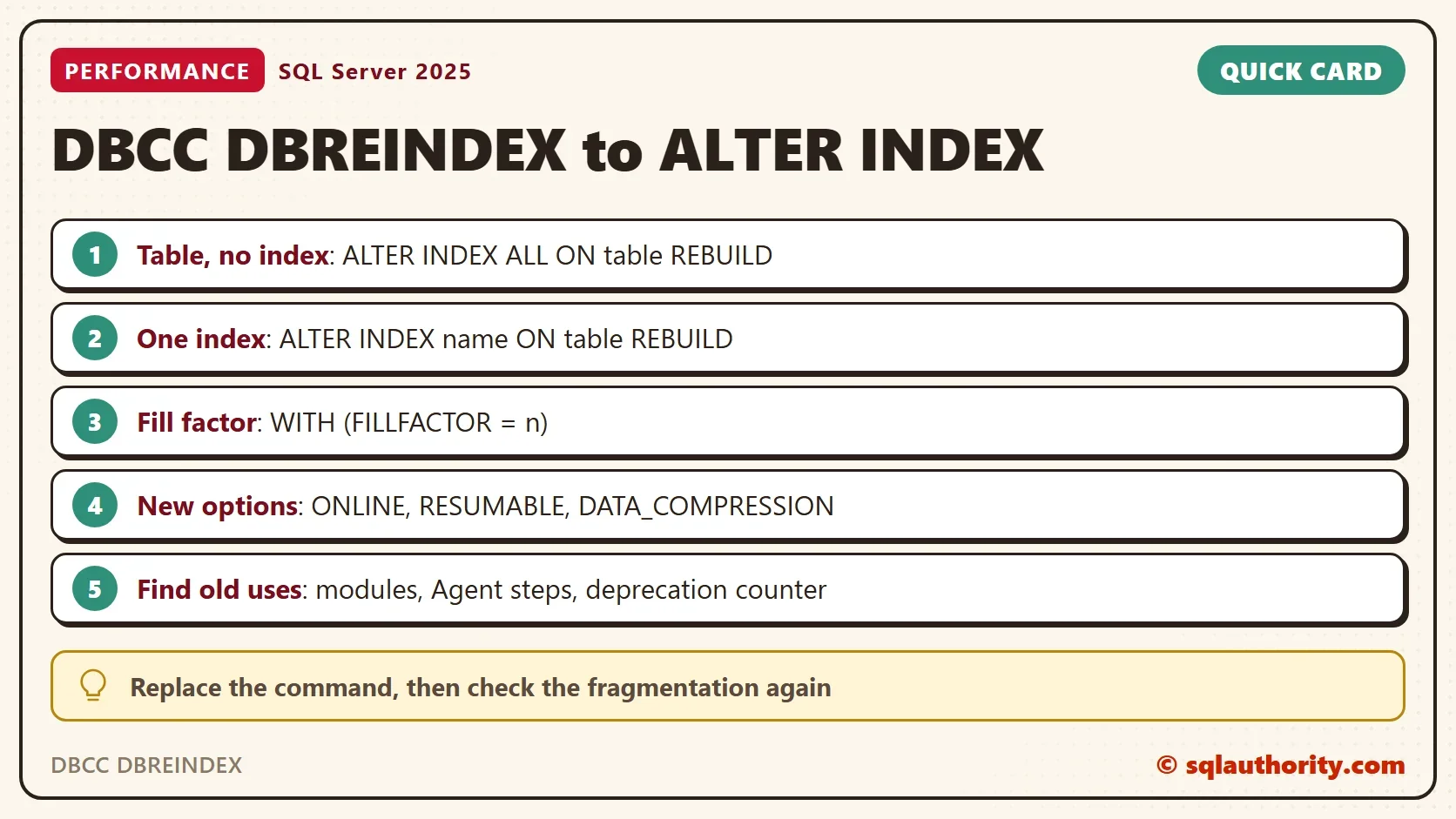
The mapping is direct. DBCC DBREINDEX (table, index, fillfactor) becomes ALTER INDEX index ON table REBUILD WITH (FILLFACTOR = n). With no index name, the old command rebuilt every index, and ALTER INDEX ALL ON table REBUILD does the same. The next call rebuilds the clustered index with a fill factor of 85 percent, and does it online. Run the ONLINE and RESUMABLE statements on Developer or Enterprise edition. On other editions they fail, so leave those options out. RESUMABLE needs SQL Server 2017 or later.
ALTER INDEX CIX_Customers_Email ON dbo.Customers REBUILD WITH (FILLFACTOR = 85, ONLINE = ON);
SELECT IndexName, FragPercent, PageCount, FillPercent FROM dbo.IndexHealth ORDER BY index_id;
| IndexName | FragPercent | PageCount | FillPercent |
|---|---|---|---|
| CIX_Customers_Email | 0.4 | 527 | 85 |
| PK_Customers | 0.3 | 380 | 0 |
| IX_Customers_City | 0.0 | 457 | 90 |
The clustered index is clean. The ONLINE option keeps the table available while the rebuild runs. Online rebuilds need Enterprise edition on older versions, so check your edition first.
What DBCC DBREINDEX Can’t Do
Three options exist only in ALTER INDEX. The first is ONLINE, which you used above. The second is data compression. The next script reorganizes the primary key, a lighter operation that DBCC DBREINDEX never offered. It then rebuilds all three indexes with page compression.
ALTER INDEX PK_Customers ON dbo.Customers REORGANIZE;
ALTER INDEX ALL ON dbo.Customers REBUILD WITH (DATA_COMPRESSION = PAGE);
SELECT IndexName, FragPercent, PageCount, FillPercent, Compression FROM dbo.IndexHealth ORDER BY index_id;
| IndexName | FragPercent | PageCount | FillPercent | Compression |
|---|---|---|---|---|
| CIX_Customers_Email | 0.0 | 255 | 85 | PAGE |
| PK_Customers | 0.0 | 216 | 0 | PAGE |
| IX_Customers_City | 0.0 | 230 | 90 | PAGE |
The pages fell by about half. The third option is a resumable rebuild. A resumable online rebuild can be paused and continued, which helps with a long rebuild on a large index.
ALTER INDEX CIX_Customers_Email ON dbo.Customers REBUILD WITH (ONLINE = ON, RESUMABLE = ON);
While such a rebuild runs, ALTER INDEX ... PAUSE, run from another session, stops it and keeps the work done. RESUME continues it, and ABORT drops it.
Find the Old Uses
Replace the command wherever it hides. Look in three places: modules such as stored procedures, Agent job steps, and the deprecation counter. The counter tells you that some code still calls the command. The first query searches module text. The second searches Agent steps. The demo procedure RebuildOld gives the first search something to find.
CREATE OR ALTER PROCEDURE dbo.RebuildOld AS
    DBCC DBREINDEX (N'dbo.Customers', IX_Customers_City, 90);
GO
SELECT OBJECT_SCHEMA_NAME(m.object_id) AS SchemaName, OBJECT_NAME(m.object_id) AS ModuleName
FROM sys.sql_modules AS m
WHERE m.definition LIKE N'%DBREINDEX%';

SELECT j.name AS JobName, s.step_id, s.step_name
FROM msdb.dbo.sysjobsteps AS s
JOIN msdb.dbo.sysjobs AS j ON j.job_id = s.job_id
WHERE s.command LIKE N'%DBREINDEX%';| SchemaName | ModuleName |
|---|---|
| dbo | RebuildOld |
The Agent query returns no row on the test server. Run both queries in every database that has maintenance code. A maintenance plan built long ago can also hold the command. Open its tasks and read them. DBCC INDEXDEFRAG and DBCC SHOWCONTIG are deprecated too. Their replacements are REORGANIZE and the physical stats view that the demo uses.
You could argue that a script which works should be left alone. That’s reasonable for a script you can’t test. For maintenance code, the replacement is one line, and the new version adds options. The risk is in waiting until an upgrade fails on it.
Rebuild Every Index in a Database
DBCC DBREINDEX worked on one table. For a whole database, drive ALTER INDEX ALL ON table REBUILD from a loop over sys.tables. A better plan applies the 5 and 30 percent rule to each index, so only fragmented indexes are touched.
Rebuild or Reorganize
A common guideline is to reorganize an index between 5 and 30 percent fragmentation, and to rebuild above 30 percent. Ignore small indexes, below about 1,000 pages, because they gain little. The demo indexes are small on purpose. Treat these numbers as a starting point and measure the result. Reorganizing is online by design and can be stopped at any time. Rebuilding rewrites the index and updates its statistics.
What to Remember
Replace DBCC DBREINDEX with ALTER INDEX in every maintenance script. Use the deprecation counter and the module searches to find the old calls. Choose REBUILD or REORGANIZE by fragmentation, and use ONLINE, RESUMABLE and DATA_COMPRESSION where they fit.
Test the new statements on a copy, and read the fragmentation after each change. When you finish with the demo, drop the demo database.
USE master;
GO
IF DB_ID(N'ReindexDemo') IS NOT NULL
BEGIN
    ALTER DATABASE ReindexDemo SET SINGLE_USER WITH ROLLBACK IMMEDIATE;
    DROP DATABASE ReindexDemo;
END;
An old command is not a safe habit, it is a debt that comes due at the next upgrade.
Published by Pinal Dave on SQLAuthority. More of my work at pinaldave.com.
Discover more from SQL Authority with Pinal Dave
Subscribe to get the latest posts sent to your email.



1 Comment. Leave new
Pinal, I know the linked post here is old, but you may want to update it. I found it googling sql reindex database. It is on the front page.