
The PRINT date format differs from the SELECT format, because PRINT works on text. SELECT returns the datetime itself, and the client decides how to show it. PRINT turns it into text first.

Two Channels, Two Jobs
SELECT sends rows to the results grid. PRINT sends a line of text to the Messages tab. A grid receives typed values, so it can show a datetime with full precision. A message line is only text, so PRINT must convert any value to text first. That conversion is where the format comes from.
The conversion follows the rules that CAST uses when you convert a value to varchar without a style. Learn those rules once, and the output of PRINT stops being a surprise.
SELECT Returns a Date, PRINT Returns Text
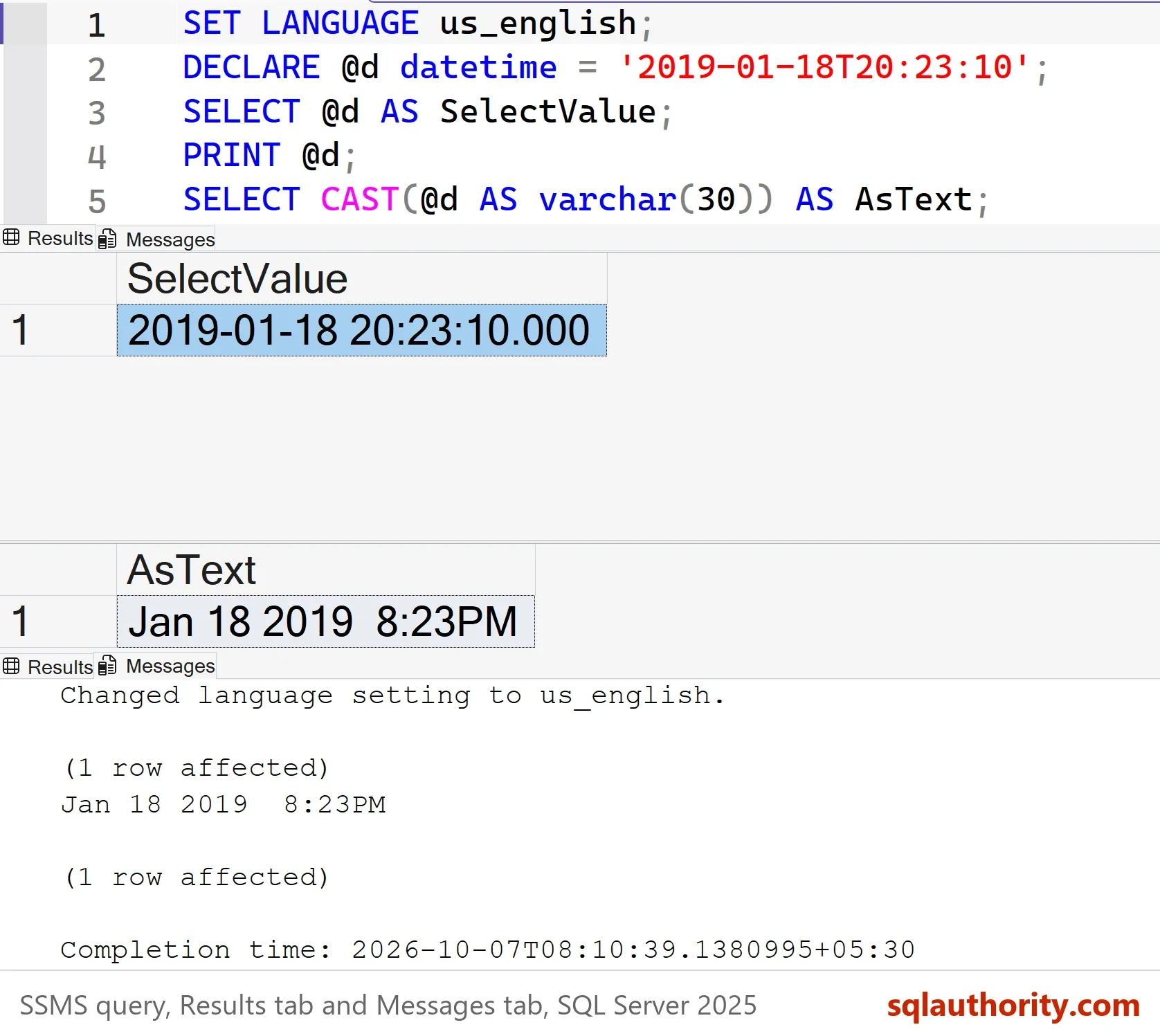
The next script declares one datetime and returns it three ways. It sets the session language first, because the language changes the text, as a later section shows.
SET LANGUAGE us_english;
DECLARE @d datetime = '2019-01-18T20:23:10';
SELECT @d AS SelectValue;
PRINT @d;
SELECT CAST(@d AS varchar(30)) AS AsText;
| SelectValue |
|---|
| 2019-01-18 20:23:10.000 |
| AsText |
|---|
| Jan 18 2019 8:23PM |
The grid shows the full datetime with milliseconds. PRINT shows Jan 18 2019 8:23PM, and the CAST to text gives the same string. There are two spaces before the 8, because the hour is padded to two places. A time of 08:03 on January 5 prints as Jan 5 2019 8:03AM. The day gets two spaces too.
PRINT has no format of its own. It converts the value with the default style for the type, the same style that CAST uses. That style is number 0 for a datetime. Anything that CAST does to a datetime, PRINT does too.
PRINT Date Format by Data Type
The PRINT date format depends on the type. The older types, datetime and smalldatetime, use the long month style. The newer types use the ISO order of year, month and day.
| Type | PRINT shows |
|---|---|
| datetime | Jan 18 2019 8:23PM |
| smalldatetime | Jan 18 2019 8:23PM |
| datetime2(3) | 2019-01-18 20:23:10.123 |
| date | 2019-01-18 |
| time(0) | 20:23:10 |
| datetimeoffset(0) | 2019-01-18 20:23:10 +05:30 |
The script below produced these lines. Each PRINT is one line in the Messages tab. A browser collapses the two spaces in the first two rows, but they are in the real output.
DECLARE @d datetime = '2019-01-18T20:23:10', @sdt smalldatetime = '2019-01-18T20:23:10',
        @dt2 datetime2(3) = '2019-01-18T20:23:10.123', @dt date = '2019-01-18',
        @tm time(0) = '20:23:10', @dto datetimeoffset(0) = '2019-01-18T20:23:10+05:30';
PRINT @d;
PRINT @sdt;
PRINT @dt2;
PRINT @dt;
PRINT @tm;
PRINT @dto;
The ISO order for the new types is a good sign. It is the same in every language, even under German, and it sorts correctly as text. The old format is the one to watch.
Why Joining Text and a Datetime Fails
Most scripts print a label with the date. The obvious line fails. SQL Server ranks datetime above text. It tries to turn the label into a datetime, not the date into text.
DECLARE @d datetime = '2019-01-18T20:23:10';
PRINT 'Today is ' + @d;
Msg 241, Level 16, State 1, Line 2
Conversion failed when converting date and/or time from character string.
Convert the date to text yourself. Style 120 gives year, month, day and the time with seconds. Style 126 gives the same with a T between the date and the time.
DECLARE @d datetime = '2019-01-18T20:23:10';
PRINT 'Today is ' + CONVERT(varchar(30), @d, 120);
PRINT 'Today is ' + CONVERT(varchar(30), @d, 126);
The first line prints Today is 2019-01-18 20:23:10. The second prints Today is 2019-01-18T20:23:10. A CAST to varchar would work here too, but it gives the long month text again. The same implicit conversion explains Change in Date Format: Why LEFT Turns GETDATE Into Text.
The Language Changes the Month
The long month style is not stable. It follows the language of the session. The next script declares a date in March, then prints it under three languages.
DECLARE @d datetime = '2019-03-18T20:23:10';
SET LANGUAGE German;
PRINT @d;
SET LANGUAGE French;
PRINT @d;
SET LANGUAGE us_english;
PRINT @d;
The three lines read Mär 18 2019 8:23PM, mars 18 2019 8:23PM and Mar 18 2019 8:23PM. A log file that mixes such lines is hard to sort and hard to parse. Language also changes how text is read. Under German, a literal written as 2019-01-18 20:23:10 fails with Msg 242, and the message itself comes in German. The dashed text is read as year, day and month.
SET LANGUAGE German;
DECLARE @d datetime = '2019-01-18 20:23:10';
SET LANGUAGE us_english;
Msg 242, Level 16, State 3, Line 2
Bei der Konvertierung eines varchar-Datentyps in einen datetime-Datentyp liegt der Wert außerhalb des gültigen Bereichs.
Write a datetime literal with a T between the date and the time, and the language no longer matters.
Pick the Format Yourself
Choose a style on purpose. For logs and messages, use style 120 or 126. They sort, they read the same in every language, and any tool can parse them. For a message meant for people in one country, FORMAT takes a pattern and a culture.
DECLARE @d datetime = '2019-01-18T20:23:10';
PRINT FORMAT(@d, 'd', 'de-DE');
PRINT FORMAT(@d, 'D', 'de-DE');
These return 18.01.2019 and Freitag, 18. Januar 2019. FORMAT needs SQL Server 2012, and it is slower than CONVERT over many rows. For a few lines of output, that cost is invisible.
You could argue that PRINT is only for debugging, so the format doesn’t matter. That’s true for a throwaway script. A deployment script, an Agent job step or a long load keeps its PRINT lines in a log. Someone reads that log at three in the morning, and a stable format helps.
What to Remember
The PRINT date format is the default text of the type. A datetime prints as a long month text that follows the session language. The newer types print in ISO order. A label plus a datetime fails with Msg 241 until you convert the date.
Convert with style 120 or 126 for logs, and write literals with a T. Use FORMAT with a culture when people need their own style. The scripts here create nothing, so there is nothing to clean up.
A date is not text, it is a value that PRINT has to translate.
Published by Pinal Dave on SQLAuthority. More of my work at pinaldave.com.
Discover more from SQL Authority with Pinal Dave
Subscribe to get the latest posts sent to your email.




2 Comments. Leave new
Hi Sir,Do return terminates statement from being executed further??
Try Format:
DECLARE @DATE DATETIME
SET @DATE =’2019-01-18 20:23:10′
SELECT @DATE AS DATE_VALUE
Print or Select FORMAT(@Date,’d’,’de-DE’) — d= Short Format | D=Long Format
Greetings from Germany