
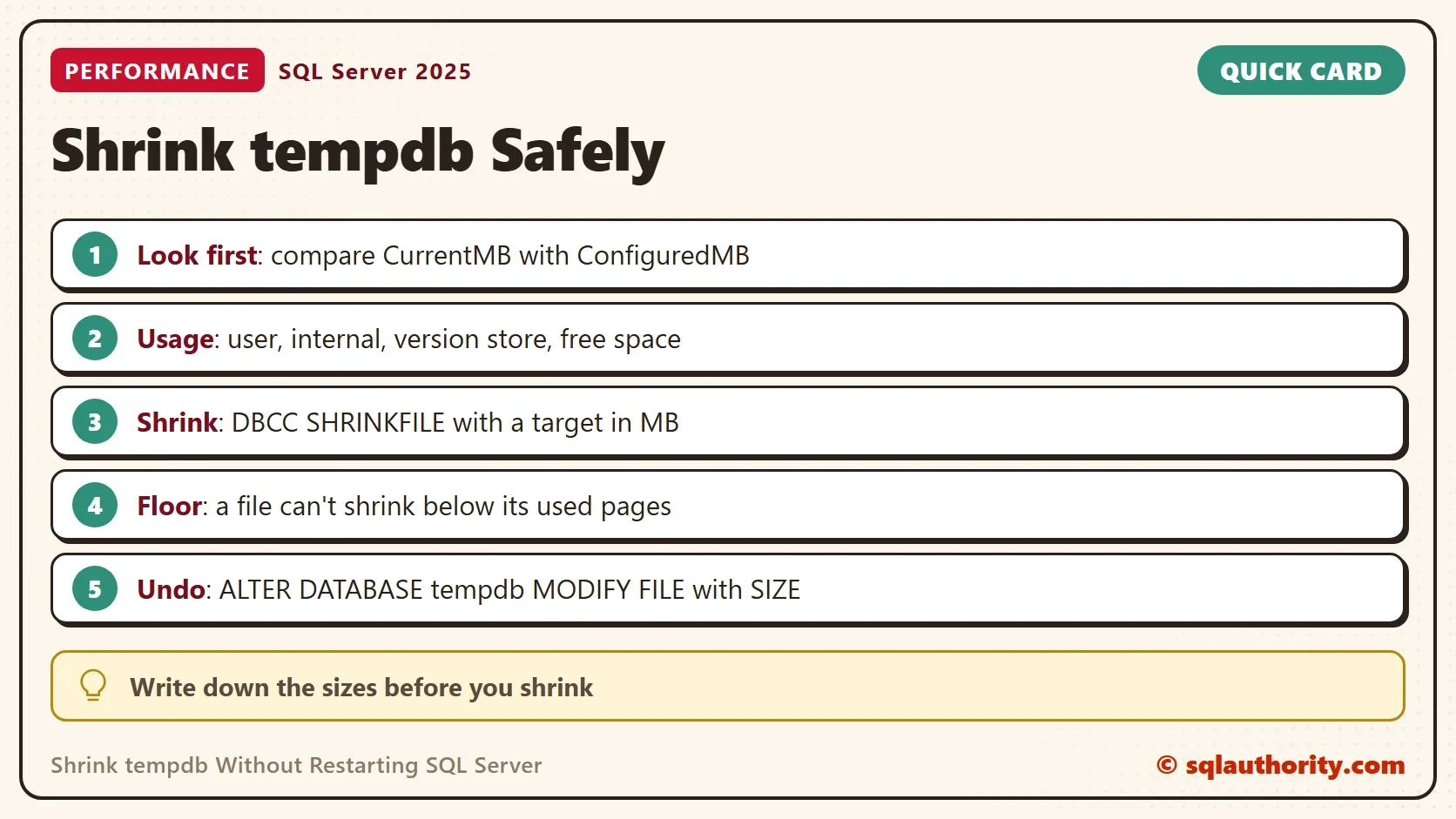
To shrink tempdb without a restart, run DBCC SHRINKFILE on each tempdb file with a target size in megabytes. That is the easy part. The skill is knowing when it works, when it stalls and how to undo it.

Look Before You Shrink
Shrinking moves pages and can’t be rolled back, and regrowing the file is the only undo. Read the current state first. To shrink tempdb safely, you need three numbers per file. The first query lists every tempdb file with its current size, the space in use and the configured size. The configured size is where the file returns after a restart. The second query splits the space by owner.
USE tempdb;
GO
SELECT f.name, f.type_desc, f.size / 128 AS CurrentMB, FILEPROPERTY(f.name, 'SpaceUsed') / 128 AS UsedMB, mf.size / 128 AS ConfiguredMB
FROM sys.database_files AS f
JOIN master.sys.master_files AS mf ON mf.database_id = DB_ID() AND mf.file_id = f.file_id
ORDER BY f.file_id;

SELECT SUM(total_page_count) / 128 AS TotalMB,
       SUM(user_object_reserved_page_count) / 128 AS UserObjectsMB,
       SUM(internal_object_reserved_page_count) / 128 AS InternalObjectsMB,
       SUM(version_store_reserved_page_count) / 128 AS VersionStoreMB,
       SUM(unallocated_extent_page_count) / 128 AS FreeMB
FROM sys.dm_db_file_space_usage;
GO
USE master;| name | type_desc | CurrentMB | UsedMB | ConfiguredMB |
|---|---|---|---|---|
| tempdev | ROWS | 200 | 3 | 8 |
| templog | LOG | 136 | 54 | 8 |
| temp2 | ROWS | 200 | 0 | 8 |
| temp3 | ROWS | 200 | 0 | 8 |
| temp4 | ROWS | 200 | 0 | 8 |
| temp5 | ROWS | 200 | 1 | 8 |
| temp6 | ROWS | 200 | 0 | 8 |
| temp7 | ROWS | 200 | 0 | 8 |
| temp8 | ROWS | 200 | 0 | 8 |
| TotalMB | UserObjectsMB | InternalObjectsMB | VersionStoreMB | FreeMB |
|---|---|---|---|---|
| 1600 | 2 | 0 | 0 | 1593 |
These tables are from a run before the test server restarted. Eight data files held 200 MB each, and almost nothing was in use. The files had grown, and nobody shrank them. The second table shows 1,593 MB free out of 1,600 MB. That is a shrink candidate, if the growth was a one-off.
After the restart, the same queries show 8 MB for every file. That is the configured size. Free space is 57 MB out of 64. A restart is the other way to get the space back. Your sizes will differ.
The Shrink Statements
The next block changes tempdb, so the demo doesn’t run it. Run it on a test server first. Microsoft’s advice is to shrink tempdb only when nothing is using it. Write down the CurrentMB values before you start, because the undo needs them. To shrink tempdb, run one statement per data file, and the target is in megabytes. The target must be below the current size, so 64 fits the sample above. The block shows two data files and the log.
USE tempdb;
DBCC SHRINKFILE (tempdev, 64);
DBCC SHRINKFILE (temp2, 64);
DBCC SHRINKFILE (templog, 64);
The undo is a separate statement. It sets the file back to the size you wrote down. This one regrows tempdev to 200 MB, the CurrentMB value of the sample. The files grow again on demand, so the undo matters for the week when tempdb must be that big.
ALTER DATABASE tempdb MODIFY FILE (NAME = tempdev, SIZE = 200MB);
Test the Rules on a Demo Database
A shrink obeys the same rules in every database. The next script creates ShrinkRulesDemo, fills a table with about 40 MB and reads the file size. Run it on a test server.
IF DB_ID(N'ShrinkRulesDemo') IS NULL CREATE DATABASE ShrinkRulesDemo;
GO
USE ShrinkRulesDemo;
GO
DROP TABLE IF EXISTS dbo.Scratch;
CREATE TABLE dbo.Scratch (Id int IDENTITY(1,1) PRIMARY KEY, Pad char(2000) NOT NULL DEFAULT 'x');
INSERT INTO dbo.Scratch (Pad) SELECT TOP (20000) 'x' FROM sys.all_objects AS a CROSS JOIN sys.all_objects AS b;
SELECT name, size / 128 AS SizeMB, FILEPROPERTY(name, 'SpaceUsed') / 128 AS UsedMB FROM sys.database_files WHERE type = 0;
| name | SizeMB | UsedMB |
|---|---|---|
| ShrinkRulesDemo | 72 | 42 |
Now ask for 10 MB, which is less than the data in use. The shrink can’t free pages that hold rows, so it stops at the used size.
DBCC SHRINKFILE (ShrinkRulesDemo, 10);
SELECT name, size / 128 AS SizeMB, FILEPROPERTY(name, 'SpaceUsed') / 128 AS UsedMB FROM sys.database_files WHERE type = 0;
| FileId | CurrentSize | MinimumSize | UsedPages | EstimatedPages |
|---|---|---|---|---|
| 1 | 5512 | 1024 | 5504 | 5504 |
| name | SizeMB | UsedMB |
|---|---|---|
| ShrinkRulesDemo | 43 | 43 |
The DBCC result also returns DbId, which differs per server and is left out above. Its sizes are in 8 KB pages, and they differ by a few pages from run to run. The file ends at 43 MB. MinimumSize is the lowest size the file could reach. Here it is 1,024 pages, which is the 8 MB the file was created with.
Now drop the table and try again with a target of 1 MB. SQL Server frees the pages of a large dropped table in the background. The loop waits up to 30 seconds until the used space falls.
DROP TABLE dbo.Scratch;
DECLARE @tries int = 0;
WHILE @tries < 30 AND FILEPROPERTY(N'ShrinkRulesDemo', 'SpaceUsed') / 128 > 10
BEGIN
    WAITFOR DELAY '00:00:01';
    SET @tries += 1;
END;
DBCC SHRINKFILE (ShrinkRulesDemo, 1);
SELECT name, size / 128 AS SizeMB, FILEPROPERTY(name, 'SpaceUsed') / 128 AS UsedMB FROM sys.database_files WHERE type = 0;| name | SizeMB | UsedMB |
|---|---|---|
| ShrinkRulesDemo | 3 | 3 |
The file falls from 43 MB to 3 MB. An explicit target below the creation size is accepted, and SQL Server stops at the pages still in use. A target above the current size does nothing, as the next statement shows.
DBCC SHRINKFILE (ShrinkRulesDemo, 100);
SQL Server answers with a message that the file can’t shrink to 12,800 pages because it contains only 480 pages. The size stays at 3 MB.
When the Shrink Stalls
On tempdb the common reason is that the pages are in use. User temporary tables, the work areas of running queries and the version store all hold pages. The version store holds row versions for as long as an old snapshot transaction stays open. Find that transaction before you try again.
A shrink also competes with the work that uses tempdb. Run it in a quiet window and let it finish. If you cancel it, the pages it already moved stay moved.
The tempdb log has its own rule. A shrink can only release the log that is not in use, so run CHECKPOINT first. A checkpoint writes the dirty pages to disk and lets the log clear. It is harmless.
Some old advice runs CHECKPOINT, DBCC FREEPROCCACHE and DBCC DROPCLEANBUFFERS before the shrink. The cache commands empty plan and buffer caches for every database. They also drop cached temporary tables that keep pages. Use them on a test server only, and never as a routine step.
You could argue that shrinking tempdb is pointless, because the files grow again. If a nightly job needs 100 GB, shrinking at noon only moves the growth to midnight. That’s right. Shrink tempdb after a one-off event, such as a runaway query, and size the files for the real peak. For a planned change, a restart returns every file to its configured size.
What to Remember
To shrink tempdb safely, read the sizes and the space owners first. Shrink with DBCC SHRINKFILE one file at a time, and keep the undo statement beside it. A stalled shrink points to pages in use, so look for the old transaction.
Rehearse on a test server, and write the CurrentMB values into your change notes. When you finish with the demo, drop the demo database.
USE master;
GO
IF DB_ID(N'ShrinkRulesDemo') IS NOT NULL
BEGIN
    ALTER DATABASE ShrinkRulesDemo SET SINGLE_USER WITH ROLLBACK IMMEDIATE;
    DROP DATABASE ShrinkRulesDemo;
END;
A shrink is not a cleanup, it is a loan you take from tomorrow’s growth.
Published by Pinal Dave on SQLAuthority. More of my work at pinaldave.com.
Discover more from SQL Authority with Pinal Dave
Subscribe to get the latest posts sent to your email.



2 Comments. Leave new
Just like that? Wow! So shrinikg tempdb is no different then shrinking a regular database? Then why write a whole article about how to shrink tempdb without restart?
And how about that piece of advice?
“Now, let us see how we can shrink the TempDB database.
CHECKPOINT
GO
DBCC FREEPROCCACHE
GO
DBCC SHRINKFILE (TEMPDEV, 1024)
GO
When the users were running only Shrinkfile, they were not able to shrink the database. However, when they ran DROPCLEANBUFFERS it worked just fine.”
Thanks Alexander for your kind note.
The reason, this blog post is because I get lots of emails with this question. This blog is my diary of consulting engagement.