OFFSET FETCH returns one block of rows from a sorted result, such as rows 21 to 30. It replaces the old workaround of TOP plus a ranking function with two short clauses.

Rows 21 to 30 in One Query
A common request sounds simple: show rows 21 through 30 of a sorted table. The old answers used TOP twice or a ranking function inside a subquery. SQL Server 2012 added a shorter way. OFFSET skips rows, and FETCH returns the next ones. Both belong to the ORDER BY clause.
The demo needs a small table. The first script creates a database named OffsetPagingDemo with 60 plants. Each plant has an ID, a name and a price.
IF DB_ID(N'OffsetPagingDemo') IS NULL CREATE DATABASE OffsetPagingDemo;
GO
USE OffsetPagingDemo;
GO
DROP TABLE IF EXISTS dbo.Plants;
CREATE TABLE dbo.Plants (
    PlantID   int          NOT NULL PRIMARY KEY,
    PlantName nvarchar(40) NOT NULL,
    Price     decimal(6,2) NOT NULL
);
INSERT INTO dbo.Plants (PlantID, PlantName, Price)
SELECT TOP (60) n,
       CONCAT(CHOOSE(n % 6 + 1, N'Basil', N'Mint', N'Thyme', N'Sage', N'Dill', N'Chive'), N' pot ', n),
       4.00 + (n % 7) * 1.50
FROM (SELECT ROW_NUMBER() OVER (ORDER BY (SELECT NULL)) AS n FROM sys.all_objects) AS x
ORDER BY n;
To read rows 21 to 30, skip 20 rows and take 10.
SELECT PlantID, PlantName, Price
FROM dbo.Plants
ORDER BY PlantID
OFFSET 20 ROWS FETCH NEXT 10 ROWS ONLY;
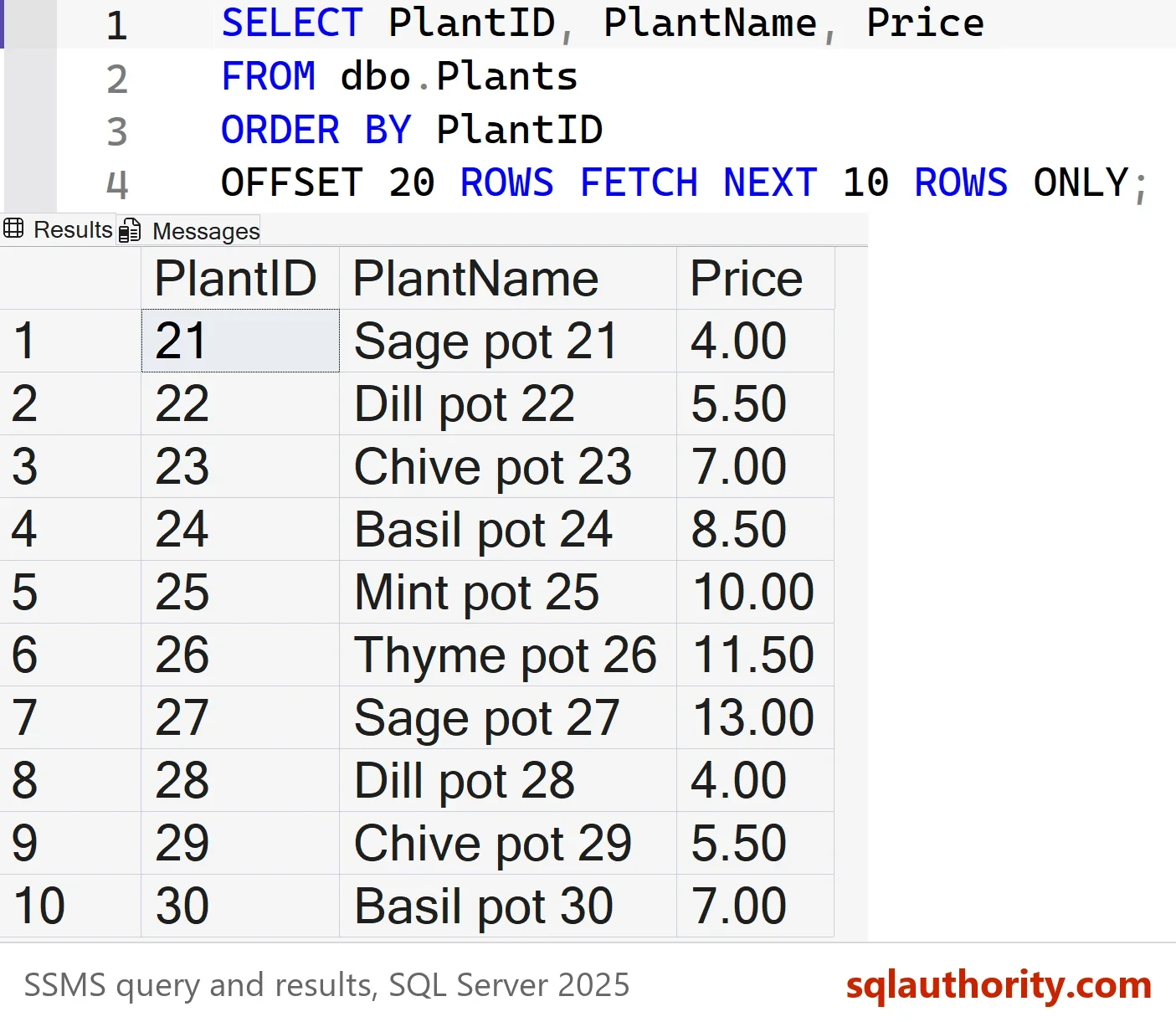
The OFFSET FETCH pair works in two steps. SQL Server sorts the rows, skips the first 20, and then returns the next 10. The words ROW and ROWS mean the same, and so do FIRST and NEXT. This form needs SQL Server 2012 or later.
Turn It Into a Page Number
A page is two numbers: the page size and the page number. The rows to skip equal the page number minus one, times the page size. Variables can sit inside both clauses, so changing the page means editing one value.
DECLARE @PageNumber int = 3, @PageSize int = 10;
SELECT PlantID, PlantName
FROM dbo.Plants
ORDER BY PlantID
OFFSET (@PageNumber - 1) * @PageSize ROWS FETCH NEXT @PageSize ROWS ONLY;
With page 3 and a size of 10, the query returns the same plants 21 to 30. Page 1 skips nothing, because the offset is zero.
The Old Way With a Ranking Function
A ranking function returns the same rows. ROW_NUMBER numbers the sorted rows, and a filter keeps the numbers 21 to 30. This version runs on SQL Server 2005 and later.
WITH Numbered AS (
    SELECT PlantID, PlantName, ROW_NUMBER() OVER (ORDER BY PlantID) AS RowNum
    FROM dbo.Plants
)
SELECT PlantID, PlantName
FROM Numbered
WHERE RowNum BETWEEN 21 AND 30
ORDER BY RowNum;
It needs a common table expression and a second sort, so the intent is harder to read. OFFSET FETCH says the same thing in one clause. On SQL Server 2012 and later, it is the form to use.
ORDER BY Is Not Optional
The clauses live inside ORDER BY. Leave the sort out and SQL Server stops with two errors. Line numbers depend on your layout.
SELECT PlantID, PlantName, Price
FROM dbo.Plants
OFFSET 20 ROWS FETCH NEXT 10 ROWS ONLY;
Msg 102, Level 15, State 1, Line 3
Incorrect syntax near '20'.
Msg 153, Level 15, State 2, Line 3
Invalid usage of the option NEXT in the FETCH statement.
A sort is not enough on its own. If the sort column holds repeated values, rows that tie can come back in either order. A row can then appear on two pages, or on none. Here the price repeats every seventh plant, so the key goes last in the sort.
SELECT PlantID, Price
FROM dbo.Plants
ORDER BY Price, PlantID
OFFSET 0 ROWS FETCH NEXT 5 ROWS ONLY;
| PlantID | Price |
|---|---|
| 7 | 4.00 |
| 14 | 4.00 |
| 21 | 4.00 |
| 28 | 4.00 |
| 35 | 4.00 |
Plants 7, 14, 21, 28 and 35 share the lowest price. Because PlantID breaks every tie, the order is the same on each run.
What Happens Past the End
A page that starts beyond the last row is not an error. It returns nothing. OFFSET also works alone: it returns every row after the skipped ones. FETCH cannot stand without OFFSET.
SELECT N'OFFSET 55, FETCH 10' AS Version, COUNT(*) AS RowsReturned
FROM (SELECT PlantID FROM dbo.Plants ORDER BY PlantID OFFSET 55 ROWS FETCH NEXT 10 ROWS ONLY) AS a
UNION ALL
SELECT N'OFFSET 70, FETCH 10', COUNT(*)
FROM (SELECT PlantID FROM dbo.Plants ORDER BY PlantID OFFSET 70 ROWS FETCH NEXT 10 ROWS ONLY) AS b
UNION ALL
SELECT N'OFFSET 20, no FETCH', COUNT(*)
FROM (SELECT PlantID FROM dbo.Plants ORDER BY PlantID OFFSET 20 ROWS) AS c;
| Version | RowsReturned |
|---|---|
| OFFSET 55, FETCH 10 | 5 |
| OFFSET 70, FETCH 10 | 0 |
| OFFSET 20, no FETCH | 40 |
Deep Pages Cost More
OFFSET does not jump to row 90,001. On a clustered key like this one, SQL Server reads the 90,000 rows before it and throws them away. Every page costs a little more than the one before. This script builds a second table with 100,000 rows to measure it.
DROP TABLE IF EXISTS dbo.PlantsBig;
CREATE TABLE dbo.PlantsBig (
    PlantID   int          NOT NULL PRIMARY KEY,
    PlantName nvarchar(40) NOT NULL
);
INSERT INTO dbo.PlantsBig (PlantID, PlantName)
SELECT TOP (100000) n, CONCAT(N'Plant ', n)
FROM (SELECT ROW_NUMBER() OVER (ORDER BY (SELECT NULL)) AS n
      FROM sys.all_columns AS a CROSS JOIN sys.all_columns AS b) AS x
ORDER BY n;
The next batch reads page 1, page 9,001, and a third version that seeks. The third version remembers the last PlantID of the previous page and asks for the rows after it. SET STATISTICS IO prints the pages each query reads on the Messages tab.
SET STATISTICS IO ON;
SELECT PlantID, PlantName FROM dbo.PlantsBig ORDER BY PlantID OFFSET 0 ROWS FETCH NEXT 10 ROWS ONLY;
SELECT PlantID, PlantName FROM dbo.PlantsBig ORDER BY PlantID OFFSET 90000 ROWS FETCH NEXT 10 ROWS ONLY;
SELECT TOP (10) PlantID, PlantName FROM dbo.PlantsBig WHERE PlantID > 90000 ORDER BY PlantID;
SET STATISTICS IO OFF;
| Query | Rows returned | Logical reads |
|---|---|---|
| Page 1, OFFSET 0 | 1 to 10 | 2 |
| Page 9,001, OFFSET 90000 | 90,001 to 90,010 | 435 |
| Seek after PlantID 90000 | 90,001 to 90,010 | 2 |
The deep page reads about 435 pages for ten rows on SQL Server 2025. The seek version reads two, the same as page 1. The trade-off is that a seek cannot jump to page 9,001 by number. It only moves to the next page.
You could argue that nobody reads page 9,001, so the cost does not matter. For a screen with ten pages, that is true. A nightly export that walks a whole table page by page is different. Each loop reads more than the last one.
What to Remember
Use OFFSET FETCH for rows in the middle of a sorted result. Always write the ORDER BY, and end it with a unique column so no row repeats or goes missing. For page numbers, compute the offset as (page number minus one) times the page size.
Send the same ORDER BY with every page request, or the pages shift between calls. Keep the page count small. For long lists, remember the last key and seek after it. Run the cleanup script when you finish.
USE master;
GO
DROP DATABASE IF EXISTS OffsetPagingDemo;
Paging is not a loop over page numbers, it is a promise that the order never changes.
Published by Pinal Dave on SQLAuthority. More of my work at pinaldave.com.
Discover more from SQL Authority with Pinal Dave
Subscribe to get the latest posts sent to your email.