A recent rows only index is a filtered index with a fixed boundary, so it does not move on its own. It is small and fast, but only for the dates you wrote into the filter.

Why index only the recent rows
Most dashboards read the last few months of orders. The table also holds years of history that nobody opens except an auditor. An ordinary index carries all of it. A filtered index carries only the rows you name, so it is smaller and cheaper to maintain.
The catch is the word “recent.” Your application thinks in rolling dates, like “the last 12 months.” The index cannot. Its filter is a fixed date, and that date stays put until you change it. Let me show you how that plays out.
Build the index and see who is in it
The table has three orders. The index keeps the ones from January 1, 2025 onward. Run this in any test database. The last query counts the rows stored in each index.
DROP TABLE IF EXISTS dbo.RecentOrders;

CREATE TABLE dbo.RecentOrders (Id int PRIMARY KEY, OrderDate date NOT NULL, Amount decimal(18,2));

INSERT dbo.RecentOrders (Id, OrderDate, Amount)
VALUES (1, '20230101', 20.00), (2, '20250101', 30.00), (3, '20250201', 40.00);

CREATE INDEX IX_RecentOrders ON dbo.RecentOrders (OrderDate) INCLUDE (Amount)
WHERE OrderDate >= '20250101';

SELECT i.name, i.filter_definition, SUM(p.row_count) AS IndexRows
FROM sys.indexes AS i
JOIN sys.dm_db_partition_stats AS p
  ON p.object_id = i.object_id AND p.index_id = i.index_id
WHERE i.object_id = OBJECT_ID(N'dbo.RecentOrders')
GROUP BY i.name, i.filter_definition, i.index_id
ORDER BY i.index_id;
The table’s primary key holds all 3 rows. The filtered index holds only 2, orders 2 and 3. The January 2023 order stays in the table but is not in the index.
Why a rolling filter does not work
The obvious idea is to let the filter roll with today’s date. SQL Server refuses.
CREATE INDEX IX_RollingOrders ON dbo.RecentOrders (OrderDate)
WHERE OrderDate >= DATEADD(MONTH, -12, GETDATE());
You get error 10735, “Incorrect WHERE clause for filtered index.” Functions that change from one run to the next are not allowed, because the index would have to rebuild itself every day. So you pick a fixed date and move it yourself.
Parameters and the filtered index
Here is where people get surprised. A query with a variable looks like it fits the index, but SQL Server cannot trust that. The plan may be reused with an older date, and an older date needs rows outside the filter. So it plays safe and ignores the filtered index. Adding OPTION (RECOMPILE) lets it see the actual value.
The block below runs both versions, then shows how each index was used. A seek is a targeted lookup. A scan reads the whole structure.
DECLARE @From date = '20250115';

SELECT Id, OrderDate, Amount
FROM dbo.RecentOrders
WHERE OrderDate >= @From
ORDER BY OrderDate, Id;

SELECT Id, OrderDate, Amount
FROM dbo.RecentOrders
WHERE OrderDate >= @From
ORDER BY OrderDate, Id
OPTION (RECOMPILE);

SELECT i.name, COALESCE(u.user_seeks, 0) AS Seeks, COALESCE(u.user_scans, 0) AS Scans
FROM sys.indexes AS i
LEFT JOIN sys.dm_db_index_usage_stats AS u
  ON u.database_id = DB_ID() AND u.object_id = i.object_id AND u.index_id = i.index_id
WHERE i.object_id = OBJECT_ID(N'dbo.RecentOrders')
ORDER BY i.index_id;
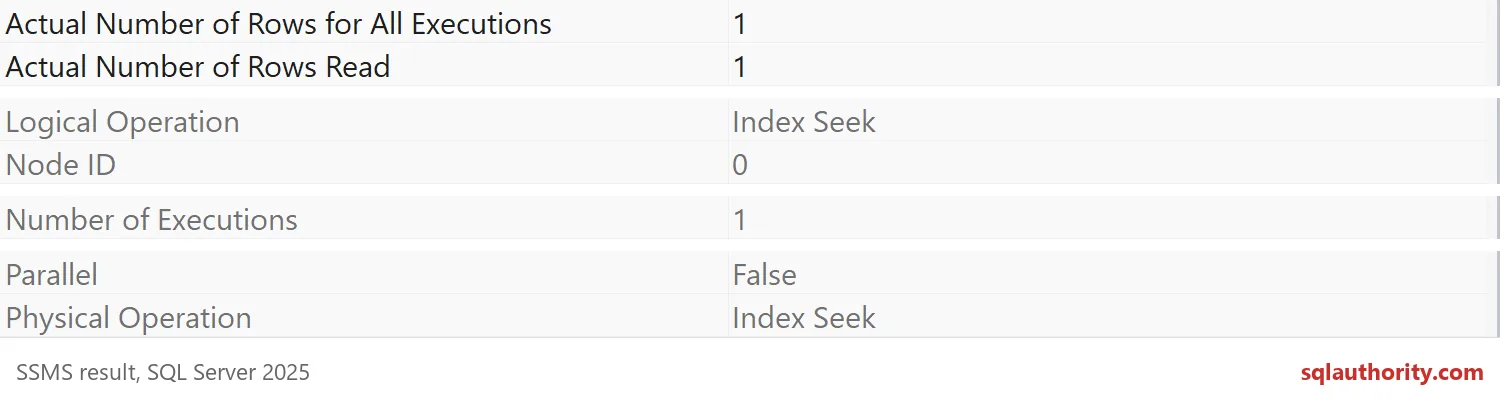
Both queries return order 3. The usage numbers tell the rest of the story. The primary key shows 1 scan, from the plain variable query. The filtered index shows 1 seek, from the RECOMPILE query. The picture below is the properties window for that seek: one row read, one row returned.
RECOMPILE pays compile time on every run, so test the real calling shape before you choose it.

When the question crosses the boundary
Now ask for orders from 2023. The filtered index cannot answer, because the old rows are not in it.
SELECT Id, OrderDate, Amount
FROM dbo.RecentOrders
WHERE OrderDate >= '20230101'
ORDER BY OrderDate, Id;

SELECT i.name, COALESCE(u.user_seeks, 0) AS Seeks, COALESCE(u.user_scans, 0) AS Scans
FROM sys.indexes AS i
LEFT JOIN sys.dm_db_index_usage_stats AS u
  ON u.database_id = DB_ID() AND u.object_id = i.object_id AND u.index_id = i.index_id
WHERE i.object_id = OBJECT_ID(N'dbo.RecentOrders')
ORDER BY i.index_id;
All three orders come back. The primary key now shows 2 scans and the filtered index still shows 1 seek. Audits and customer questions will take this slower road, so make sure it works for them.
Move the boundary on purpose
When the data ages, rebuild the index with a new date. DROP_EXISTING replaces the definition in one step. Plan for build space, logging and locks, as with any index rebuild.
CREATE INDEX IX_RecentOrders ON dbo.RecentOrders (OrderDate) INCLUDE (Amount)
WHERE OrderDate >= '20250201'
WITH (DROP_EXISTING = ON);

SELECT i.name, i.filter_definition, SUM(p.row_count) AS IndexRows
FROM sys.indexes AS i
JOIN sys.dm_db_partition_stats AS p
  ON p.object_id = i.object_id AND p.index_id = i.index_id
WHERE i.object_id = OBJECT_ID(N'dbo.RecentOrders')
GROUP BY i.name, i.filter_definition, i.index_id
ORDER BY i.index_id;
The filter now says February 1, and the index holds 1 row instead of 2. Order 2 dropped out. Give this job an owner, or the “recent” index will slowly turn into an “old” one.
One more trap: session settings
Tables with filtered indexes are fussy about session settings. SSMS uses the right ones. Some old drivers and scripts set QUOTED_IDENTIFIER OFF, and then every write to the table fails.
SET QUOTED_IDENTIFIER OFF;
GO
INSERT dbo.RecentOrders (Id, OrderDate, Amount) VALUES (4, '20250301', 50.00);
GO
SET QUOTED_IDENTIFIER ON;
GO
INSERT dbo.RecentOrders (Id, OrderDate, Amount) VALUES (4, '20250301', 50.00);

SELECT COUNT(*) AS OrderRows FROM dbo.RecentOrders;
The first insert fails with error 1934, naming QUOTED_IDENTIFIER. The second works, so the table ends with 4 rows. If a nightly import suddenly fails after you add a filtered index, check its settings first. The demo raises errors 10735 and 1934 on purpose. Now clean up.
DROP TABLE IF EXISTS dbo.RecentOrders;Next time you build a “recent” index, put a date on the calendar to move it.
A filtered index is not a moving window, it is a fixed line you have to move.
Published by Pinal Dave on SQLAuthority. More of my work at pinaldave.com.
Discover more from SQL Authority with Pinal Dave
Subscribe to get the latest posts sent to your email.