I use GET_BIT when the contract identifies one bit by position. Its offsets start at zero, with zero selecting the least significant bit. The input type determines which positions exist.

Start with a visible typed value
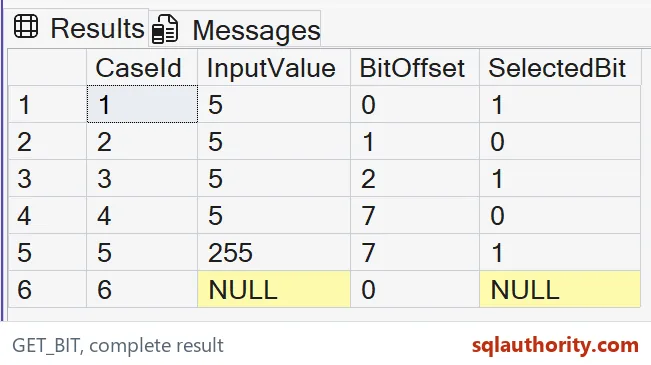
The example casts every source value to tinyint before reading a bit. That type has eight positions, from zero through seven. Input five has its least significant bit and its bit at offset two set.
The first three rows therefore return one, zero and one. I keep both the source value and requested offset beside the selected bit. A detached flag doesn’t explain whether the caller used the intended position or simply found a set bit elsewhere.
WITH Inputs AS
(
 SELECT CaseId, CAST(InputValue AS tinyint) AS InputValue, BitOffset
 FROM (VALUES (1,5,0),(2,5,1),(3,5,2),(4,5,7),(5,255,7),
              (6,CAST(NULL AS int),0)) v(CaseId,InputValue,BitOffset)
)
SELECT CaseId,InputValue,BitOffset,GET_BIT(InputValue,BitOffset) AS SelectedBit
FROM Inputs
ORDER BY CaseId;
Read the last valid position
Offset seven is the last position in these tinyint inputs. It returns zero for five and one for 255. Those rows expose the type-width boundary without executing an invalid offset.
I’d verify the input type before accepting an offset from another component. A position valid for int can exceed tinyint’s width. The same numeric value stored in two different types doesn’t give every position the same availability.
Keep position and mask separate
GET_BIT accepts a position, not a whole numeric mask. Offset two selects the bit whose numeric weight is four. Passing four would instead request the bit at position four.
I keep those terms separate in names and documentation. A caller using masks elsewhere can otherwise send the wrong argument while the function still returns a plausible bit. The result should be checked against the intended position contract, not only against whether it is zero or one.

Preserve a missing source
The last input is typed NULL and its selected bit remains NULL. A missing source isn’t a known value with the requested bit clear. The full tuple keeps that distinction visible.
I’d define the default policy before converting missing input to zero. Such a default can make sense for a particular setting, but it isn’t established by the function name. Retain the original input when a missing value needs to be explained to a caller.
Reject unsupported offsets and types deliberately
A negative offset, or one beyond the last bit of the input type, raises an error. The method supports integer and non-LOB binary inputs. Large-object types are outside that input contract.
This demonstration stays within valid tinyint offsets. I’d validate a user-supplied position before using it and retain separate controlled error tests if needed. The successful rows here don’t establish that every arbitrary position is safe for every storage type.
Keep the version requirement visible
GET_BIT is available in SQL Server 2022 and later. The query uses only inline values and SELECT, so it changes no stored flags. It returns a bit column with a declared position in every row.
I’d compare all six expected tuples on the target instance. A count of six rows could miss an incorrect offset mapping. The position contract tells me which bit I’m reading. Updating a stored flag still needs a business rule and write authorization.
Say position when you mean position, and mask when you mean mask.
A bit offset is not a numeric mask, it is a zero-based position within the input type.
Published by Pinal Dave on SQLAuthority. More of my work at pinaldave.com.
Discover more from SQL Authority with Pinal Dave
Subscribe to get the latest posts sent to your email.