
The current language of a SQL Server session decides how dates read and how month names print. Two system variables and one view report it, and one statement changes it.

Read the Current Language
The variable @@LANGUAGE returns the name of the current language of your session. The variable @@LANGID returns the matching language ID. Both describe the session, not the server. Another connection to the same server can use a different language. The query below reads both.
SELECT @@LANGUAGE AS LanguageName, @@LANGID AS LanguageID;
| LanguageName | LanguageID |
|---|---|
| us_english | 0 |
This session uses us_english, which has ID 0. The view sys.syslanguages lists every language the instance supports. It adds each alias, date format and first day of the week. Filter it by the ID of your session and you get the details of your language. The view is a backward compatibility view, and it still works on SQL Server 2025.
SELECT name, alias, dateformat, datefirst
FROM sys.syslanguages
WHERE langid = @@LANGID;
| name | alias | dateformat | datefirst |
|---|---|---|---|
| us_english | English | mdy | 7 |
Month first, then day, then year, and the week starts on day 7. In SQL Server’s numbering, 7 is Sunday. These two settings are the reason the language matters. They change how SQL Server reads and writes dates.
Change the Current Language
The statement SET LANGUAGE changes the language for the current session only. When the connection closes, the setting is gone. The next script switches to German and repeats the check. It also reads the month and the weekday name of one fixed date.
SET LANGUAGE German;
SELECT @@LANGUAGE AS LanguageName, @@LANGID AS LanguageID, @@DATEFIRST AS FirstDay;
SELECT name, alias, dateformat, datefirst FROM sys.syslanguages WHERE langid = @@LANGID;
SELECT DATENAME(MONTH, '2026-10-06') AS MonthName, DATENAME(WEEKDAY, '2026-10-06') AS DayName;
SET LANGUAGE us_english;
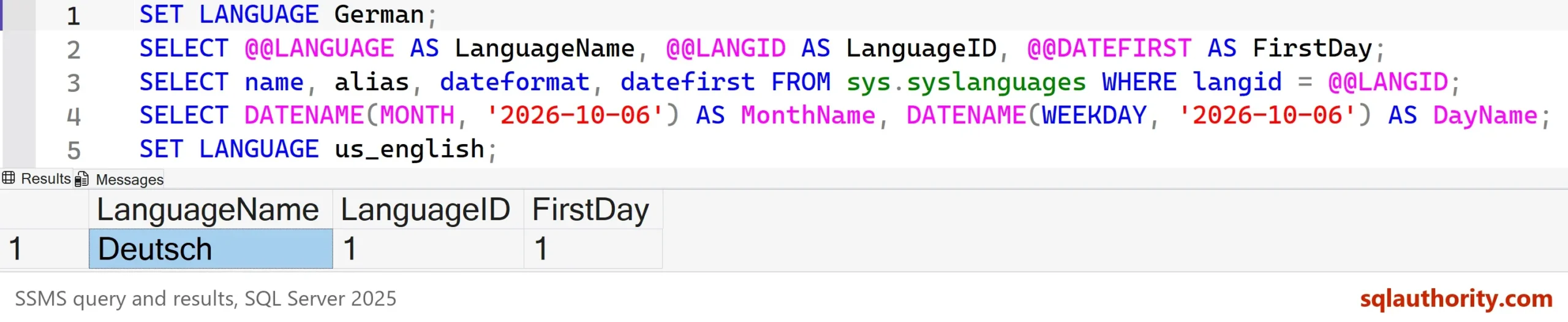
The picture shows the first result. The tables below show the other two.
| name | alias | dateformat | datefirst |
|---|---|---|---|
| Deutsch | German | dmy | 1 |
| MonthName | DayName |
|---|---|
| Oktober | Dienstag |
Read the first result closely. The statement used the alias German, but @@LANGUAGE returns the name Deutsch. SET LANGUAGE accepts either, and the variable always reports the name. The language ID is now 1. The date format is day, month, year, and the week starts on Monday, which is day 1. The month and weekday print in German. A report in this session speaks German to its reader.
The Language Changes How Text Becomes a Date
The language also decides how text with only numbers turns into a date. The text 06/10/2026 is June 10 in one language and October 6 in another. This is a real trap when one application serves users in several countries. The next script reads three kinds of text under two languages. It ends by switching back to us_english.
SET LANGUAGE British;
SELECT @@LANGID AS LanguageID, CAST('06/10/2026' AS datetime) AS SlashForm,
       CAST('2026-10-06' AS datetime) AS DashForm, CAST('20261006' AS datetime) AS CompactForm;
SET LANGUAGE us_english;
SELECT @@LANGID AS LanguageID, CAST('06/10/2026' AS datetime) AS SlashForm,
CAST('2026-10-06' AS datetime) AS DashForm, CAST('20261006' AS datetime) AS CompactForm;| LanguageID | SlashForm | DashForm | CompactForm |
|---|---|---|---|
| 23 (British) | 2026-10-06 | 2026-06-10 | 2026-10-06 |
| 0 (us_english) | 2026-06-10 | 2026-10-06 | 2026-10-06 |
The slash form and the dash form each gave two different dates, and nothing failed. That makes the trap worse. Even the year-first dash form changes meaning for the datetime type. Only the compact form 20261006 read the same in both languages. The ISO form with a T before the time, 2026-10-06T00:00:00, is also safe. So are date typed parameters.
Other Places the Language Shows Up
The view sys.dm_exec_sessions lists the language, the date format and the first day of the week for every session. It answers the question for other connections, not only yours. The query below filters it to your own session.
SELECT language, date_format, date_first
FROM sys.dm_exec_sessions
WHERE session_id = @@SPID;
| language | date_format | date_first |
|---|---|---|
| us_english | mdy | 7 |
Remove the WHERE clause and you see every session. A session with an unexpected language has a login with another default language. Or its application changed the language after connecting. The default of a login lives in the server principals view.
SELECT default_language_name
FROM sys.server_principals
WHERE sid = SUSER_SID();
| default_language_name |
|---|
| us_english |
A login that reaches the server through a Windows group has no row of its own. This query returns nothing for it. A new session starts with that language. SET LANGUAGE overrides it until the connection ends. The command DBCC USEROPTIONS also prints the language and the date format. It lists the other SET options of the session too.
Is It Worth Checking?
You could argue that most servers run one language, so checking the current language is wasted effort. For a single-country system, that’s true. It stops being true the day a new application, a new login or a report tool connects with another default. Then a month name or a date reads differently, and nothing reports an error. A one-line check on @@LANGUAGE costs nothing, and it settles the question.
What to Remember
Read the current language with @@LANGUAGE or @@LANGID. Use sys.syslanguages for the details, and sys.dm_exec_sessions to see other sessions. SET LANGUAGE changes it for one session. It changes month and day names, the date format and the first day of the week.
Never rely on the language to read numeric text as a date. Write dates as yyyymmdd or as an ISO value with a T, forms that every language reads the same way. Reset the language when your test script ends, as the demos above did.
A session is not a copy of the server, it is a small world with its own language.
Published by Pinal Dave on SQLAuthority. More of my work at pinaldave.com.
Discover more from SQL Authority with Pinal Dave
Subscribe to get the latest posts sent to your email.



1 Comment. Leave new
Hi Pinal,
I am using SQL Server 2016 and can use @@LANGUAGE instead of @@LANGID and system view SYS.SYSLANGUAGES.
Thanks,
Srini