Output parameters are how sp_executesql hands a value back to the batch that called it. Forget one small word in the right place and the variable stays NULL, with no error to tell you why.

The NULL that looks like a bug in your query
A colleague once showed me a report that printed NULL for a count. They had pasted the dynamic SQL into a window, and it returned the right number. So the query was fine. The value just never made it out.
Dynamic SQL runs in its own scope. Variables in the caller are invisible inside it, even when the names match. To send a value out, you need OUTPUT in two places: once in the parameter definition, and once where you bind the caller’s variable.
For the demos I use a small temp table of three orders. Run everything in one query window, because the temp table lives only in that session.
Bind the inner variable to the caller
The dynamic batch counts the orders into @InnerCount. The definition string says that parameter is OUTPUT. The binding connects it to the caller’s @Count.
DROP TABLE IF EXISTS #Orders;
CREATE TABLE #Orders (Id int PRIMARY KEY, Amount decimal(18,2));
INSERT #Orders (Id, Amount) VALUES (4, 10.00), (7, 5.00), (9, 25.00);

DECLARE @Count bigint = NULL;

EXEC sys.sp_executesql
     N'SELECT @InnerCount = COUNT_BIG(*) FROM #Orders;',
     N'@InnerCount bigint OUTPUT',
     @InnerCount = @Count OUTPUT;

SELECT @Count AS ReturnedCount;
ReturnedCount is 3. Notice that OUTPUT appears twice: after the type in the definition string, and after the caller’s variable in the binding. The temp table is visible inside the dynamic batch because the batch runs as a child of the session that created it.
Two ways the value goes missing
First mistake: leave OUTPUT off the binding. The dynamic code still runs, but the caller never sees the result. Second mistake: an assignment from a SELECT that finds no rows. It does not set the variable to NULL. It leaves the old value alone.
DECLARE @WithoutBinding bigint = NULL;

EXEC sys.sp_executesql
     N'SELECT @Result = COUNT_BIG(*) FROM #Orders;',
     N'@Result bigint OUTPUT',
     @Result = @WithoutBinding;

SELECT @WithoutBinding AS MissingOutputBinding;

DECLARE @Empty int = 99;

EXEC sys.sp_executesql
     N'SELECT @Result = Id FROM #Orders WHERE Amount > 1000;',
     N'@Result int OUTPUT',
     @Result = @Empty OUTPUT;

SELECT @Empty AS UnchangedWhenNoRows;
MissingOutputBinding is NULL, even though the table has three rows. UnchangedWhenNoRows is 99, the number I started with. The second one is nastier. In a loop, the variable quietly keeps the value from the previous pass, and you report a result that belongs to someone else. Give your variable a known starting value and reset it on every pass.

Return more than one value
You can return several scalars at once. List each output in the definition, then bind each one. Here I count the orders of at least 10 and find the highest Id among them.
DECLARE @Rows bigint, @Maximum int;

EXEC sys.sp_executesql
     N'SELECT @N = COUNT_BIG(*), @M = MAX(Id) FROM #Orders WHERE Amount >= 10;',
     N'@N bigint OUTPUT, @M int OUTPUT',
     @N = @Rows OUTPUT,
     @M = @Maximum OUTPUT;

SELECT @Rows AS ReturnedRows, @Maximum AS ReturnedMaximum;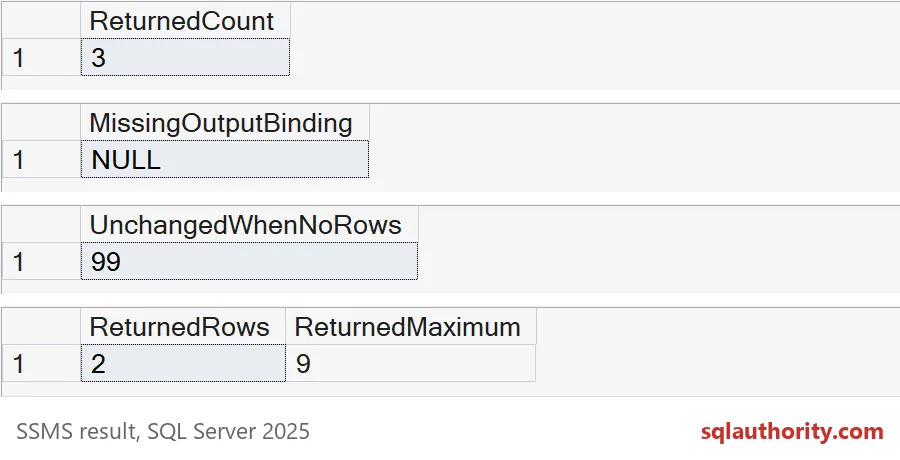
ReturnedRows is 2 and ReturnedMaximum is 9. Output parameters carry single values. If you need rows back, return a result set and catch it with INSERT EXEC into a table with matching columns. Keep those two channels separate.
Let an aggregate answer the empty case
If you want a definite answer when nothing matches, use an aggregate. COUNT_BIG returns 0 for an empty set, so the variable is overwritten.
DECLARE @Total bigint = 99;

EXEC sys.sp_executesql
     N'SELECT @Result = COUNT_BIG(*) FROM #Orders WHERE Amount > 1000;',
     N'@Result bigint OUTPUT',
     @Result = @Total OUTPUT;

SELECT @Total AS CountWhenNoRows;
CountWhenNoRows is 0, not 99. No stale value, no guessing.
Names are identifiers, values are parameters
One more habit. A table name cannot be a parameter, so when it must be dynamic, wrap it in QUOTENAME. Values still go in as parameters, never glued into the string.
DECLARE @TableName sysname = N'#Orders', @Found bigint;

DECLARE @Sql nvarchar(max) =
    N'SELECT @N = COUNT_BIG(*) FROM ' + QUOTENAME(@TableName) + N' WHERE Amount >= @MinAmount;';

EXEC sys.sp_executesql @Sql,
     N'@N bigint OUTPUT, @MinAmount decimal(18,2)',
     @N = @Found OUTPUT,
     @MinAmount = 10.00;

SELECT @Found AS OrdersAtLeastTen;

DROP TABLE IF EXISTS #Orders;
The answer is 2 again. Test your own version with NULLs, long strings and a table the login cannot reach. Return the smallest thing the caller actually needs.
Next time a variable stays NULL, count the OUTPUT words before you blame the query.
An output parameter is not automatic, it is a promise you make twice.
Published by Pinal Dave on SQLAuthority. More of my work at pinaldave.com.
Discover more from SQL Authority with Pinal Dave
Subscribe to get the latest posts sent to your email.