In an UPDATE trigger, inserted and deleted hold the new and old versions of every row the statement touched. Join them on the key and you can see exactly what changed.

Why a trigger needs both tables
Picture a support call. A customer swears their email address changed, and nobody remembers touching it. You open the table and see the new value. The old one is gone. A small audit trigger would have kept it.
Inside a trigger, SQL Server gives you two virtual tables. The deleted table holds the rows as they were before the UPDATE. The inserted table holds them as they are after. Join them on the primary key and you have old and new side by side.
One more thing. A trigger fires once per statement, not once per row. If one UPDATE changes 500 rows, both tables hold 500 rows. Code that grabs a single value into a variable quietly looks at one of them and ignores the rest. Keep the comparison set-based.
Create a table, an audit table and the trigger
Run this in any test database. The sample rows cover the cases that matter. One value changes, one NULL becomes a value, one value becomes NULL, and one value nobody touches. The trigger needs SQL Server 2022 or later because of IS DISTINCT FROM.
DROP TABLE IF EXISTS dbo.CustomerEmailAudit;
DROP TABLE IF EXISTS dbo.CustomerEmail;

CREATE TABLE dbo.CustomerEmail (Id int PRIMARY KEY, Email nvarchar(100) NULL);
CREATE TABLE dbo.CustomerEmailAudit (Id int, OldEmail nvarchar(100), NewEmail nvarchar(100));

INSERT dbo.CustomerEmail (Id, Email)
VALUES (1, N'first@example.test'), (2, NULL), (3, N'third@example.test'),
       (4, NULL), (5, N'unchanged@example.test');
GO
CREATE TRIGGER dbo.CustomerEmail_Audit ON dbo.CustomerEmail AFTER UPDATE AS
BEGIN
    SET NOCOUNT ON;

    INSERT dbo.CustomerEmailAudit (Id, OldEmail, NewEmail)
    SELECT i.Id, d.Email, i.Email
    FROM inserted AS i
    JOIN deleted AS d ON d.Id = i.Id
    WHERE i.Email IS DISTINCT FROM d.Email;
END;
Read the WHERE clause closely. It keeps only the rows whose email really changed. The join does the pairing, and IS DISTINCT FROM does the judging.
Why plain not-equal is not enough
Here is the trap. In SQL, comparing NULL to anything with an equals or not-equals sign gives unknown, and a WHERE clause throws unknown away. So a trigger that says i.Email <> d.Email misses every change that starts or ends with NULL. Those are exactly the changes you most want to hear about.
IS DISTINCT FROM treats NULL as a real value. Two NULLs are equal, and NULL against a value is different. On older versions you write the same test by hand with extra IS NULL checks. It works, but nobody enjoys reading it.
Now run one UPDATE that changes three of the five rows, then a second UPDATE that sets every row to itself. Then query the audit table. After that, start a transaction, update row 5 and roll it back.
UPDATE dbo.CustomerEmail
SET Email = CASE Id
                WHEN 1 THEN N'changed@example.test'
                WHEN 2 THEN N'added@example.test'
                WHEN 3 THEN NULL
                ELSE Email
            END;

UPDATE dbo.CustomerEmail SET Email = Email;

SELECT Id, OldEmail, NewEmail FROM dbo.CustomerEmailAudit ORDER BY Id;

BEGIN TRANSACTION;
UPDATE dbo.CustomerEmail SET Email = N'rolledback@example.test' WHERE Id = 5;
ROLLBACK TRANSACTION;

SELECT COUNT(*) AS AuditRows FROM dbo.CustomerEmailAudit;
SELECT Id, Email FROM dbo.CustomerEmail WHERE Id = 5;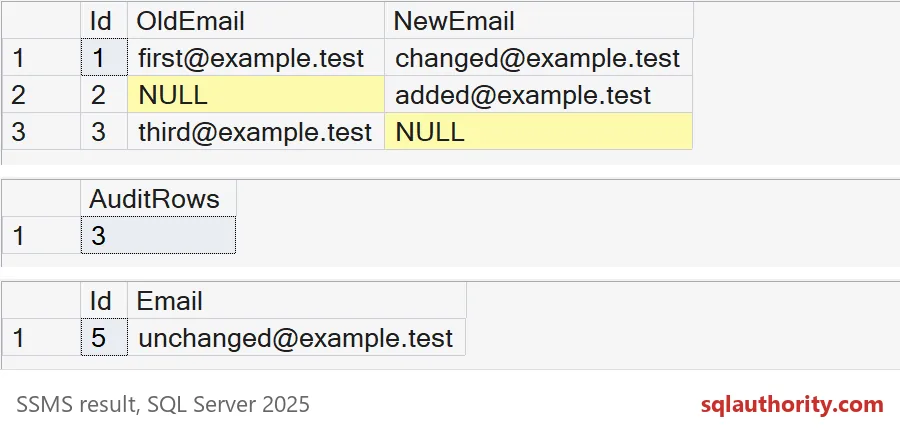
The first result shows rows 1, 2 and 3. Row 4 started as NULL and stayed NULL, so it is not there. Row 5 did not change, so it is not there either. The second UPDATE, the one that set every email to itself, added nothing. No change means no audit row.
The second and third results show the rollback. The audit table still has 3 rows, and row 5 still holds unchanged@example.test. The trigger runs inside your transaction, so the audit insert and the update live or die together.

See the difference with your own eyes
If you want proof of the NULL trap, ask the audit rows both questions. The not-equals column says no for rows 2 and 3. IS DISTINCT FROM says yes for all three.
SELECT Id, OldEmail, NewEmail,
       CASE WHEN OldEmail <> NewEmail THEN 'yes' ELSE 'no' END AS NotEqual,
       CASE WHEN OldEmail IS DISTINCT FROM NewEmail THEN 'yes' ELSE 'no' END AS IsDistinct
FROM dbo.CustomerEmailAudit
ORDER BY Id;
What a real audit table adds
My demo table has three columns on purpose. In production, add the time in UTC and the login that ran the statement. Remember that an application using one pooled login does not tell you which person clicked save.
Protect the audit table with permissions. Anyone who can alter the trigger can also switch it off, so an audit trail is only as honest as your access rules. Keep the trigger short, because it runs inside every UPDATE. A slow trigger makes every save slow.
Finally, test the boring cases: no change, NULL to value, value to NULL, and many rows in one statement. Those are the cases where triggers break. Here is the cleanup.
DROP TABLE IF EXISTS dbo.CustomerEmailAudit;
DROP TABLE IF EXISTS dbo.CustomerEmail;
Next time you write an audit trigger, test it with a NULL before you trust it.
An UPDATE is not a change, it is a request that you still have to compare.
Published by Pinal Dave on SQLAuthority. More of my work at pinaldave.com.
Discover more from SQL Authority with Pinal Dave
Subscribe to get the latest posts sent to your email.