Search for hard-coded passwords in your stored procedures before somebody else does. A short regular expression can list the suspects without ever printing the secrets. The list is a starting point for review, not proof that you are clean.

Why this scan is worth ten minutes
Imagine a code review on a Monday morning. A new colleague opens a procedure and finds a connection string with Password= and a real value. Their question is the right one: “How many more are there?” Nobody knows, because nobody has searched.
Procedure text lives in the database, in sys.sql_modules. It is copied into backups, scripts and source control. A password in that text travels with it. SQL Server 2025 has regular expression functions that make the search short. Check that your database is at compatibility level 170 before you try them.
Teach the pattern with four test strings
The first query shows the version and the compatibility level. The second tests the pattern on four made-up strings. It looks for PASSWORD or PWD followed by an equals sign, in any letter case, with optional spaces in between.
SELECT SERVERPROPERTY('ProductVersion') AS ProductVersion,
       compatibility_level FROM sys.databases WHERE database_id = DB_ID();
SELECT Label, CASE WHEN REGEXP_LIKE(TextValue, '(PASSWORD|PWD)\s*=', 'i') THEN 1 ELSE 0 END AS Candidate
FROM (VALUES
 ('Assignment', CAST(N'Pwd = demo-only-value' AS nvarchar(200))),
 ('Mixed case', N'password   = demo-only-value'),
 ('Harmless word', N'Password reset status'),
 ('Split text', N'PW' + N' D = demo-only-value')) AS v(Label, TextValue)
ORDER BY Label;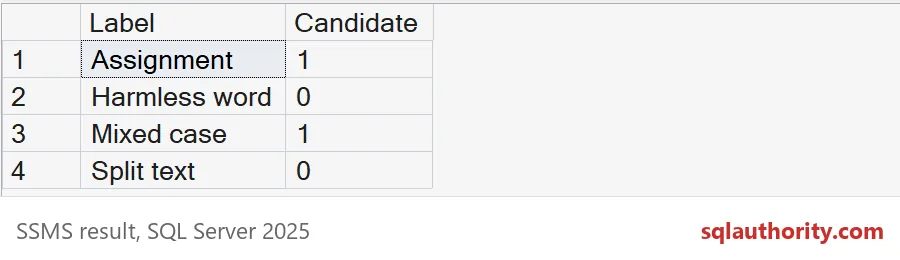
Assignment and Mixed case match. Harmless word and Split text do not. The miss on Split text is the lesson: a pattern reads characters, not intent. Anyone who builds a string in pieces will slip past it.
Plant a few procedures to scan
Now a small demo database with four procedures. One hard-codes a password in a connection string. One only mentions the word in a comment. One is clean. One is created WITH ENCRYPTION and has a variable named @Pwd. The demo creates the SqlAuthorityDemo database and drops it at the end.
USE master;
DROP DATABASE IF EXISTS SqlAuthorityDemo;
GO
CREATE DATABASE SqlAuthorityDemo;
GO
USE SqlAuthorityDemo;
GO
CREATE PROCEDURE dbo.ConnectToReports
AS
BEGIN
    DECLARE @Conn nvarchar(200) = N'Server=reports;User Id=app;Password=demo-only-value;';
    SELECT LEN(@Conn) AS ConnectionLength;
END;
GO
CREATE PROCEDURE dbo.UpdateLoginNote
AS
BEGIN
    -- Reminder: never write password = something in this file.
    SELECT N'Password reset status' AS Note;
END;
GO
CREATE PROCEDURE dbo.SafeLookup
AS
BEGIN
    SELECT name FROM sys.objects WHERE type = 'U';
END;
GO
CREATE PROCEDURE dbo.HiddenLogic
WITH ENCRYPTION
AS
BEGIN
    DECLARE @Pwd nvarchar(50) = N'demo-only-value';
    SELECT LEN(@Pwd) AS PwdLength;
END;
Scan without printing the secrets
The scan returns only the schema and procedure name. It never selects the matching text, so the report is safe to paste into a ticket. It skips definitions over two million bytes, to keep the regular expression bounded.
SELECT SCHEMA_NAME(o.schema_id) AS SchemaName, o.name AS ModuleName
FROM sys.sql_modules AS m JOIN sys.objects AS o ON o.object_id = m.object_id
WHERE DATALENGTH(m.definition) <= 2000000
 AND REGEXP_LIKE(CASE WHEN DATALENGTH(m.definition) <= 2000000 THEN m.definition ELSE N'' END,
                 '(PASSWORD|PWD)\s*=', 'i')
ORDER BY SchemaName, ModuleName;
Two names come back: ConnectToReports and UpdateLoginNote. The first is a real exposure. The second is a false alarm, because only a comment matched. That is why the result is a candidate list and a person has to review it.
Show where, not what
To help the reviewer, report how many matches each module has and the line of the first one. The reviewer can then open the module at that line. The value stays out of the report.
SELECT o.name AS ModuleName,
       REGEXP_COUNT(m.definition, '(PASSWORD|PWD)\s*=', 1, 'i') AS Matches,
       LEN(LEFT(m.definition, REGEXP_INSTR(m.definition, '(PASSWORD|PWD)\s*=', 1, 1, 0, 'i')))
         - LEN(REPLACE(LEFT(m.definition, REGEXP_INSTR(m.definition, '(PASSWORD|PWD)\s*=', 1, 1, 0, 'i')), CHAR(10), N'')) + 1 AS FirstMatchLine
FROM sys.sql_modules AS m JOIN sys.objects AS o ON o.object_id = m.object_id
WHERE REGEXP_LIKE(m.definition, '(PASSWORD|PWD)\s*=', 'i')
ORDER BY o.name;
Both modules have one match, on line 4. The line number counts from the first line of the stored definition.
Know your blind spots
HiddenLogic holds a variable called @Pwd, yet it was not in the results. Its text is encrypted, so SQL Server returns NULL for the definition, and the pattern cannot read NULL. This query lists the modules the scan could not read. Very long definitions would show up here too, for a separate review.
SELECT SCHEMA_NAME(o.schema_id) AS SchemaName, o.name AS ModuleName,
       CASE WHEN m.definition IS NULL THEN 'Definition unavailable' ELSE 'Separate long-text review' END AS Coverage
FROM sys.sql_modules AS m JOIN sys.objects AS o ON o.object_id = m.object_id
WHERE m.definition IS NULL OR DATALENGTH(m.definition) > 2000000
ORDER BY SchemaName, ModuleName;
HiddenLogic appears as “Definition unavailable”. Also remember what this scan never touches. Agent job steps can hold connection strings, and external scripts and application code are outside sys.sql_modules. Search those separately. An empty report is not a statement about the whole machine.

Fix the cause, then scan again
Before you change anything, confirm the exposure is real and tell the owner of the secret. Rotate it, because old text lives on in backups and exports. Then remove the literal. Here the procedure receives its connection string from the caller. The rescan shows only the comment.
ALTER PROCEDURE dbo.ConnectToReports @Conn nvarchar(200)
AS
BEGIN
    SELECT LEN(@Conn) AS ConnectionLength;
END;
GO
SELECT o.name AS ModuleName
FROM sys.sql_modules AS m JOIN sys.objects AS o ON o.object_id = m.object_id
WHERE REGEXP_LIKE(m.definition, '(PASSWORD|PWD)\s*=', 'i')
ORDER BY o.name;
GO
USE master;
DROP DATABASE IF EXISTS SqlAuthorityDemo;
Now only UpdateLoginNote is left. Test the real operation under its real identity too, because a clean scan says nothing about whether the job still works.
Run the scan, review each name, and rotate what you find.
A password scan is not a clean bill of health, it is a list to review.
Published by Pinal Dave on SQLAuthority. More of my work at pinaldave.com.
Discover more from SQL Authority with Pinal Dave
Subscribe to get the latest posts sent to your email.