A huge transaction log file has a reason, and SQL Server names it in one column. Four quick checks tell you the reason, the size, the VLF count and the room left on the drive. A small demo database below runs them.

What a Huge Transaction Log File Means
The log records every change before it reaches the data file. SQL Server can reuse log space only when those records are no longer needed. In FULL recovery, the records stay until a log backup copies them. An open transaction keeps them too. When nothing frees the space, the file grows until the drive is full.
The log is a circle of chunks called virtual log files, or VLFs. SQL Server reuses a VLF only when every record inside it is free. One busy VLF holds back its neighbors behind it.
Build a Small Demo
The first script creates LogSizeDemo in FULL recovery, takes one full backup, and loads 200,000 rows. The backup goes to the NUL device, which throws the data away. That is fine for a demo and wrong for anything real, because a restore needs real backup files. A FULL recovery database behaves like SIMPLE until its first full backup. That backup starts the log chain.
IF DB_ID(N'LogSizeDemo') IS NULL CREATE DATABASE LogSizeDemo;
GO
ALTER DATABASE LogSizeDemo SET RECOVERY FULL;
BACKUP DATABASE LogSizeDemo TO DISK = N'NUL';
GO
USE LogSizeDemo;
GO
DROP TABLE IF EXISTS dbo.Readings;
CREATE TABLE dbo.Readings (
    ReadingID  int IDENTITY(1,1) NOT NULL PRIMARY KEY,
    SensorCode char(8)       NOT NULL,
    Reading    decimal(9,3)  NOT NULL,
    Note       char(200)     NOT NULL DEFAULT 'x'
);
INSERT INTO dbo.Readings (SensorCode, Reading)
SELECT TOP (200000)
       'S' + RIGHT('0000000' + CAST(ABS(CHECKSUM(NEWID())) % 100 AS varchar(7)), 7),
       ABS(CHECKSUM(NEWID())) % 1000 / 10.0
FROM sys.all_objects AS a CROSS JOIN sys.all_objects AS b;
Ask the Log Four Questions
The next script asks four things. Why can’t the log be reused? How big is it? How many VLFs does it hold? How much room does the drive have? The view sys.dm_db_log_space_usage reports on the current database only. For every database at once, run DBCC SQLPERF(LOGSPACE). The function sys.dm_db_log_info needs SQL Server 2016 SP2 or later.
SELECT name, recovery_model_desc, log_reuse_wait_desc
FROM sys.databases
WHERE name = DB_NAME();

SELECT CAST(total_log_size_in_bytes / 1048576.0 AS decimal(10,1)) AS LogMB,
       CAST(used_log_space_in_bytes / 1048576.0 AS decimal(10,1)) AS UsedMB,
       CAST(used_log_space_in_percent AS decimal(5,1)) AS UsedPercent
FROM sys.dm_db_log_space_usage;

SELECT COUNT(*) AS VlfCount, SUM(CAST(vlf_active AS int)) AS ActiveVlfs
FROM sys.dm_db_log_info(DB_ID());

SELECT CAST(f.size * 8 / 1024.0 AS decimal(10,1)) AS LogFileMB,
       v.volume_mount_point AS Drive,
       CAST(v.available_bytes / 1073741824.0 AS decimal(10,1)) AS DriveFreeGB
FROM sys.database_files AS f
CROSS APPLY sys.dm_os_volume_stats(DB_ID(), f.file_id) AS v
WHERE f.type_desc = N'LOG';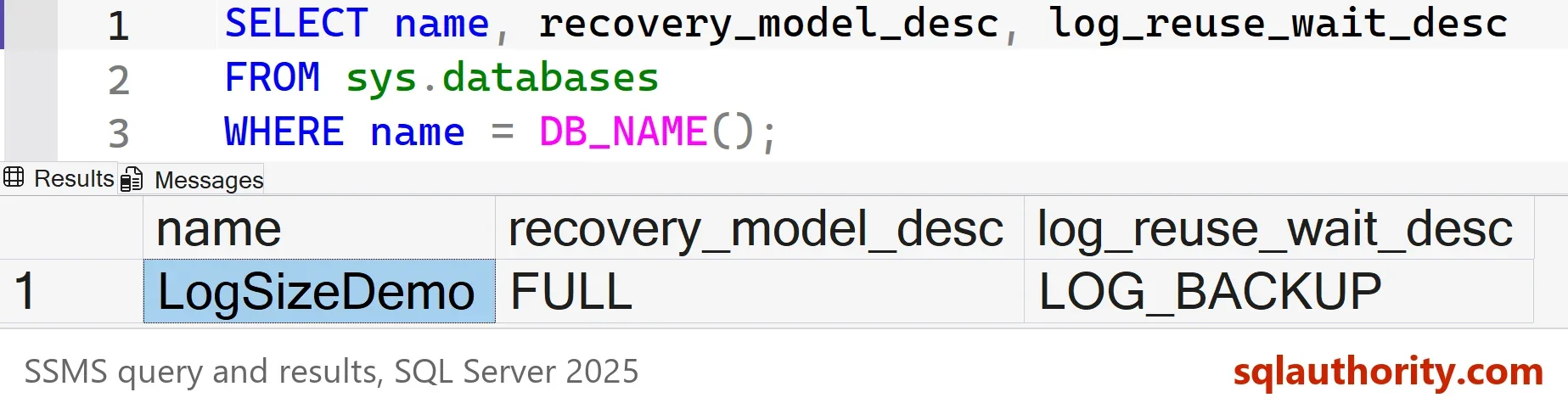
The picture shows the first result. The tables below show the other three.
| LogMB | UsedMB | UsedPercent |
|---|---|---|
| 136.0 | 68.3 | 50.2 |
| VlfCount | ActiveVlfs |
|---|---|
| 6 | 5 |
| LogFileMB | Drive | DriveFreeGB |
|---|---|---|
| 136.0 | C:\ | 125.4 |
The reason is LOG_BACKUP. The database is in FULL recovery and no log backup has run since the load. SQL Server must keep every record. The log is 136 MB, and about half of it is in use. The drive has plenty of room here. On a real server, this last number is the one that raises an alarm. Small differences in the used space and the free space are normal on your run.
The reason column is the most useful part. Learn its main values.
| log_reuse_wait_desc | What it means | What to do |
|---|---|---|
| LOG_BACKUP | FULL or BULK_LOGGED recovery, no log backup yet | Back up the log, and schedule it |
| ACTIVE_TRANSACTION | A transaction is still open | Find it, then commit or end it |
| AVAILABILITY_REPLICA | A replica has not received the log yet | Check the replica and the network |
| REPLICATION | Replication has not read the records yet | Check the log reader |
| NOTHING | The space can be reused | No action |
Fix the Cause
Back up the log. The records leave the log, and SQL Server can reuse the space. Run the same checks afterward.
BACKUP LOG LogSizeDemo TO DISK = N'NUL';
GO
SELECT name, log_reuse_wait_desc FROM sys.databases WHERE name = N'LogSizeDemo';

SELECT CAST(used_log_space_in_percent AS decimal(5,1)) AS UsedPercent FROM sys.dm_db_log_space_usage;

SELECT CAST(vlf_size_mb AS decimal(6,1)) AS SizeMB, vlf_active AS Active
FROM sys.dm_db_log_info(DB_ID())
ORDER BY vlf_begin_offset;
| name | log_reuse_wait_desc |
|---|---|
| LogSizeDemo | NOTHING |
| UsedPercent |
|---|
| 44.4 |
| SizeMB | Active |
|---|---|
| 1.9 | 0 |
| 1.9 | 0 |
| 1.9 | 0 |
| 2.2 | 0 |
| 64.0 | 1 |
| 64.0 | 0 |
The reason is now NOTHING, yet 44 percent of the log still shows as used. The reuse works one VLF at a time. The VLF that holds the current end of the log stays active, and here it is a 64 MB chunk. The other five are free. The file keeps its size, because a log backup frees space inside the file and never shrinks it.
Find the Open Transaction
A transaction that stays open holds the log as firmly as a missing backup. The next script opens a transaction, updates 50,000 rows, and reports how much log the transaction owns. On a real server, run the SELECT from a second window while the long transaction runs.
BEGIN TRANSACTION;
UPDATE dbo.Readings SET Reading = Reading + 1 WHERE ReadingID <= 50000;
SELECT st.session_id, tr.transaction_begin_time AS Began,
       CAST(dt.database_transaction_log_bytes_used / 1048576.0 AS decimal(10,2)) AS LogUsedMB
FROM sys.dm_tran_database_transactions AS dt
JOIN sys.dm_tran_active_transactions AS tr ON tr.transaction_id = dt.transaction_id
JOIN sys.dm_tran_session_transactions AS st ON st.transaction_id = dt.transaction_id
WHERE dt.database_id = DB_ID()
ORDER BY tr.transaction_begin_time;
ROLLBACK TRANSACTION;| session_id | Began | LogUsedMB |
|---|---|---|
| 56 | 2026-10-06 20:13:12.623 | 5.05 |
This one transaction holds about 5 MB for 50,000 changed rows. A transaction that loads millions of rows holds far more. The session_id tells you who to ask. Your session number and time will differ. Commit or roll back the work, then take a log backup. DBCC OPENTRAN prints the oldest open transaction of a database, if you prefer a one line answer.
Shrink Once, Then Size It
After you fix the cause of a huge transaction log file, the file is still big. A shrink gives the space back to the drive. It can only cut up to the active VLF, so the script backs up the log and shrinks twice. In this demo the first shrink cuts nothing, because the end of the file is still in use. After another log backup, the same shrink works.
The result is 72 MB, not the 16 MB target, because the shrink stops at the active VLF. Next, set a growth step in megabytes. A percentage grows larger every time.
BACKUP LOG LogSizeDemo TO DISK = N'NUL';
DBCC SHRINKFILE (N'LogSizeDemo_log', 16) WITH NO_INFOMSGS;
BACKUP LOG LogSizeDemo TO DISK = N'NUL';
DBCC SHRINKFILE (N'LogSizeDemo_log', 16) WITH NO_INFOMSGS;
ALTER DATABASE LogSizeDemo MODIFY FILE (NAME = N'LogSizeDemo_log', FILEGROWTH = 32MB);
SELECT CAST(size * 8 / 1024.0 AS decimal(10,1)) AS LogFileMB, growth * 8 / 1024 AS GrowthMB, is_percent_growth
FROM sys.database_files
WHERE type_desc = N'LOG';
| LogFileMB | GrowthMB | is_percent_growth |
|---|---|---|
| 72.0 | 32 | 0 |
You could argue that shrinking is never a good idea. A shrink that repeats every night forces the file to grow again. Each growth adds VLFs and stalls writes. Shrink once, after an emergency, and leave the file big enough for the busiest day. For a database that doesn’t need point-in-time restore, SIMPLE recovery removes the log backup problem. It also removes the restore options, so choose it on purpose.
What to Remember
When a huge transaction log file appears, read the reason column first. LOG_BACKUP means the backup schedule is missing or too slow. ACTIVE_TRANSACTION means a person or a job holds the log. Everything else on the list has its own owner, such as a replica or a replication job.
Never back up to NUL on a real database, because it breaks the restore chain. When you finish with the demo, run the cleanup script. It also clears the backup history that the demo wrote.
USE master;
GO
IF DB_ID(N'LogSizeDemo') IS NOT NULL
BEGIN
    ALTER DATABASE LogSizeDemo SET SINGLE_USER WITH ROLLBACK IMMEDIATE;
    DROP DATABASE LogSizeDemo;
END;
EXEC msdb.dbo.sp_delete_database_backuphistory @database_name = N'LogSizeDemo';
A huge log file is not a mystery, it is a reason you have not read yet.
Published by Pinal Dave on SQLAuthority. More of my work at pinaldave.com.
Discover more from SQL Authority with Pinal Dave
Subscribe to get the latest posts sent to your email.