Salted password hashes make two identical passwords look different in your table, but they do not make guessing slow. One HASHBYTES call is fast, and a fast hash is a gift to anyone trying millions of guesses. Treat this post as a map of a legacy design, not a recipe for a new one.
What a salt does for you
Imagine a database leak. If two users share a password and you stored a plain hash, their hashes match. One cracked hash opens every account that uses it. A salt fixes that. It is a random value stored next to the hash and mixed into the input. The same password then produces a different digest for every user.
The salt is not a secret key. It sits in the same row as the digest. Its only job is to make each stored value unique. The passwords in this post are made up, so never put a real password in a script.
Build one salted digest
The first query makes a 16-byte random salt with CRYPT_GEN_RANDOM, then hashes the salt plus the password bytes with SHA2_512. It then checks the right and the wrong password against the stored digest. Keep the byte layout and the order of concatenation identical every time you verify.
DECLARE @Password nvarchar(200) = N'Sample phrase for the demo';
DECLARE @Salt varbinary(16) = CRYPT_GEN_RANDOM(16);
DECLARE @Digest varbinary(64) = HASHBYTES('SHA2_512',
    CONVERT(varbinary(max), @Salt) + CONVERT(varbinary(max), @Password));

SELECT DATALENGTH(@Salt) AS SaltBytes, DATALENGTH(@Digest) AS DigestBytes,
       CASE WHEN @Digest = HASHBYTES('SHA2_512', CONVERT(varbinary(max), @Salt)
            + CONVERT(varbinary(max), @Password)) THEN 1 ELSE 0 END AS CorrectMatches,
       CASE WHEN @Digest = HASHBYTES('SHA2_512', CONVERT(varbinary(max), @Salt)
            + CONVERT(varbinary(max), N'Wrong phrase')) THEN 1 ELSE 0 END AS WrongMatches;
The salt has 16 bytes and the digest has 64. The correct phrase matches with 1, and the wrong one returns 0.
NULL and encoding bite quietly
Two small traps live here. A missing password gives a NULL hash, so reject empty input before you hash. And the same text hashes differently as varchar and as nvarchar, because the bytes differ. Pick one encoding and keep it.
SELECT HASHBYTES('SHA2_512', CAST(NULL AS varbinary(max))) AS MissingInput,
       CASE WHEN HASHBYTES('SHA2_512', CONVERT(varbinary(max), CAST('sample' AS varchar(20))))
               = HASHBYTES('SHA2_512', CONVERT(varbinary(max), CAST(N'sample' AS nvarchar(20))))
            THEN 1 ELSE 0 END AS EncodingsMatch;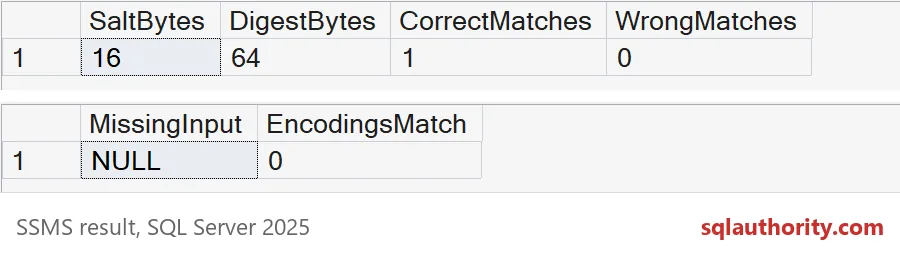
The missing input produces NULL, and EncodingsMatch is 0. For the same reason, do not trim, lowercase or shorten a password before hashing. A friendly cleanup quietly changes what the user typed.
Two users, one password, two digests
Now see the salt do its job. Two users get the same password. The second query counts how many different digests you would store with and without a salt.
DROP TABLE IF EXISTS #Users;
CREATE TABLE #Users
(
    UserName nvarchar(20)  NOT NULL PRIMARY KEY,
    Salt     varbinary(16) NOT NULL,
    Digest   varbinary(64) NOT NULL
);

DECLARE @Password nvarchar(200) = N'Sample phrase for the demo';

INSERT #Users (UserName, Salt, Digest)
SELECT u.UserName, s.Salt, HASHBYTES('SHA2_512', s.Salt + CONVERT(varbinary(max), @Password))
FROM (VALUES (N'user_a'), (N'user_b')) AS u(UserName)
CROSS APPLY (SELECT CRYPT_GEN_RANDOM(16) AS Salt) AS s;

SELECT COUNT(*) AS users,
       COUNT(DISTINCT Digest) AS distinct_digests_with_salt,
       COUNT(DISTINCT HASHBYTES('SHA2_512', CONVERT(varbinary(max), @Password))) AS distinct_digests_without_salt
FROM #Users;
Two users, two different digests with a salt, and only one without. Verification still works, because each row carries its own salt. Rebuild the hash from the salt and the attempt, then compare.
SELECT u.UserName,
       CASE WHEN u.Digest = HASHBYTES('SHA2_512', u.Salt
            + CONVERT(varbinary(max), N'Sample phrase for the demo')) THEN 1 ELSE 0 END AS RightAttempt,
       CASE WHEN u.Digest = HASHBYTES('SHA2_512', u.Salt
            + CONVERT(varbinary(max), N'Wrong phrase')) THEN 1 ELSE 0 END AS WrongAttempt
FROM #Users AS u
ORDER BY u.UserName;
Why one fast hash is still weak
The salt stops one precomputed table from serving every account. It does not stop someone from guessing against a single account. Watch how fast that goes. Here is an account whose password is Welcome150000, and a script that tries 200,000 guesses.
DECLARE @Salt varbinary(16) = CRYPT_GEN_RANDOM(16);
DECLARE @Digest varbinary(64) = HASHBYTES('SHA2_512', @Salt + CONVERT(varbinary(max), N'Welcome150000'));
DECLARE @Start datetime2 = SYSDATETIME();

SELECT COUNT(*) AS guesses_tried,
       SUM(CASE WHEN HASHBYTES('SHA2_512', @Salt + CONVERT(varbinary(max), CONCAT(N'Welcome', value))) = @Digest
                THEN 1 ELSE 0 END) AS found
FROM GENERATE_SERIES(1, 200000);

SELECT DATEDIFF(MILLISECOND, @Start, SYSDATETIME()) AS elapsed_ms;
It finds the password, found = 1, in under a second on my test server. I saw about 750 ms. Your time will differ, but the lesson will not. The salt did not slow anything down. For a real system, use a password-hashing library in your application, built to be slow on purpose, with a work factor you can raise later.
Plan the migration, not just the hash
Store the algorithm and a version number with every credential, so you can upgrade later. Move users to the new scheme when they log in successfully. Limit who can read the credential table, and return a yes or no, never the salt and digest. Old backups and exports still hold the old values, so include them in your review.
DROP TABLE IF EXISTS #Users;Keep the password rules in the application, and use this only to understand what you inherited.
A salted hash is not a login system, it is one small part of one.
Published by Pinal Dave on SQLAuthority. More of my work at pinaldave.com.
Discover more from SQL Authority with Pinal Dave
Subscribe to get the latest posts sent to your email.