The money data type keeps four decimal places, and it rounds after every division. If you divide first and convert to decimal later, the digits are already gone. Convert the operands to decimal before you divide, and pick the final rounding yourself.

The penny that disappeared
Here is a call every DBA gets once. Finance says the monthly report is off by a penny. Nobody lost a penny. The report divided one money value by another, multiplied by 100, and the intermediate result had already been rounded to four decimals.
Storing amounts in a money column is fine. The trouble starts when money values meet division. The column also holds no currency, so keep the currency code somewhere else.
Divide one by three, two ways
I use one third because it never ends. That makes the lost digits easy to see. The first query shows a percentage built from money and one built from decimal. It also reports the type and scale of the money ratio.
The second query casts to decimal(19,8) after the division, then before. The third checks a negative number and a zero denominator, where NULLIF turns a zero denominator into NULL.
DECLARE @Part money = 1, @Total money = 3;

SELECT (@Part / @Total) * 100 AS money_percentage,
       (CONVERT(decimal(19,4), @Part) / CONVERT(decimal(19,4), @Total)) * 100 AS decimal_percentage,
       SQL_VARIANT_PROPERTY(@Part / @Total, 'BaseType') AS money_ratio_type,
       SQL_VARIANT_PROPERTY(@Part / @Total, 'Scale') AS money_ratio_scale;

SELECT CONVERT(decimal(19,8), @Part / @Total) AS cast_after_division,
       CONVERT(decimal(19,8), @Part) / CONVERT(decimal(19,8), @Total) AS decimal_before_division;

SELECT CONVERT(decimal(19,8), -1) / CONVERT(decimal(19,8), 3) AS negative_ratio,
       CONVERT(decimal(19,8), 1) / NULLIF(CONVERT(decimal(19,8), 0), 0) AS zero_denominator_result;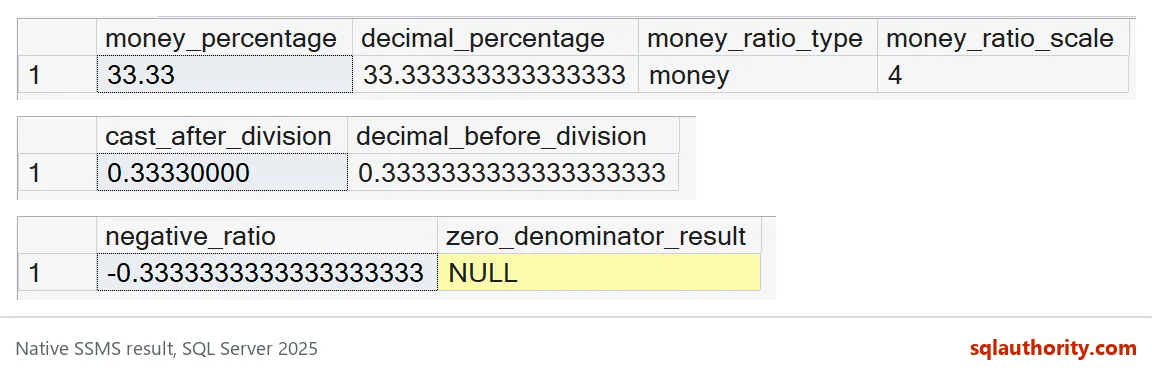
Read the first grid. The money percentage is 33.33, because the ratio is stored as 0.3333 and then multiplied by 100. Money always has four decimals, so some tools print it as 33.3300. The decimal path gives 33.333333333333333. The type is money and the scale is 4.
The second grid is the lesson. Cast after the division and you get 0.33330000. The cast only adds zeros to a number that was already rounded. Divide in decimal and you get 0.3333333333333333333. You cannot recover digits that were thrown away.
The third grid shows the checks you should always try: a negative ratio works, and a zero denominator gives NULL.

No type gives you exactly one third
Decimal is better, but it is not magic. Divide one by three and multiply by three again. Money gets back to 0.9999. Decimal(19,8) gets to 0.9999999999. Neither one returns to 1.
DECLARE @MoneyOne money = 1, @DecimalOne decimal(19,8) = 1;

SELECT @MoneyOne / 3 * 3 AS money_thirds,
       @DecimalOne / 3 * 3 AS decimal_thirds;
That is why a business rule has to decide where the rounding happens. Pick the scale from your currency and policy, round once at the end, and write that rule down.
Split a total and find the leftover penny
The classic example is splitting 100.00 across three people. Round each share to cents, add them up, and compare with the total.
DECLARE @Total decimal(19,2) = 100.00;
DECLARE @Share decimal(19,2) = ROUND(@Total / 3, 2);

SELECT @Share AS each_share,
       @Share * 3 AS shares_added,
       @Total - @Share * 3 AS leftover;
Each share is 33.33, the three add up to 99.99, and 0.01 is left over. The report is correct and the money is still missing a penny. Decide who gets it, for example the first share, and make that an explicit rule in your code.
Before you change a money column
Moving a column from money to decimal touches parameters, result sets and every client that reads them. Test the real application path, not just the table. Try negative amounts, tiny ratios, large values and zero denominators. Then compare the sum of your parts with the original total, row by row.
Next time Finance mentions a penny, you will know where to look first.
A late decimal cast is not a repair, it is a new label on lost digits.
Published by Pinal Dave on SQLAuthority. More of my work at pinaldave.com.
Discover more from SQL Authority with Pinal Dave
Subscribe to get the latest posts sent to your email.