
To get column names from a table in SQL Server, query sys.columns with OBJECT_ID, or read INFORMATION_SCHEMA.COLUMNS. Both return one row per column, in the order the table defines. This tutorial tests four methods and one trap on a small demo database.

A Demo Database With a Trap
The script creates a database named ColumnNamesDemo. It holds a Customer table in the dbo schema and a view. A second table, also named Customer, sits in a schema named shop. That second table is the trap, because two tables can share a name when their schemas differ. The computed column Initials and the default on Joined give the methods something to show.
IF DB_ID(N'ColumnNamesDemo') IS NULL CREATE DATABASE ColumnNamesDemo;
GO
USE ColumnNamesDemo;
GO
IF SCHEMA_ID(N'shop') IS NULL EXEC (N'CREATE SCHEMA shop');
GO
DROP VIEW IF EXISTS dbo.CustomerCity;
DROP TABLE IF EXISTS dbo.Customer, shop.Customer;
CREATE TABLE dbo.Customer (
    CustomerID int IDENTITY(1,1) NOT NULL PRIMARY KEY,
    FullName   nvarchar(60) NOT NULL,
    City       nvarchar(40) NULL,
    Joined     date NOT NULL CONSTRAINT DF_Customer_Joined DEFAULT (SYSDATETIME()),
    Initials   AS (LEFT(FullName, 1))
);
CREATE TABLE shop.Customer (ShopCustomerID int NOT NULL PRIMARY KEY, Nickname nvarchar(30) NOT NULL);
GO
CREATE VIEW dbo.CustomerCity AS SELECT CustomerID, City FROM dbo.Customer;
Method 1: INFORMATION_SCHEMA.COLUMNS
The INFORMATION_SCHEMA views are part of the SQL standard, so this query ports to other database systems. Filter by schema and table, and sort by ORDINAL_POSITION to get the columns in table order.
SELECT COLUMN_NAME, DATA_TYPE, IS_NULLABLE
FROM INFORMATION_SCHEMA.COLUMNS
WHERE TABLE_SCHEMA = N'dbo' AND TABLE_NAME = N'Customer'
ORDER BY ORDINAL_POSITION;
| COLUMN_NAME | DATA_TYPE | IS_NULLABLE |
|---|---|---|
| CustomerID | int | NO |
| FullName | nvarchar | NO |
| City | nvarchar | YES |
| Joined | date | NO |
| Initials | nvarchar | YES |
Now the trap. Leave out the schema and filter by table name only. SQL Server then returns every table that carries that name.
SELECT TABLE_SCHEMA, COLUMN_NAME
FROM INFORMATION_SCHEMA.COLUMNS
WHERE TABLE_NAME = N'Customer'
ORDER BY TABLE_SCHEMA, ORDINAL_POSITION;
| TABLE_SCHEMA | COLUMN_NAME |
|---|---|
| dbo | CustomerID |
| dbo | FullName |
| dbo | City |
| dbo | Joined |
| dbo | Initials |
| shop | ShopCustomerID |
| shop | Nickname |
Seven rows come back, and two of them belong to a different table. Always filter by schema too, or you build a query on columns that don’t exist in your table.
Method 2: sys.columns and OBJECT_ID
To get column names reliably, use the catalog view sys.columns. It holds every column of every table and view. The function OBJECT_ID turns a schema-qualified name into the number the view uses, so the schema trap can’t happen. This is the method I use most. It also exposes details that the standard views hide, such as identity and computed columns.
SELECT c.column_id, c.name, TYPE_NAME(c.user_type_id) AS data_type, c.max_length,
       c.is_nullable, c.is_identity, c.is_computed
FROM sys.columns AS c
WHERE c.object_id = OBJECT_ID(N'dbo.Customer')
ORDER BY c.column_id;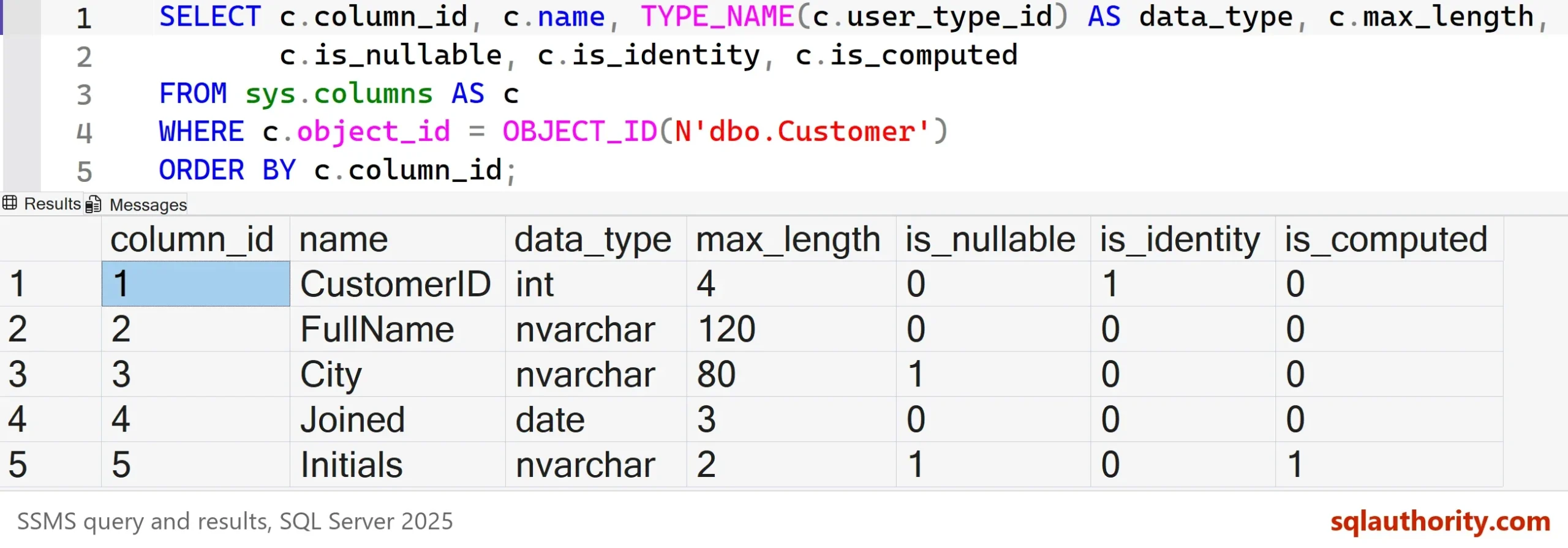
The result shows five columns. CustomerID is the identity column, and Initials is the computed one. The column max_length counts bytes, so the nvarchar(60) column FullName shows 120. The same pattern works for a view. Point OBJECT_ID at the view and the query returns its column names.
SELECT c.name FROM sys.columns AS c WHERE c.object_id = OBJECT_ID(N'dbo.CustomerCity') ORDER BY c.column_id;
That query returns CustomerID and City. If you skip the schema in OBJECT_ID, SQL Server uses the default schema of the caller. In the demo that is dbo, so it finds the right table. For a caller with another default schema it finds a different one. Name the schema every time.
Method 3: sp_columns
The system procedure sp_columns returns the same facts in an ODBC style. It takes the table name and the owner. The result has 19 columns, so it’s better for a quick look than for a query you plan to reuse.
EXEC sp_columns @table_name = N'Customer', @table_owner = N'dbo';
The result includes the type name, the length, the default and the position. The type name for CustomerID reads int identity.
Method 4: Describe a Result Set
The first three methods describe tables. The function sys.dm_exec_describe_first_result_set describes what a query returns. That’s useful when the source is a join, a view or a stored procedure. Pass the query text, and it lists the names and types of the columns it would return.
SELECT column_ordinal, name, system_type_name, is_nullable
FROM sys.dm_exec_describe_first_result_set(N'SELECT * FROM dbo.Customer', NULL, 0)
ORDER BY column_ordinal;
The names match the table, and the type column shows the full definition, such as nvarchar(60). Nothing runs against the data.
Build a Column List to Paste
Sometimes the real goal is the list itself, ready to paste into a SELECT. STRING_AGG joins the names into one string, and QUOTENAME adds the brackets that protect unusual names. It needs SQL Server 2017.
SELECT STRING_AGG(QUOTENAME(c.name), N', ') WITHIN GROUP (ORDER BY c.column_id) AS ColumnList
FROM sys.columns AS c
WHERE c.object_id = OBJECT_ID(N'dbo.Customer');
| ColumnList |
|---|
| [CustomerID], [FullName], [City], [Joined], [Initials] |
Find Every Table That Has a Column
The reverse question is common too. Which tables contain a column named City? One query over sys.columns answers it, because the view holds all of them.
SELECT s.name AS SchemaName, t.name AS TableName
FROM sys.columns AS c
JOIN sys.tables AS t ON t.object_id = c.object_id
JOIN sys.schemas AS s ON s.schema_id = t.schema_id
WHERE c.name = N'City'
ORDER BY SchemaName, TableName;
The answer is dbo.Customer. The same query helps when you look for matching columns across tables. A join key is a good example. On a real database the list can be long. Add a LIKE when you know only part of the name.
In Management Studio
In SSMS 22, expand the table in Object Explorer and open its Columns folder to see the names. Drag the Columns folder into a query window to insert the names as a list. You can also right click the table. Choose Script Table as, then SELECT To, then New Query Editor Window. That writes a full SELECT.
You could argue that the drag is quicker than any query. For one table, it is. A query wins when a script needs the names. It also wins for many tables, or when the tool has no Object Explorer.
What to Remember
To get column names from one table, use sys.columns with a schema-qualified OBJECT_ID. Use INFORMATION_SCHEMA.COLUMNS when the query must run on other database systems. Always filter by schema as well as table name. Use the describe function for query results. Run the cleanup script when you finish.
USE master;
GO
ALTER DATABASE ColumnNamesDemo SET SINGLE_USER WITH ROLLBACK IMMEDIATE;
DROP DATABASE ColumnNamesDemo;
A column name is not a guess, it is a row in a catalog that SQL Server will hand you.
Published by Pinal Dave on SQLAuthority. More of my work at pinaldave.com.
Discover more from SQL Authority with Pinal Dave
Subscribe to get the latest posts sent to your email.



1 Comment. Leave new
Thanks Pinal for sharing another nice article.
This post is very help full me.
Keep Sharing