
The log shipping alternative for a simple recovery database is a copy that restores the newest full and differential backups. It isn’t real log shipping, and it has limits. It works without a single log backup.

Why Simple Recovery Can’t Ship Logs
Log shipping copies transaction log backups from one server to another and restores them there. A database in the simple recovery model reuses its log, so SQL Server refuses to back it up. You can see the refusal in the next section.
The honest fix is to change the recovery model to FULL and ship the logs. Sometimes that isn’t possible, or the database doesn’t need minute-level recovery. A differential backup holds every page changed since the last full backup. That’s enough to keep a second copy fairly fresh.
How the Log Shipping Alternative Works
The log shipping alternative needs two files: the newest full backup, and the newest differential backup built on it. Restore the full with NORECOVERY, then restore the differential, and the copy matches the source as of that differential. If someone takes a new full backup, every older differential becomes useless, because it was built on the old one.
The demo uses two databases on one instance, ShipSourceDemo as the primary and ShipCopyDemo as the copy. The first script creates the source with three orders, takes a full backup, adds two orders, and takes a differential. File names without a folder go to the instance’s default backup folder.
IF DB_ID(N'ShipSourceDemo') IS NULL CREATE DATABASE ShipSourceDemo;
GO
ALTER DATABASE ShipSourceDemo SET RECOVERY SIMPLE;
GO
USE ShipSourceDemo;
GO
DROP TABLE IF EXISTS dbo.Orders;
CREATE TABLE dbo.Orders (OrderID int NOT NULL PRIMARY KEY, Item nvarchar(40) NOT NULL);
INSERT INTO dbo.Orders VALUES (1, N'Oat bars'), (2, N'Herb tea'), (3, N'Fig jam');
GO
BACKUP DATABASE ShipSourceDemo TO DISK = N'ShipSourceDemo_full.bak' WITH INIT, CHECKSUM;
GO
INSERT INTO dbo.Orders VALUES (4, N'Lemon tart'), (5, N'Mint tea');
GO
BACKUP DATABASE ShipSourceDemo TO DISK = N'ShipSourceDemo_diff1.bak' WITH DIFFERENTIAL, INIT, CHECKSUM;
Now try a log backup on the source. SQL Server refuses.
BACKUP LOG ShipSourceDemo TO DISK = N'ShipSourceDemo_log.bak';
Msg 4208, Level 16, State 1, Line 1
The statement BACKUP LOG is not allowed while the recovery model is SIMPLE. Use BACKUP DATABASE or change the recovery model using ALTER DATABASE.
Msg 3013, Level 16, State 1, Line 1
BACKUP LOG is terminating abnormally.
Find the Two Files
SQL Server records every backup in msdb. A differential row stores database_backup_lsn, which equals the checkpoint_lsn of the full backup it belongs to. The query below picks the newest full backup that isn’t COPY_ONLY, then the newest differential with that base. If no differential exists yet, DiffFile is NULL.
USE master;
GO
DECLARE @db sysname = N'ShipSourceDemo';
SELECT f.Device AS FullFile, d.Device AS DiffFile
FROM (SELECT TOP (1) b.checkpoint_lsn, m.physical_device_name AS Device
      FROM msdb.dbo.backupset b JOIN msdb.dbo.backupmediafamily m ON m.media_set_id = b.media_set_id
      WHERE b.database_name = @db AND b.type = 'D' AND b.is_copy_only = 0
      ORDER BY b.backup_finish_date DESC) f
OUTER APPLY (SELECT TOP (1) m.physical_device_name AS Device
      FROM msdb.dbo.backupset b JOIN msdb.dbo.backupmediafamily m ON m.media_set_id = b.media_set_id
      WHERE b.database_name = @db AND b.type = 'I' AND b.database_backup_lsn = f.checkpoint_lsn
ORDER BY b.backup_finish_date DESC) d;| FullFile | DiffFile |
|---|---|
| D:\SQLDEV-Backup\ShipSourceDemo_full.bak | D:\SQLDEV-Backup\ShipSourceDemo_diff1.bak |
Your backup folder differs.
A COPY_ONLY full backup is ignored here on purpose. It doesn’t change the differential base, so it’s the right kind of backup for an extra one-off copy. A full backup, with or without COPY_ONLY, doesn’t break a log backup chain. COPY_ONLY only keeps the differential base where it is, which is why a one-off extra full backup should use it.
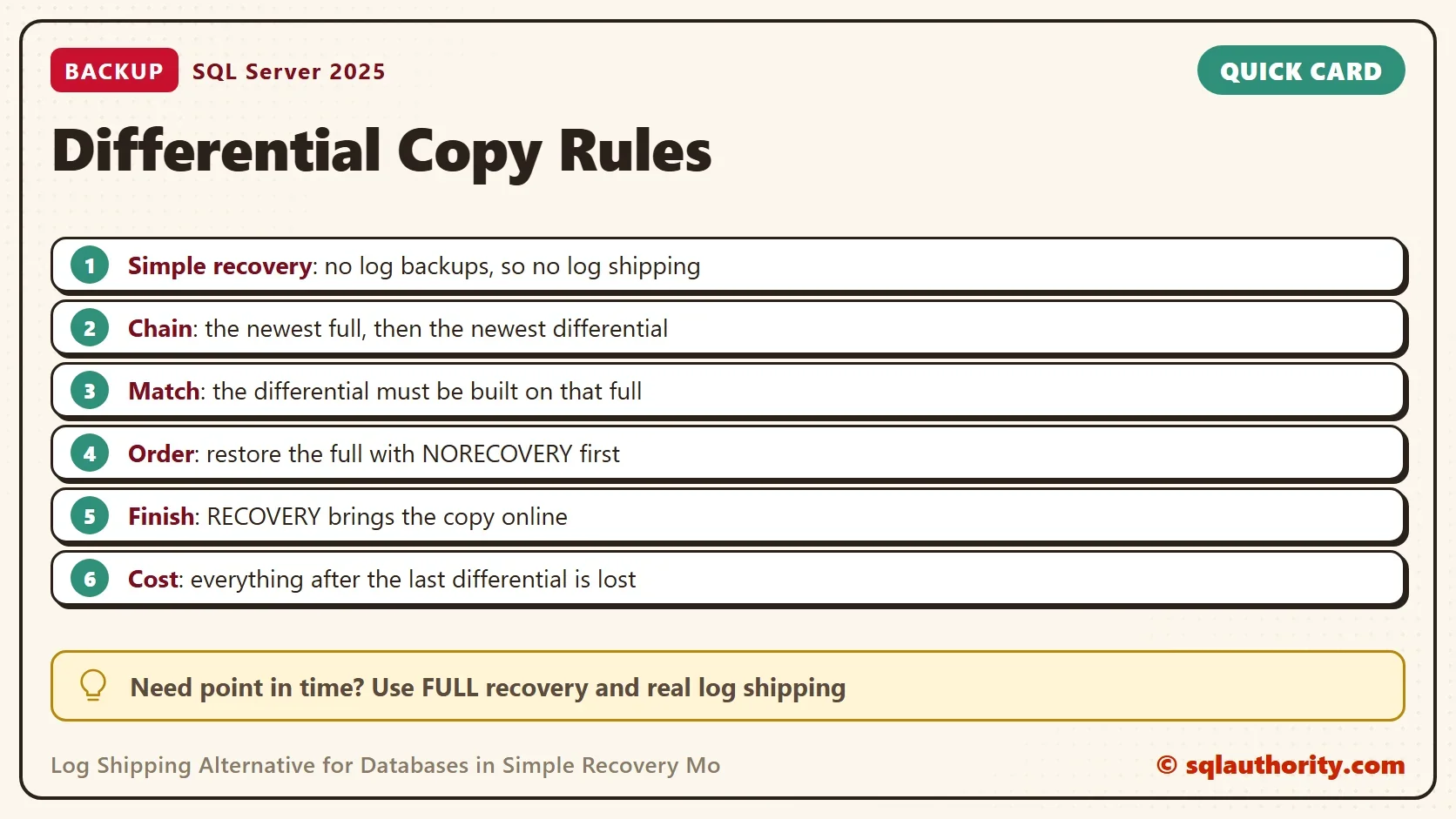
Restore the Copy
On a real secondary, put the primary’s linked server name in front of msdb. Keep the backup files on a share both servers can read. Here everything is local. The temporary procedure below builds the two RESTORE statements from the query above and runs them.
The full backup goes in with NORECOVERY so SQL Server waits for the differential. MOVE puts the copy’s files in new paths, because the originals belong to the source. The differential goes in with RECOVERY, which brings the copy online.
CREATE PROCEDURE #RefreshShipCopy AS
BEGIN
    SET NOCOUNT ON;
    DECLARE @db sysname = N'ShipSourceDemo', @copy sysname = N'ShipCopyDemo', @full nvarchar(260), @diff nvarchar(260), @sql nvarchar(max);
    DECLARE @data nvarchar(260) = CONVERT(nvarchar(260), SERVERPROPERTY('InstanceDefaultDataPath'));
    SELECT @full = f.Device, @diff = d.Device
    FROM (SELECT TOP (1) b.checkpoint_lsn, m.physical_device_name AS Device
          FROM msdb.dbo.backupset b JOIN msdb.dbo.backupmediafamily m ON m.media_set_id = b.media_set_id
          WHERE b.database_name = @db AND b.type = 'D' AND b.is_copy_only = 0
          ORDER BY b.backup_finish_date DESC) f
    OUTER APPLY (SELECT TOP (1) m.physical_device_name AS Device
          FROM msdb.dbo.backupset b JOIN msdb.dbo.backupmediafamily m ON m.media_set_id = b.media_set_id
          WHERE b.database_name = @db AND b.type = 'I' AND b.database_backup_lsn = f.checkpoint_lsn
          ORDER BY b.backup_finish_date DESC) d;
    SET @sql = N'RESTORE DATABASE ' + QUOTENAME(@copy) + N' FROM DISK = N''' + @full + N''' WITH REPLACE, NORECOVERY,'
             + N' MOVE N''' + @db + N''' TO N''' + @data + @copy + N'.mdf'','
             + N' MOVE N''' + @db + N'_log'' TO N''' + @data + @copy + N'_log.ldf'';';
    EXEC (@sql);
    IF @diff IS NOT NULL
        SET @sql = N'RESTORE DATABASE ' + QUOTENAME(@copy) + N' FROM DISK = N''' + @diff + N''' WITH RECOVERY;';
    ELSE
        SET @sql = N'RESTORE DATABASE ' + QUOTENAME(@copy) + N' WITH RECOVERY;';
    EXEC (@sql);
END;
The last branch handles a fresh full backup with no differential yet. It finishes the full restore with RECOVERY, so the copy comes online either way. Run the procedure, then look at the copy.
EXEC #RefreshShipCopy;
GO
SELECT name, state_desc FROM sys.databases WHERE name = N'ShipCopyDemo';
SELECT COUNT(*) AS RowsInCopy FROM ShipCopyDemo.dbo.Orders;
| name | state_desc |
|---|---|
| ShipCopyDemo | ONLINE |
| RowsInCopy |
|---|
| 5 |
The copy is online and holds all five orders, including the two that came with the differential.
Run It Again
Add a sixth order to the source and take another differential. The newest differential has the same base, so the procedure picks it up on its own. It restores the full backup again too, replacing the copy.
USE ShipSourceDemo;
GO
INSERT INTO dbo.Orders VALUES (6, N'Rye bread');
GO
BACKUP DATABASE ShipSourceDemo TO DISK = N'ShipSourceDemo_diff2.bak' WITH DIFFERENTIAL, INIT, CHECKSUM;
GO
USE master;
GO
EXEC #RefreshShipCopy;
GO
SELECT COUNT(*) AS RowsInCopy FROM ShipCopyDemo.dbo.Orders;
| RowsInCopy |
|---|
| 6 |
Schedule the differential backup on the source. Schedule the procedure on the copy a few minutes later. The copy follows the source. SQL Server needs exclusive access during a restore, so connections to the copy must close before each run.
What You Give Up
You could argue that this is worse than real log shipping, and it is. The copy is only as fresh as the last differential. Everything after it is missing, and there is no restore to a point in time.
Each refresh also restores the full backup again, which hurts on a large database. A copy restored with STANDBY stays readable and accepts the next differential, so the full restore can be skipped. That holds only while the new differential has the same full backup as its base. It needs an undo file, and anyone reading the copy must disconnect before each restore.
Differential backups grow until the next full backup. Take the full backup regularly, so the differential stays small. Do you need a copy that is minutes old, or a point in time? Then change the database to the full recovery model and use real log shipping.
What to Remember
A simple recovery database can’t ship logs. The log shipping alternative ships differentials instead. Restore the full with NORECOVERY, then the matching differential with RECOVERY. Check the base through the LSN, and ignore COPY_ONLY backups when you pick the full.
When you finish, drop both databases. Then delete the backup files from the backup folder by hand.
USE master;
GO
IF DB_ID(N'ShipCopyDemo') IS NOT NULL DROP DATABASE ShipCopyDemo;
IF DB_ID(N'ShipSourceDemo') IS NOT NULL
BEGIN
    ALTER DATABASE ShipSourceDemo SET SINGLE_USER WITH ROLLBACK IMMEDIATE;
    DROP DATABASE ShipSourceDemo;
END;
EXEC msdb.dbo.sp_delete_database_backuphistory @database_name = N'ShipCopyDemo';
EXEC msdb.dbo.sp_delete_database_backuphistory @database_name = N'ShipSourceDemo';
A copy is not a log shipping secondary, it is a snapshot you refresh on a schedule.
Published by Pinal Dave on SQLAuthority. More of my work at pinaldave.com.
Discover more from SQL Authority with Pinal Dave
Subscribe to get the latest posts sent to your email.


3 Comments. Leave new
Nice one! This should be called Differential shipping ;)
Hello. I have two servers SQL2016 with LogShipping. How can I configure backup of database on Primary Server without break the chain of LogShipping? I need the daily full backup of database and every hour backup of logs (this is important high availability database in my company).
Hi Adam .. Please configure backup with COPY_ONLY option…this will make sure without break the chain of LogShipping