Error 2628 tells you which column was too small and shows the start of the value that did not fit. Use that to fix the input, not to switch the warning off.

The nightly import that said almost nothing
Many of us have lived this. A nightly import fails with “String or binary data would be truncated.” The table has forty columns. Nobody knows which one is too small, so someone spends the morning guessing.
Modern SQL Server answers that question for you. Error 2628 names the table and the column, and it quotes the beginning of the offending value. Let me show it. The demo creates a database and drops it at the end. First, two settings that decide which message you get.
USE master;
DROP DATABASE IF EXISTS SqlAuthorityDemo;
GO
CREATE DATABASE SqlAuthorityDemo;
GO
USE SqlAuthorityDemo;
GO
SELECT compatibility_level
FROM sys.databases
WHERE database_id = DB_ID();

SELECT name, value
FROM sys.database_scoped_configurations
WHERE name = N'VERBOSE_TRUNCATION_WARNINGS';
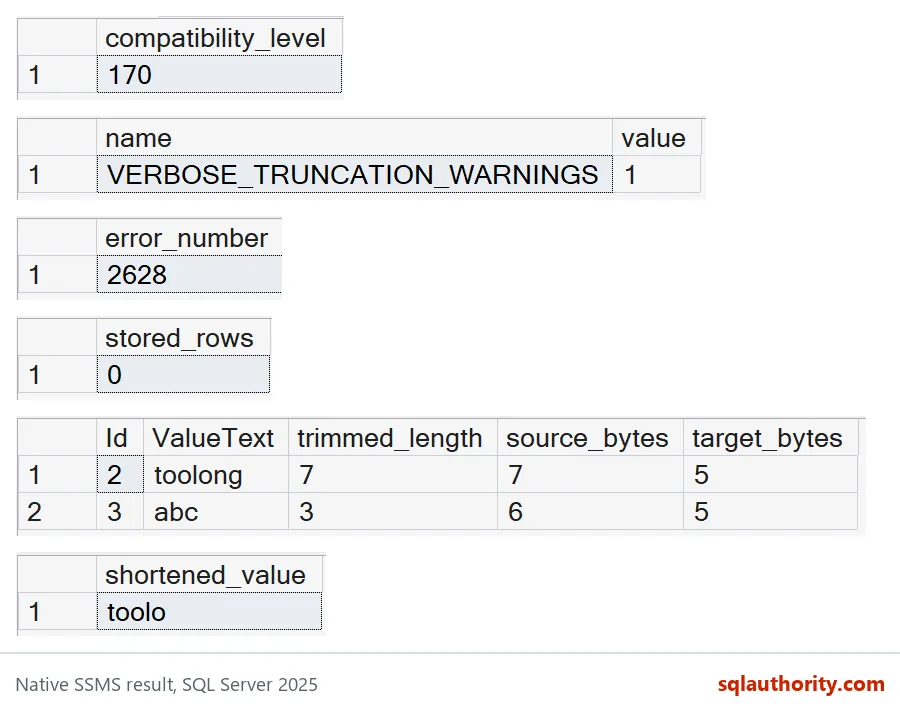
On my server the compatibility level is 170 and VERBOSE_TRUNCATION_WARNINGS is 1. That combination gives the detailed message. Switch the setting off, as I do near the end, and you get the short one.
Trigger the error and read it
The table has one varchar(5) column. I try to insert the word toolong, which is 7 characters. The CATCH block returns the error number and prints the message.
CREATE TABLE dbo.TruncDemo (ValueText varchar(5));
GO
BEGIN TRY
    INSERT dbo.TruncDemo (ValueText) VALUES ('toolong');
END TRY
BEGIN CATCH
    SELECT ERROR_NUMBER() AS error_number;
    PRINT ERROR_MESSAGE();
END CATCH;

SELECT COUNT_BIG(*) AS stored_rows FROM dbo.TruncDemo;
The error number is 2628 and the table is still empty, so the statement was rejected, not half done. The message in the Messages tab names the table, the column ValueText, and the truncated value ‘toolo’. That is the first five characters of what you tried to store.
One warning. The message can contain part of the input. If that input is a name or an account number, it may end up in a log that many people can read. Protect those logs.
Find every bad value before you insert
The error shows only the first offender. In a real import you want all of them at once. Load the data into a staging table first, then compare each value with the target column size. I use DATALENGTH, because LEN ignores trailing spaces.
DROP TABLE IF EXISTS #Stage;

CREATE TABLE #Stage (Id int PRIMARY KEY, ValueText varchar(100));
INSERT #Stage (Id, ValueText) VALUES (1, 'short'), (2, 'toolong'), (3, 'abc   ');

SELECT Id, ValueText,
       LEN(ValueText) AS trimmed_length,
       DATALENGTH(ValueText) AS source_bytes,
       COL_LENGTH(N'dbo.TruncDemo', N'ValueText') AS target_bytes
FROM #Stage
WHERE DATALENGTH(ValueText) > COL_LENGTH(N'dbo.TruncDemo', N'ValueText')
ORDER BY Id;
Two rows come back. Row 2 is obvious: 7 bytes against 5. Row 3 is the sneaky one. LEN says 3, but the value has three trailing spaces, so DATALENGTH says 6. Remember that COL_LENGTH reports bytes, and it returns NULL if the table or column name is wrong. An empty work list can mean a clean batch, or it can mean a typo.
My filter is deliberately strict. It flags the padded row even though, as you will see below, SQL Server accepts that value. Strict is the safe side for a boundary check.

Do not hide the problem
Casting to a shorter type looks like an easy escape. It is not.
SELECT TRY_CONVERT(varchar(5), 'toolong') AS shortened_value;You get toolo, with no error and no NULL. The value is silently cut, and nobody is told. For an identifier whose last characters matter, that is worse than a failed import.
Two things that surprise people
First, trailing spaces. The padded value from the staging table has 6 bytes, but it fits in the column.
INSERT dbo.TruncDemo (ValueText) VALUES ('abc   ');

SELECT ValueText, DATALENGTH(ValueText) AS stored_bytes
FROM dbo.TruncDemo;
No error. SQL Server keeps five bytes: abc and two spaces. The extra trailing spaces are cut quietly. That is why my strict filter is a policy, not a prediction.
Second, the short message. The setting I checked at the start can be turned off for a database. Then you get the old message, with no table, column or value in it.
ALTER DATABASE SCOPED CONFIGURATION SET VERBOSE_TRUNCATION_WARNINGS = OFF;
GO
BEGIN TRY
    INSERT dbo.TruncDemo (ValueText) VALUES ('toolong');
END TRY
BEGIN CATCH
    SELECT ERROR_NUMBER() AS error_number;
    PRINT ERROR_MESSAGE();
END CATCH;
GO
ALTER DATABASE SCOPED CONFIGURATION SET VERBOSE_TRUNCATION_WARNINGS = ON;
The error number is now 8152, and the message is only “String or binary data would be truncated.” That is the one that cost the team a morning. Leave the setting on, fix the input, or talk to the people who call this code about a larger column.
DROP TABLE IF EXISTS #Stage;
DROP TABLE IF EXISTS dbo.TruncDemo;
GO
USE master;
DROP DATABASE IF EXISTS SqlAuthorityDemo;
Next time an import fails, read the error before you start guessing.
A truncation error is not noise, it is a boundary telling you where it was crossed.
Published by Pinal Dave on SQLAuthority. More of my work at pinaldave.com.
Discover more from SQL Authority with Pinal Dave
Subscribe to get the latest posts sent to your email.