
Last week we had amazing time with an interesting puzzle about Datetime. You can see the puzzle over SQL SERVER – Puzzle – Playing with Datetime with Customer Data. The puzzle was extremely well received and lots of people asked me to bring another puzzle which can help us learn something new. Looking at the request of everyone, here is another very simple puzzle with Date Format.

This puzzle is very simple – first, execute following script.
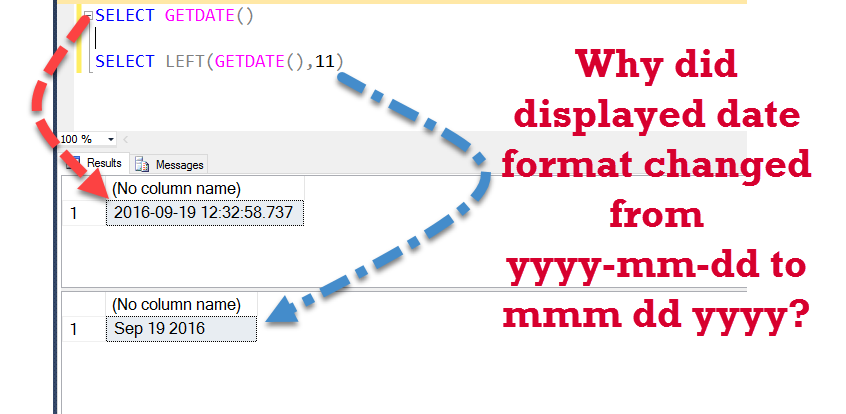
SELECT GETDATE()
When you execute above script, you will notice that it will display the current date in the format as yyyy-mm-dd, along with the date it is also displaying time values as well.
Resultset: 2016-09-19 12:32:58.737
Now let us assume that we do not want the time part in our display, we only want to display date part of the date time value. There are many different methods to get only date part, here is a relevant blog post: SQL SERVER – Retrieve – Select Only Date Part From DateTime – Best Practice.
Now let us assume that we have not read the blog post about how to select only date part from datetime. Now from visual inspection, it is very clear that we only want to retrieve left 11 characters from the datetime value. In SQL Server we have function LEFT(string,n) when we apply it over any string, it returns us n characters starting from the left. Let us apply the LEFT () function over our datetime function and retrieve only date part from it.
SELECT LEFT(GETDATE(),11)
When you execute above script, it does give us only date part, but the value of the data part is changed from yyyy-mm-dd to mmm dd yyyy.
Resultset: Sep 19 2016
The Puzzling question is –
Why did displayed date format changed from yyyy-mm-dd to mmm dd yyyy?
Well, just leave a comment in the blog post and after 2 days I will publish all the comments. If you know the answer of this puzzle, I suggest you ask this question to your friends and see if they know the answer of the same.
Reference: Pinal Dave (https://blog.sqlauthority.com)




168 Comments. Leave new
Because LEFT is a string function, it does an implicit conversion from DATETIME to VARCHAR.
cause of LEFT it converts datetime to varchar and selects 11 chars from left of converted string
Hi,
Why did displayed date format changed from yyyy-mm-dd to mmm dd yyyy?
>> LEFT(character_expression,integer_expression): LEFT function takes character_expression as argument with any data type but implicitly convert into varchar or nvarchar. ‘GETDATE()’ will be converted to varchar automatically with default format ‘mmm dd yyyy hh:mi:ss’ in LEFT function and than will fetch first 11 characters from date time string. So it will display date with changed date format to user.
Thanks,
Hello Pinal,
Thanks for one more interesting concept.
When we do LEFT(GETDATE(), then the database will do an implicit conversion from datetime to some string value and it uses some internal settings .As per my knowledge Date>varchar conversion and we have to convert to get the 2016-09-20
SELECT CONVERT(DATE,GETDATE())
Hello Dave,
The Getdate() is a date function which will outputs the datetime output based on the configured time zone.
LEFT() is the string function which will outputs varchar data only, thus there is an implicit conversion was done inside the left function.
Best Regards,
Jafer
left converts it to varchar , soSELECT CONVERT(VARCHAR,GETDATE()) returns like Sep 20 2016 10:34AM so taking left 11 gives mmm dd yyyyy
I believe LEFT function will internally convert/cast datetime datatype to varchar or char. Hence LEFT output differs.
left need two parameters m 1st parameter is nvarchar, whe we provide GEDATE() as 1st parameter it will be converted to nvarchar i.e. select CONVERT(nvarchar,getdate()) = Sep 20 2016 3:28AM
2nd parameter is first 11 chars from left = Sep 20 2016
Nice puzzle keep continue :)
LEFT keyword return data type value is nvarchar so it is converting date into nvarchar first and then it is taking first 11 character and returning value.
select getdate() [CurrentDatetime],CAST(getdate() as nvarchar(30)) AS [Convert2Varchar],LEFT(getdate(),11) AS [LEFT11]
I think is because using left function, leads to a conversión to string.
Direct conversión with “select cast(getdate() as varchar)” results “Sep 20 2016 9:48AM”
LEFT() and RIGHT() convert to VARCHAR to perform manipulation.
If you CAST the results of GETDATE() to a VARCHAR it shows local full date time format. It is this converted test that is trimmed. not the original input values.
SELECT GETDATE()–its chooses Standard Dateformat where as Select left(getdate(),11) then the database needs to do an implicit conversion from datetime to some string value and then wil display 11 characters from the output and show.To get only date as it is we can use convert(date,getdate(),11)
this is because of sql server default short date format set in configration.
Because… the LEFT function returns a string. You’re returning a string and not a date.
the function left returns nvarchar.
LEFT function’s first parameter is of type varchar/nvarchar, so when we pass Datetime it is implicitely converted to string. eg. Datetime “2016-09-20 16:57:12.310” gets converted to string “Sep 20 2016 4:57PM”.
As it is implicit conversion, default style is used to format the datetime.
This is one way to do it – > SELECT CONVERT(DATE,GETDATE())
SELECT CAST(GETDATE() AS VARCHAR(11)) => ;
getdate returns a datetime, LEFT can only be applied to a string, so a conversion is done.
GETDATE() returns a DATETIME type.
LEFT accepts this data type as it can be implicitly converted to a VARCHAR
The implicit conversion uses the default “style” so the output value would be “Sep 20 2016 1:28PM”.
As LEFT is set to only return the first 11 characters you only get “Sep 20 2016”
You can see the full value without the LEFT function by using:
SELECT CONVERT(VARCHAR, GETDATE())
and by explicitly setting the style:
SELECT CONVERT(VARCHAR, GETDATE(), 0)