FOR JSON data types come from the type of each SQL expression, not from the name of the property. A column called is_active is a number unless you make it a bit.

The ticket that says “the flag is a number”
A front-end developer files a ticket: “Your API returns 1, we expected true.” The column is named is_active. It sounds like a checkbox. SQL Server does not care how it sounds.
FOR JSON looks at the data type of each value and picks a JSON token. A bit becomes true or false. An int becomes a number. Let me put the common types side by side and read the real text SQL Server produces.
WITHOUT_ARRAY_WRAPPER only removes the square brackets, so you get one object.
SELECT CAST(1 AS bit) AS bit_flag,
       CAST(1 AS int) AS integer_flag,
       CAST('2026-09-26T12:30:00' AS datetime) AS legacy_time,
       CAST('2026-09-26T12:30:00.1234567' AS datetime2(7)) AS precise_time,
       CAST(12.3400 AS decimal(19,4)) AS decimal_value,
       CAST(12.3400 AS money) AS money_value,
       CAST(0x010203 AS varbinary(3)) AS binary_value,
       CAST(NULL AS int) AS missing_value
FOR JSON PATH, WITHOUT_ARRAY_WRAPPER;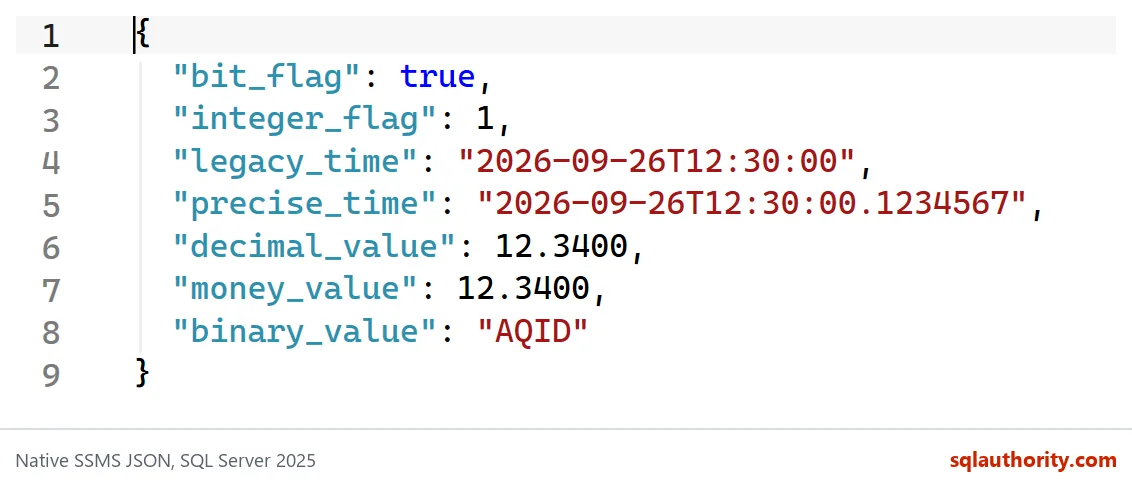
Reading each token
The bit flag comes out as true, and the int flag as 1. Same value in the table, different meaning for the client.
Both dates are quoted strings. The datetime value has no fraction, and the datetime2 value keeps all seven digits. Neither one carries a time zone. So when the client reads 12:30, it has to guess whether that is local time or UTC. Guessing is how reports end up off by a few hours.
Decimal and money both arrive as plain numbers, 12.3400. Notice the trailing zeros: the scale of the column decides how many digits you get. A parser treats 12.3400 and 12.34 as the same number, but a test that compares text will not. The binary value 0x010203 is Base64 text, AQID.
And look at what is not there. The missing_value column is NULL, so the property is simply absent.

Decide what NULL should mean
A missing property and an explicit null are not always the same to a client. “Not sent” can mean “leave it alone”, while null can mean “clear it”. INCLUDE_NULL_VALUES gives you the second form. The datetimeoffset value is the only one here that carries an offset.
SELECT CAST(0 AS bit) AS is_active,
       CAST(NULL AS nvarchar(20)) AS optional_note,
       CAST('2026-09-26T12:30:00+02:00' AS datetimeoffset(0)) AS offset_time
FOR JSON PATH, INCLUDE_NULL_VALUES, WITHOUT_ARRAY_WRAPPER;
The result has is_active as false, optional_note as null, and offset_time ending in +02:00. If the offset matters to your contract, use datetimeoffset. A datetime2 will not give it to you.
Fix the flag at the boundary
Back to the ticket. The table stores the flag as an int, and that is fine. Do not change the table. Cast in the query that feeds the API.
DROP TABLE IF EXISTS #Users;

CREATE TABLE #Users (UserId int PRIMARY KEY, IsActive int NOT NULL);
INSERT #Users (UserId, IsActive) VALUES (1, 1), (2, 0);

SELECT UserId, IsActive
FROM #Users
ORDER BY UserId
FOR JSON PATH;

SELECT UserId, CAST(IsActive AS bit) AS IsActive
FROM #Users
ORDER BY UserId
FOR JSON PATH;
The first document has IsActive as 1 and 0. The second has true and false. This time I left out WITHOUT_ARRAY_WRAPPER, so you see an array with one object per row.
Before you ship, save a few real documents and let the client parse them. Include a false, a true, a fraction, a missing property and a null. A document that is valid JSON can still be wrong for the reader.
DROP TABLE IF EXISTS #Users;Next time a client says a value has the wrong type, look at the cast before you look at the name.
A JSON property name is not a type, it is a label on a typed expression.
Published by Pinal Dave on SQLAuthority. More of my work at pinaldave.com.
Discover more from SQL Authority with Pinal Dave
Subscribe to get the latest posts sent to your email.