Unsaved query windows are not always lost when SSMS closes, but you need to know where to look. There are two places to dig: the recovery files SSMS keeps on disk, and the SQL text SQL Server remembers in its plan cache.
The restart that ate your script
Someone has spent two hours building a clean-up script in a tab called SQLQuery7. The laptop restarts for an update. The tab is gone.
Sometimes I can. Not always. This post shows both recovery paths, and what each one can and cannot give you back.
Path one: the SSMS recovery files
SSMS can back up your open, unsaved tabs every few minutes. After a crash, it often offers to reopen them when you start it again. If you see that prompt, say yes, then save every recovered tab under a real name before you do anything else.
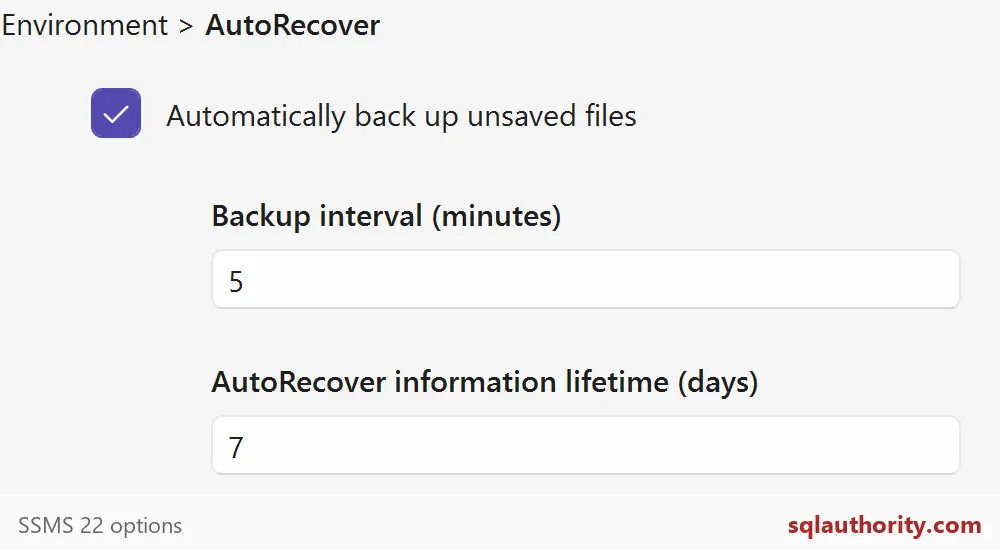
Check that the feature is on. In the SSMS 22 options, look under Environment, then AutoRecover. On this machine it is switched on, with a backup every 5 minutes and a lifetime of 7 days. Older versions place it elsewhere, so use the Options search box.
If no prompt appears, look for the backup folder by hand. On many installs it sits under Documents, in a folder named SQL Server Management Studio, then Backup Files. Yours may differ, so search Documents for recent .sql files.
Mind the interval: with a 5-minute backup, the last few minutes of typing may never reach the disk.
Path two: the text SQL Server remembers
If the file route fails, ask the server. Every query you ran leaves its text in the plan cache for a while. Let me create a small “draft” and run it, the way you would in a tab. It uses a temp table, so there is nothing to clean up. The batch has a delete in it that never runs, because the condition is false.
CREATE TABLE #RecoveryDemo (id int, note varchar(40));
INSERT #RecoveryDemo VALUES (1, 'first draft row');
IF 1 = 0 DELETE FROM #RecoveryDemo;
SELECT id, note FROM #RecoveryDemo;
Now search the cache for a word you remember from the draft. Pick something unusual, not SELECT. The query filters out its own text.
DECLARE @Fragment nvarchar(100) = N'RecoveryDemo';

SELECT TOP (50) qs.last_execution_time, qs.execution_count,
       qs.statement_start_offset, qs.statement_end_offset, txt.text
FROM sys.dm_exec_query_stats AS qs
CROSS APPLY sys.dm_exec_sql_text(qs.sql_handle) AS txt
WHERE txt.text LIKE N'%' + @Fragment + N'%'
  AND txt.text NOT LIKE N'%dm_exec_query_stats%'
ORDER BY qs.last_execution_time DESC, qs.plan_handle, qs.statement_start_offset;
You get two rows, not one. Both show the whole batch in the text column. The offsets differ: 112 to 210, then 292 to 358 on my run. Yours will vary a little. Each row is one statement that ran, once, at the time shown.

Cut out the statement that really ran
The text column holds the whole batch. The two offset columns tell you where each statement starts and ends, in bytes. Divide by two for characters, because the text is stored as Unicode. This query cuts out each statement on its own.
SELECT qs.last_execution_time,
       SUBSTRING(txt.text, qs.statement_start_offset / 2 + 1,
         (CASE WHEN qs.statement_end_offset = -1 THEN DATALENGTH(txt.text)
               ELSE qs.statement_end_offset END
          - qs.statement_start_offset) / 2 + 1) AS statement_text
FROM sys.dm_exec_query_stats AS qs
CROSS APPLY sys.dm_exec_sql_text(qs.sql_handle) AS txt
WHERE txt.text LIKE N'%RecoveryDemo%'
  AND txt.text NOT LIKE N'%dm_exec_query_stats%'
ORDER BY qs.last_execution_time DESC, qs.statement_start_offset;
Two statements come back: the INSERT and the SELECT. The DELETE is missing, which is exactly right, because it never ran. The CREATE TABLE is missing too, since that kind of statement does not show up in this view. So treat the list as a partial picture of the draft, not the draft itself.
Why a recovered query is only a clue
A timestamp tells you that SQL Server ran a statement. It does not tell you the statement finished the job you wanted. Before you run any recovered write again, check the current state of the data. The server remembers SQL better than it remembers your intention.
There are limits too. The cache is cleared when the SQL Server service restarts, so a laptop with a local instance may come back empty. Old plans get pushed out when memory is tight. And you need the VIEW SERVER STATE permission, which is why this works on your dev box and often not on production.
Protect the next window
Treat both paths as a seat belt, not a plan. Save scripts early, into a normal scripts folder, with a real name. Turn AutoRecover on, but keep it as the second line of defense.
Next time a tab disappears, check the recovery prompt first, then the folder, then the cache.
Recovery is not a backup, it is the draft fragment that survived.
Published by Pinal Dave on SQLAuthority. More of my work at pinaldave.com.
Discover more from SQL Authority with Pinal Dave
Subscribe to get the latest posts sent to your email.