SQL Server has no built-in db_executor role, so you create one and decide how far its EXECUTE permission reaches. Grant it on a schema, and the application can run your procedures and nothing else.

The call that starts with “it works for me”
A developer pings you. The new procedure runs fine in SSMS, but the application gets a permission error. Of course it does. You are a sysadmin in SSMS. The application account is not.
The usual fix is a role that holds EXECUTE. Many DBAs call it db_executor, though SQL Server does not ship one. It is only a name, and the real decision is the scope of the grant. Let me build a small demo. It creates a database named SqlAuthorityDemo and drops it at the end.
Set up the role, a user and a procedure
Check first whether your database already has a role with this name. Someone may have created one years ago with a very different grant. In the demo, the user has no login, which is plenty for testing permissions. The procedure lives in its own schema, AppExecLab, and reads a small table in dbo. That matters in a minute.
USE master;
DROP DATABASE IF EXISTS SqlAuthorityDemo;
GO
CREATE DATABASE SqlAuthorityDemo;
GO
USE SqlAuthorityDemo;
GO
CREATE ROLE db_executor AUTHORIZATION dbo;
CREATE USER ExecutorProbe WITHOUT LOGIN;
GO
CREATE SCHEMA AppExecLab AUTHORIZATION dbo;
GO
CREATE TABLE dbo.Customer (CustomerId int PRIMARY KEY, CustomerName nvarchar(50) NOT NULL);
INSERT dbo.Customer VALUES (1, N'First'), (2, N'Second'), (3, N'Third');
GO
CREATE PROCEDURE AppExecLab.ReadIdentity
AS SELECT USER_NAME() AS database_user, COUNT(*) AS customer_rows FROM dbo.Customer;
Watch it fail before the grant
Now pretend to be the application user. EXECUTE AS USER switches your identity until REVERT. The call fails with error 229, which is the permission-denied error.
EXECUTE AS USER = N'ExecutorProbe';
BEGIN TRY
    EXEC AppExecLab.ReadIdentity;
END TRY
BEGIN CATCH
    SELECT ERROR_NUMBER() AS ErrorNumber, ERROR_MESSAGE() AS ErrorMessage;
END CATCH;
REVERT;
Grant execute on the schema
Grant EXECUTE on the schema to the role, then add the user to the role. Anything in AppExecLab is now runnable by members. That includes procedures you have not written yet.
GRANT EXECUTE ON SCHEMA::AppExecLab TO db_executor;
ALTER ROLE db_executor ADD MEMBER ExecutorProbe;
Run the procedure again as the user. This time it works, and it returns three customer rows even though the user has no rights on the table. The procedure and the table share an owner, so SQL Server skips the permission check on the table. This is ownership chaining. The direct SELECT below fails with error 229. The role gives access through procedures only.
EXECUTE AS USER = N'ExecutorProbe';
EXEC AppExecLab.ReadIdentity;
BEGIN TRY
    SELECT CustomerId, CustomerName FROM dbo.Customer;
END TRY
BEGIN CATCH
    SELECT ERROR_NUMBER() AS ErrorNumber;
END CATCH;
REVERT;
Test the future and the private
Create one new procedure inside the granted schema, and one in dbo, outside it. Then test both as the user, along with the membership and the grant itself.
CREATE PROCEDURE AppExecLab.FutureProbe
AS SELECT N'Future schema grant applies' AS Outcome;
GO
CREATE PROCEDURE dbo.PrivateProbe
AS SELECT N'Private procedure' AS Outcome;
GO
EXECUTE AS USER = N'ExecutorProbe';
SELECT permission_name FROM sys.fn_my_permissions(N'AppExecLab.ReadIdentity', N'OBJECT');
EXEC AppExecLab.FutureProbe;
BEGIN TRY
    EXEC dbo.PrivateProbe;
END TRY
BEGIN CATCH
    SELECT ERROR_NUMBER() AS ErrorNumber;
END CATCH;
REVERT;

SELECT r.name AS role_name, m.name AS member_name
FROM sys.database_role_members AS rm
JOIN sys.database_principals AS r ON r.principal_id = rm.role_principal_id
JOIN sys.database_principals AS m ON m.principal_id = rm.member_principal_id
WHERE r.name = N'db_executor';

SELECT class_desc, SCHEMA_NAME(major_id) AS schema_name, permission_name, state_desc
FROM sys.database_permissions
WHERE grantee_principal_id = DATABASE_PRINCIPAL_ID(N'db_executor');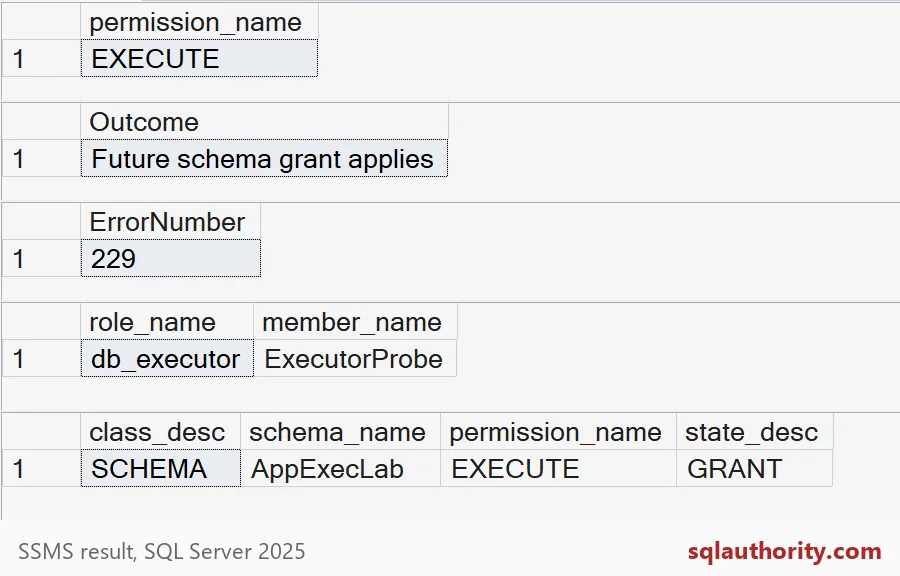
Read the five results in order. The user holds EXECUTE. The procedure created later runs, because the grant sits on the schema. The private procedure fails with 229. Then you see the one member and the one grant, on the schema AppExecLab.

The wide grant and its price
Many scripts on the internet grant EXECUTE with no scope. That covers every procedure in the database, including the private ones. Try it, and the private procedure opens up. Then drop the demo.
GRANT EXECUTE TO db_executor;

EXECUTE AS USER = N'ExecutorProbe';
EXEC dbo.PrivateProbe;
REVERT;
GO
USE master;
DROP DATABASE IF EXISTS SqlAuthorityDemo;
The private procedure now returns its row. Nothing warned you. Decide which procedures the application may call, put them in one schema, and grant on that schema. Review the schema whenever someone adds a module. Always test with a restricted user, because a sysadmin test answers the wrong question.
Next time a developer says it works for me, ask which user ran it.
An execution role is not a fixed list, it is a scope that future procedures inherit.
Published by Pinal Dave on SQLAuthority. More of my work at pinaldave.com.
Discover more from SQL Authority with Pinal Dave
Subscribe to get the latest posts sent to your email.