
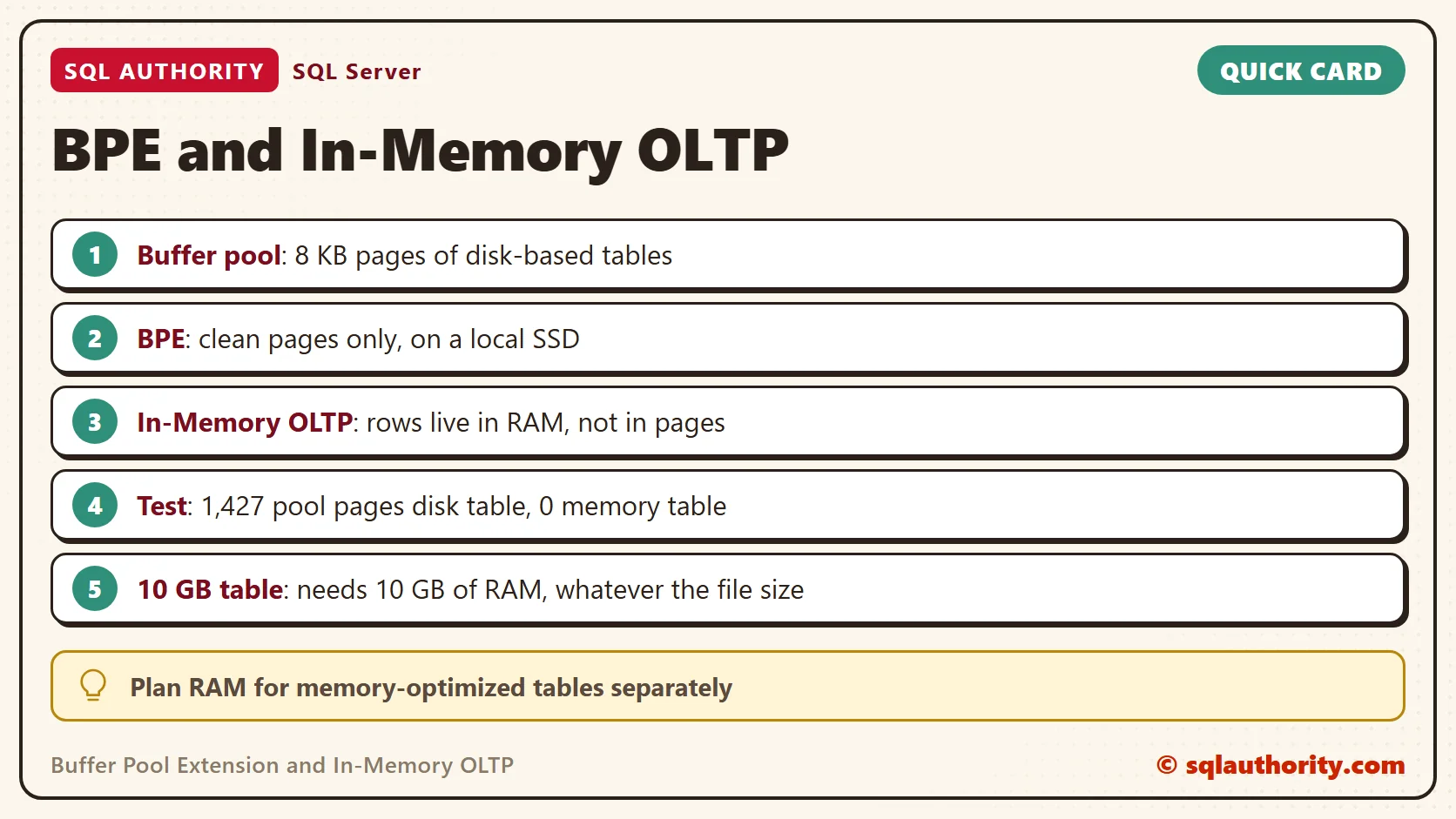
Buffer pool extension cannot hold the rows of a memory-optimized table. The two features cache different things in different places. A 10 GB memory-optimized table needs 10 GB of RAM, however large the extension file is.

The Question
A common question goes like this. My memory-optimized table will be 10 GB. Can I run with 5 GB of RAM and a 50 GB extension file? Will the file hold the rest?
The answer is no, and the reason sits in what each feature stores. Once you see that, you can tell what to do with a table that is too big for the server.
What the Buffer Pool Holds
The buffer pool is the main cache of SQL Server. It holds 8 KB pages of disk-based tables and indexes. A query that needs a page reads it from the data file once, and later reads come from RAM.
Buffer pool extension, or BPE, adds a second level on a local SSD. When RAM runs short, clean pages move to the file instead of leaving the cache. Only clean pages go there, so the file never holds the only copy of a change. It is a cache for pages, and nothing else.
What In-Memory OLTP Holds
A memory-optimized table stores rows as separate objects in memory, linked by its indexes. The rows do not live in pages. They do not pass through the buffer pool at all. The engine takes the memory from its own memory clerk.
The whole table and its indexes must fit in RAM. Durable tables also write checkpoint files to disk, but only for recovery after a restart. Reads never come from those files. So nothing in a memory-optimized table is ever a clean page that could move to an SSD.
Indexes follow the same rule. They are built in memory and are not saved to disk, so they take RAM on top of the rows. Updates write new row versions in memory, and the engine removes the old versions in the background. A table with many updates needs more room than its data size suggests.
This is why the file cannot help. The buffer manager moves whole pages between RAM and the extension. A memory-optimized table has no page to move. Reads never fall back to a disk copy of a row. The engine keeps every row in RAM.
A Test You Can Run
Let us prove it with two tables of the same size. I ran this on SQL Server 2025 Enterprise Developer. The extension is not enabled, and the script does not enable it. First, create the test database.
IF DB_ID(N'SqlBpeInMemDemo') IS NULL CREATE DATABASE SqlBpeInMemDemo;
A memory-optimized table needs a special filegroup. This script adds one in the default data folder.
DECLARE @sql nvarchar(max) = N'ALTER DATABASE SqlBpeInMemDemo ADD FILEGROUP XtpFG CONTAINS MEMORY_OPTIMIZED_DATA; ALTER DATABASE SqlBpeInMemDemo ADD FILE (NAME = N''XtpFiles'', FILENAME = N''' + CAST(SERVERPROPERTY('InstanceDefaultDataPath') AS nvarchar(260)) + N'SqlBpeInMemDemo_xtp'') TO FILEGROUP XtpFG;';
IF NOT EXISTS (SELECT 1 FROM SqlBpeInMemDemo.sys.filegroups WHERE type = 'FX') EXEC (@sql);
Now create one disk-based table and one memory-optimized table, with the same columns and 50,000 rows each.
USE SqlBpeInMemDemo;
GO
CREATE TABLE dbo.OrdersDisk (OrderID int NOT NULL PRIMARY KEY, Note char(200) NOT NULL);
CREATE TABLE dbo.OrdersMem (OrderID int NOT NULL PRIMARY KEY NONCLUSTERED, Note char(200) NOT NULL) WITH (MEMORY_OPTIMIZED = ON, DURABILITY = SCHEMA_AND_DATA);
GO
INSERT INTO dbo.OrdersDisk (OrderID, Note) SELECT value, 'order' FROM GENERATE_SERIES(1, 50000);
INSERT INTO dbo.OrdersMem (OrderID, Note) SELECT value, 'order' FROM GENERATE_SERIES(1, 50000);
GO
SELECT COUNT(*) AS DiskRows FROM dbo.OrdersDisk;
SELECT COUNT(*) AS MemRows FROM dbo.OrdersMem;
| DiskRows |
|---|
| 50000 |
| MemRows |
|---|
| 50000 |
Next, count how many buffer pool pages belong to each table. The view sys.dm_os_buffer_descriptors lists every page in the buffer pool, and the joins map pages back to table names.
SELECT t.name AS TableName, t.is_memory_optimized AS IsMemoryOptimized, COUNT(b.page_id) AS BufferPoolPages
FROM sys.tables AS t
LEFT JOIN sys.partitions AS p ON p.object_id = t.object_id
LEFT JOIN sys.allocation_units AS a ON a.container_id = p.hobt_id AND a.type IN (1, 3)
LEFT JOIN sys.dm_os_buffer_descriptors AS b ON b.allocation_unit_id = a.allocation_unit_id AND b.database_id = DB_ID()
GROUP BY t.name, t.is_memory_optimized
ORDER BY t.name;
| TableName | IsMemoryOptimized | BufferPoolPages |
|---|---|---|
| OrdersDisk | 0 | 1427 |
| OrdersMem | 1 | 0 |
The disk-based table has 1,427 pages in the buffer pool, about 11 MB. The memory-optimized table has none. Your count for the first table will differ a little between runs. The zero will not.
The memory-optimized table lives somewhere else. This view shows what it uses.
SELECT OBJECT_NAME(object_id) AS TableName, memory_allocated_for_table_kb, memory_used_by_table_kb
FROM sys.dm_db_xtp_table_memory_stats
WHERE object_id = OBJECT_ID(N'dbo.OrdersMem');
| TableName | memory_allocated_for_table_kb | memory_used_by_table_kb |
|---|---|---|
| OrdersMem | 11776 | 11718 |
The rows take about 11.4 MB, and the engine allocated a little more than that. The two tables hold the same data, and they cost nearly the same RAM. Only one of them can use an SSD cache.
Last, ask the extension itself. The view has a flag for pages that sit in the file.
SELECT (SELECT state_description FROM sys.dm_os_buffer_pool_extension_configuration) AS ExtensionState,
(SELECT COUNT(*) FROM sys.dm_os_buffer_descriptors WHERE is_in_bpool_extension = 1) AS PagesInExtension;| ExtensionState | PagesInExtension |
|---|---|
| BUFFER POOL EXTENSION DISABLED | 0 |
The extension is off, so zero pages sit in it. On a server where BPE is on, the same query counts the pages that live in the file. It counts disk-based pages only, which is the point of this post in one number.
What to Do With a 10 GB Table
- Give the server enough RAM for the table, its indexes and the room that row versions need.
- Keep only the hot rows in the memory-optimized table. Move old rows to a disk-based table on a schedule.
- Use a disk-based table, and let the buffer pool, with or without BPE, cache the busy pages.
- Use a non-durable table for staging data that you can load again after a restart.
The second option is the usual answer. Most workloads touch a small part of a large table, such as this month of orders out of ten years. Memory-optimized storage pays off for that part, and the rest can sit on disk at a lower cost.
The third option suits tables that are large and read in many different ways. The buffer pool keeps whatever the queries ask for. BPE adds a second level for the clean pages that fall out of RAM. You trade the peak speed of memory-optimized rows for a table that does not need to fit in memory.
The fourth option is for temporary work. A non-durable table keeps its structure after a restart but not its rows. It writes nothing to the log or to checkpoint files. That makes it a good home for staging data that a job can load again.
A Fair Objection
You could say BPE still helps an In-Memory OLTP workload, since the same database can hold disk-based tables too. Fair point. It helps those tables, and only those. The memory-optimized side of the same database never touches the file.
A related question is whether to enable BPE on a busy OLTP server. Test it first. The file holds clean pages, so a write-heavy workload gains little. More RAM is faster than any SSD.
A Short Checklist
- Ask what the table holds: pages or rows. Pages can use BPE. Rows in memory cannot.
- Check your memory use with
sys.dm_db_xtp_table_memory_stats, not with buffer pool counters. - Plan RAM for memory-optimized tables as a separate line item.
- Test BPE on a copy, and measure reads from disk before and after.
BPE exists on SQL Server for Windows only, and not in every edition. Confirm your platform before you plan around it. SQL Server deletes the extension file at shutdown. The file is a cache and never a backup.
When you finish testing, remove the example database.
USE master;
GO
ALTER DATABASE SqlBpeInMemDemo SET SINGLE_USER WITH ROLLBACK IMMEDIATE;
DROP DATABASE SqlBpeInMemDemo;
Buffer pool extension is not more RAM, it is a second shelf for clean pages.
Published by Pinal Dave on SQLAuthority. More of my work at pinaldave.com.
Discover more from SQL Authority with Pinal Dave
Subscribe to get the latest posts sent to your email.



1 Comment. Leave new
Is it good practice to enable BPE on SQL Server 2019 for high OLTP workloads?